Several statements and scripted SQL
An endpoint normally runs one query. When a response needs more than one result set, for example a page of rows and the total count for a pager, add more statements. When the SQL itself must change shape depending on the caller's parameters in a way {% if %} cannot express, build it with a short script.
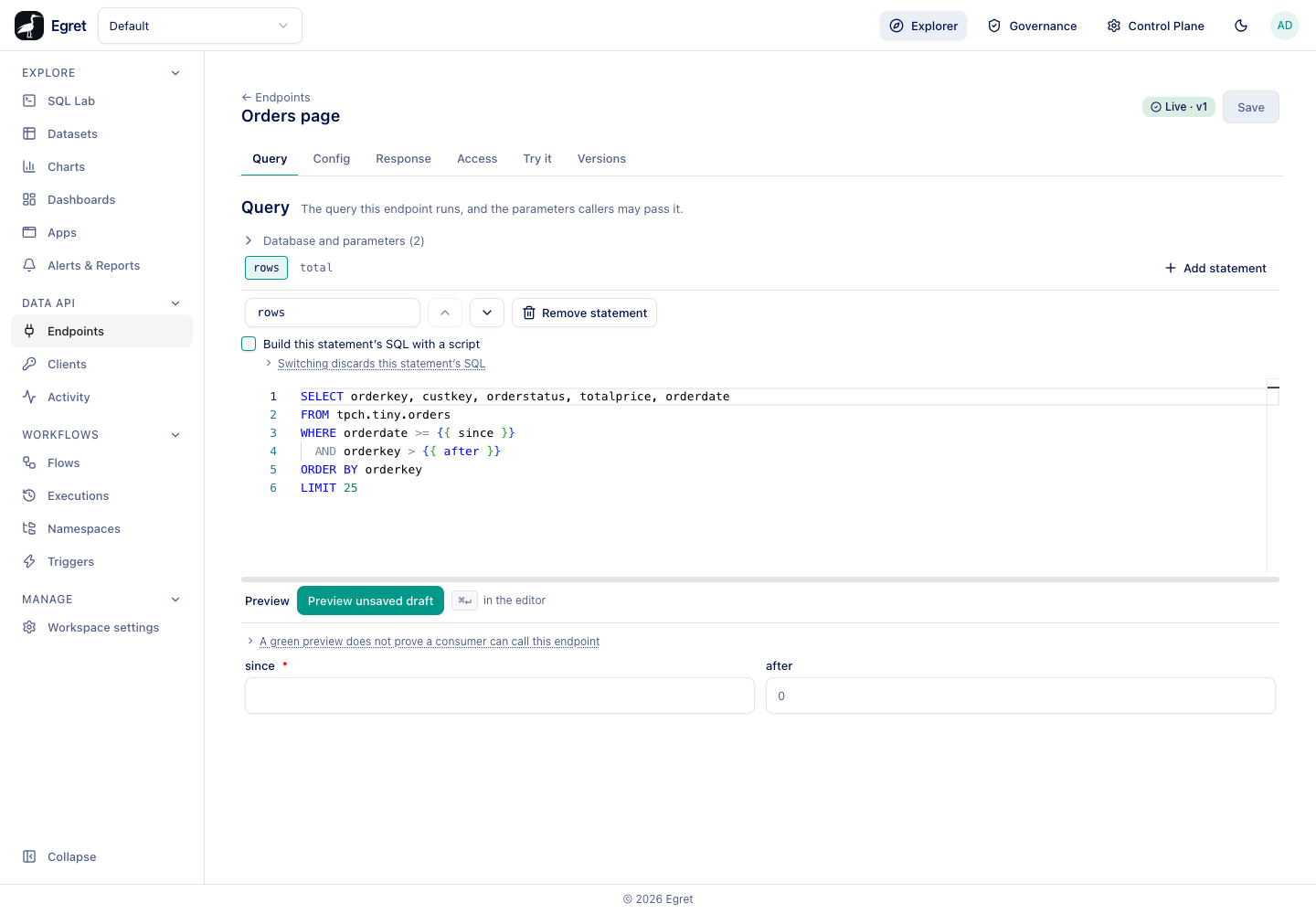
Add a statement
- Open the endpoint's Query tab.
- Press Add statement. A tab bar appears with one tab per statement, and a new statement named
statement_2is selected. - In the Statement name box, give it a name.
- Write its SQL in the editor.
- Press Save.
With more than one statement, these controls appear above the editor:
| Control | What it does |
|---|---|
| Statement tabs | Switch between statements. The tab shows the statement's name. |
| Statement name | The key callers read this statement's rows under. |
| Move up / Move down | Reorder. Statements run in this order. |
| Remove statement | Deletes the selected statement. The last remaining statement cannot be removed. |
| Add statement | Appends another. Disabled at 16. |
Statement names
A name starts with a lower-case letter and uses only lower-case letters, digits and underscores (^[a-z][a-z0-9_]*$). It must be unique within the endpoint, because it becomes a key in the response. The editor shows the reason under the box when a name is wrong. A one-statement endpoint hides its name (main): its response is an array.
What the response looks like
One statement answers with an array. Several answer with an object keyed by statement name, and meta.statements describes each one.
curl -s "$BASE/data-api/v1/default/orders/page?since=1998-06-01&after=5000000" \
  -H "Authorization: Bearer $TOKEN"
{
  "status": "ok",
  "message": null,
  "data": {
    "rows": [],
    "total": [{ "total": 386 }]
  },
  "meta": {
    "version": 1,
    "cached": false,
    "request_id": "d64e5b95-8b2f-490e-9113-3127db0471e6",
    "statements": {
      "rows": { "row_count": 0, "columns": [{ "name": "orderkey", "ty": "bigint", "required": true }] },
      "total": { "row_count": 1, "columns": [{ "name": "total", "ty": "bigint", "required": true }] }
    }
  }
}
(Columns shortened.) The rows statement is empty here because no order with a key above 5000000 exists in the sample data.
Every statement may use any declared parameter. Declare the parameters once on the endpoint; a parameter that none of the statements uses has no effect.
How statements run
- They run one after another, in order. There is no shared transaction and no shared snapshot, so a table changing between two statements can make their results disagree.
- Each statement has its own timeout (the endpoint's Timeout (seconds)), and the worst case is the timeout multiplied by the statement count. A served call is cut off at 50 seconds, so Config shows a warning when the worst case is above that. See Cache, limits and rate limits.
- Each statement is validated on its own at publish: a single read-only
SELECT, with every{{ name }}declared. The columns of every statement are frozen.
Page with a key range and a constant limit: WHERE orderkey > {{ after }} ORDER BY orderkey LIMIT 25. A parameter cannot be used in LIMIT or OFFSET. A second total statement gives the pager its count.
Build a statement's SQL with a script
Tick Build this statement's SQL with a script above the editor to replace the SQL with a script that returns the SQL. The editor switches from SQL to Python-style code.
def build_sql(params):
    cols = "orderstatus, count(*) AS orders"
    if params.get("detail"):
        cols = cols + ", sum(totalprice) AS revenue"
    return "SELECT " + cols + " FROM tpch.tiny.orders GROUP BY orderstatus"
The script language is Starlark, a small deterministic subset of Python. It has no file access, no network, no clock and no randomness, so the same inputs always build the same SQL.
What the script returns
build_sql(params) returns the statement's SQL as a template. Leave a parameter as {{ name }} in the returned text; Egret binds it on every call exactly as if you had typed the SQL yourself. The script decides the shape of the query, not the values in it.
Two mistakes are caught at validate or publish time:
| Mistake | Result |
|---|---|
Putting a parameter's value into the text, for example "... WHERE custkey = " + params["c"] | Refused. A number cannot be joined to a string, and a script that puts a parameter's value into the SQL text is refused at publish. Write {{ c }} in the returned SQL instead. |
Using something Starlark does not have, such as open(...) | Refused with the interpreter's message, for example Variable open not found. |
Optional columns work the same way as with {% if %}: Egret describes each branch and marks columns that only some branches produce as optional (May be absent).
Preview shows what the script built
Preview unsaved draft runs the script against the test values you typed under the editor. The result includes SQL this script built: the template build_sql returned for those values, with {{ }} still in it. Another value can build another statement, so this is the one your values reach.
Switching mode discards the body
A statement has one body, never both. Ticking or unticking the box discards the current SQL or script. Switching back restores it while you stay on the Query tab; leaving the tab or reloading the page loses it.
Limits and known issues
- At most 16 statements per endpoint.
- A script is for building SQL text. To reshape the response, use a response transform.
- The Preview panel runs one statement at a time, the one selected.