Query with parameters
Parameters let a caller change what an endpoint returns: filter by a status, pick a date, choose a sort column. You declare each parameter on the Query tab and refer to it in the SQL as {{ name }}. Egret checks every value before the query runs and sends it to the engine as a bound value, never as pasted text.
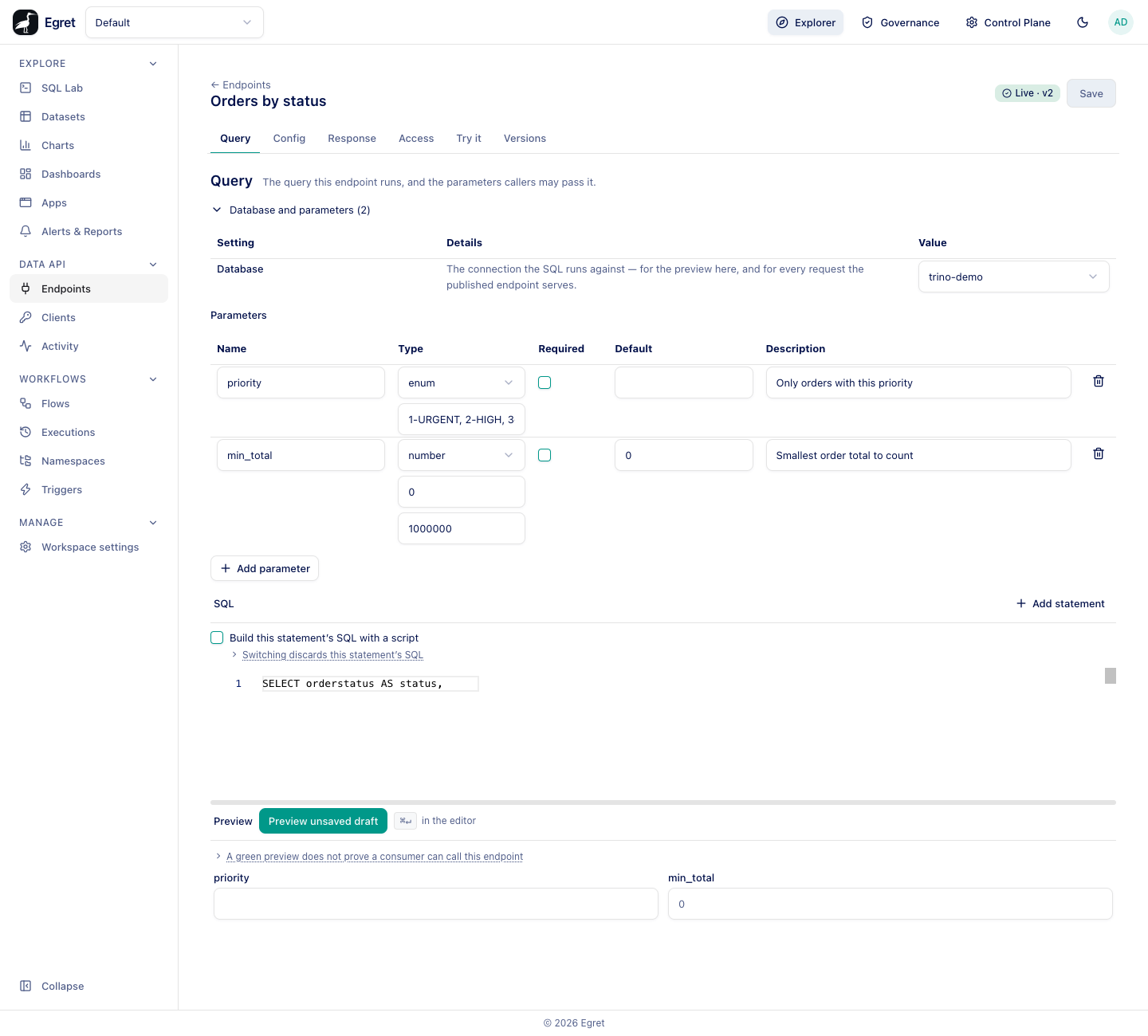
Declare a parameter
- Open the endpoint and stay on the Query tab.
- Open Database and parameters (N) and press Add parameter.
- Fill in the row, then refer to the name in the SQL as
{{ name }}. - Press Save, then Preview unsaved draft to test.
The table has one row per parameter.
| Column | What it does | Default |
|---|---|---|
| Name | The query-string key callers send, and the name used in {{ name }}. | none |
| Type | string, number, boolean, date, timestamp or enum. Choosing a type shows the constraints that apply to it. | string |
| Required | When ticked, a call without the parameter is refused with 400 param_missing. | off |
| Default | Used when the caller omits the parameter. | none |
| Description | Shown in the generated OpenAPI document. | none |
Every parameter is read from the query string, for GET and POST endpoints alike. A request body is never read. Declaring a parameter with a body location is refused at publish with nothing on the serving surface reads a request body.
Types and how callers write them
| Type | Accepted values | Notes |
|---|---|---|
string | Any text. | Use min length, max length and pattern to constrain it. |
number | -?digits with an optional decimal part, such as 12, -3 or 12.5. | Exponent notation (1e3), a leading +, and non-numbers are refused. A value outside minimum and maximum is refused. |
boolean | true, false, TRUE, 1, 0. | Anything else, such as yes, is 400 param_invalid. |
date | YYYY-MM-DD. 1998-6-1 is also read. | A timestamp or 06/01/1998 is refused. |
timestamp | YYYY-MM-DDTHH:MM:SS or YYYY-MM-DD HH:MM:SS, with optional fractional seconds. No time zone. | A trailing Z or an offset is refused. Use not before and not after to bound it, written in the same form. |
enum | One of the allowed values, written comma-separated in the box under the type. | Anything else is refused. The only type that may become part of the SQL text; see identifiers. |
An empty value (?priority=) is not treated as absent. It is checked like any other value and fails for an enum or a number. Omit the key instead. Parameters the endpoint does not declare are ignored.
Constraints
Constraints are checked on every call, before the query runs and before the cache is consulted. They also appear in the OpenAPI document, so a client generator can enforce them.
| Type | Constraint fields | Meaning |
|---|---|---|
string | min length, max length | Length in Unicode characters, not bytes. |
string | pattern (regex) | The value must match. |
number | minimum, maximum | Inclusive bounds. Stored as text so decimals are compared exactly. |
date, timestamp | not before, not after | Inclusive bounds. |
enum | allowed values | The closed list. |
Changing a parameter's type clears the constraints that no longer apply. A constraint on a type that cannot carry it is refused at publish.
A failed check answers 400 param_invalid and does not say which parameter failed, so an endpoint does not reveal what it declares. Use Try it or Preview to see which value you got wrong.
Write the SQL
Parameters are written as {{ name }}. Egret renders the template with a hardened Jinja-style engine whose only way to emit a value is to emit a bind marker, so a value can never turn into SQL text.
SELECT orderstatus AS status,
       count(*) AS orders,
       round(sum(totalprice), 2) AS revenue
FROM tpch.tiny.orders
WHERE totalprice >= {{ min_total }}
{% if priority %}  AND orderpriority = {{ priority }}
{% endif %}GROUP BY orderstatus
ORDER BY revenue DESC
With ?priority=2-HIGH&min_total=100000 the engine receives orderpriority = ? and totalprice >= ? with the two values bound separately.
Optional filters with {% if %}
{% if priority %} … {% endif %} includes its text only when the caller supplied the parameter (or it has a default). Use it for optional filters. The parameter in the example above is not required, so omitting it returns every priority.
A boolean parameter set to false or 0 is false in an {% if %}, so ?with_revenue=false leaves the block out.
Lists with {% for %}
Repeating a key sends a list: ?statuses=O&statuses=P. A key sent once is a one-element list when the SQL loops over it.
SELECT orderkey, orderstatus, totalprice
FROM tpch.tiny.orders
WHERE orderstatus IN (
  {% for s in statuses %}{{ s }}{% if not loop.last %}, {% endif %}{% endfor %}
)
+ in a value decodes to a space. Send a literal plus as %2B.
A parameter used as a scalar and repeated is refused (400 param_invalid): repeat only keys the SQL loops over.
Sort or select a column with ident
A bind marker cannot stand in for a column name or sort key. The one way to turn a parameter into SQL text is the ident filter, and it is accepted only for an enum parameter. It emits the matching entry from allowed values, written by you, never the caller's text.
SELECT orderkey, totalprice FROM tpch.tiny.orders
ORDER BY {{ sort | ident }} DESC
Declare sort as an enum with allowed values orderkey, totalprice. A caller sending ?sort=custkey gets 400 param_invalid. Using ident on a parameter of any other type is refused at publish.
Branches that change the columns
A parameter may add or drop a column:
SELECT orderstatus AS status
{% if with_revenue %}, round(sum(totalprice), 2) AS revenue
{% endif %}FROM tpch.tiny.orders
GROUP BY orderstatus
Egret describes every branch at publish time. A column that only some parameter values produce is frozen as optional: the Response tab marks it May be absent, and on a call that skips the branch the key is missing from the row, never null. See Response shape.
Rules Egret enforces at publish
Publishing runs the SQL through checks that refuse constructs which cannot be made safe or cannot work. The refusal text names the problem.
| Rule | Why |
|---|---|
A parameter in the select list needs a CAST, for example CAST({{ n }} AS bigint). | Neither Trino nor StarRocks infers a bind marker's type in a projection, so Egret would freeze a wrong column type. |
A parameter may not appear in LIMIT or OFFSET. | Neither engine accepts a bind marker there. Publish a constant limit, or page with a key range such as orderkey > {{ after }} and LIMIT 25. |
A parameter may not appear inside quoted text ('abc{{ x }}'). | It would not be bound. Pass the whole value as a parameter instead. |
Every {{ name }} must be declared. | An undeclared name is refused: the query references {{name}} but no parameter named name is declared. |
{% filter %}, {% set %}…{% endset %}, {% macro %}, {% call %} and recursive loops are refused. | They would let rendering buffer text and desynchronise the bound values. |
Paginate with a key range rather than OFFSET. The Orders page endpoint in the walk-through uses WHERE orderkey > {{ after }} ORDER BY orderkey LIMIT 25 and a second statement for the total; see Several statements.
Preview your parameters
The Preview panel under the editor has one input per declared parameter. Fill them in and press Preview unsaved draft to run the SQL as it is on screen. The placeholder in an input is the parameter's default. See Try it for how Preview differs from a real call.
Limits and known issues
- Parameter errors never name the parameter.
- A parameter name may be referenced from several statements; a key sent once is a list wherever any statement loops over it.
- Number constraint boxes in the editor show their value without a label; they are minimum then maximum in that order.