Cache, limits and rate limits
The Config tab holds everything about an endpoint that is not its query or its response: its name and URL, whether answers are cached, how big and how slow an answer may be, and how often each caller may ask. Changes are saved with Save and reach consumers when you publish.
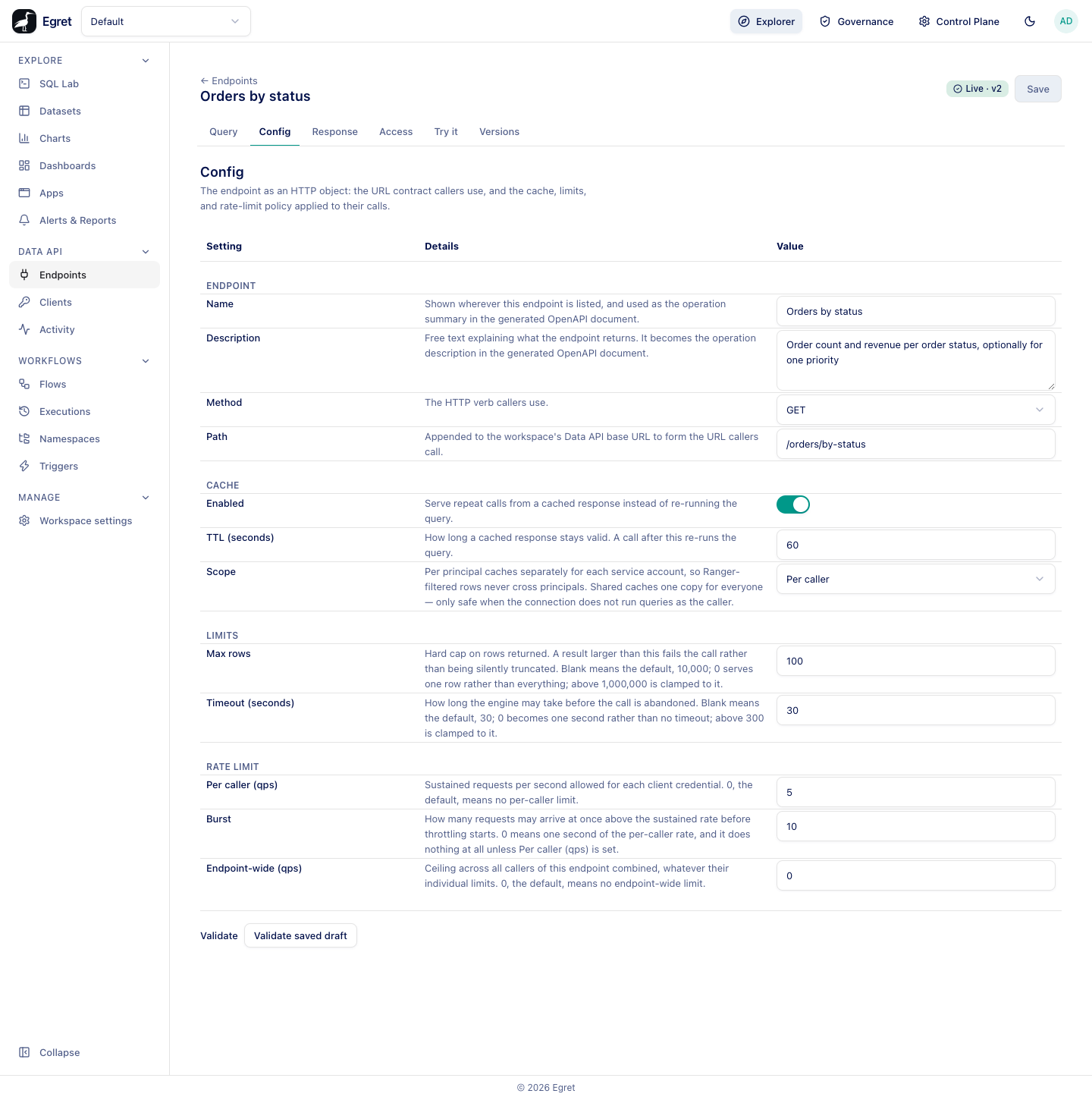
The tab is a table with Setting, Details and Value columns, grouped under Endpoint, Cache, Limits and Rate limit, followed by a Validate check.
Endpoint
| Setting | What it does | Default |
|---|---|---|
| Name | Shown wherever the endpoint is listed, and used as the operation summary in the generated OpenAPI document. | The name you gave it |
| Description | Free text about what the endpoint returns. It becomes the operation description in OpenAPI. | Empty |
| Method | The HTTP verb callers use: GET or POST. A POST endpoint still reads its parameters from the query string and ignores a request body; a GET request to a POST endpoint is 404 not_found. | GET |
| Path | Appended to the workspace's Data API base URL to form the URL callers call. Same rules as at creation: see Endpoints. | The path you gave it |
Method and path are part of the contract. Publishing a change to either is reported as a breaking change, and saving a new path moves the live URL at once; see Publishing.
Cache
An endpoint can serve repeat calls from a stored answer instead of running the query again. A cached answer sets meta.cached to true in the response.
Enabled
A switch. Off by default for a new endpoint.
TTL (seconds)
Shown when the cache is enabled. How long a stored answer stays valid. A call after that re-runs the query and stores the new answer. In the walk-through, Orders by status caches for 60 seconds: the first call returns "cached": false and an identical call within the minute returns "cached": true.
A cache entry is keyed on the endpoint, the published version, the declared parameter values (after defaults are applied) and, for Per caller, the service account. Parameters the endpoint does not declare never change the key, so a caller cannot fill the cache by inventing parameters. Publishing a new version starts with an empty cache for it.
Scope
Shown when the cache is enabled.
| Option | Behaviour | When to use |
|---|---|---|
| Per caller | Each service account gets its own cached copy. | The default. Required when the connection runs queries as the caller, because the engine may filter rows per principal. |
| Shared | One copy for every caller. | Only when every caller is allowed to see the same rows. |
Shared is refused at validate and publish time when the endpoint's database runs queries as the caller (per-user delegation or impersonation). The check runs again on every call, so switching a connection to per-user access later makes a Shared endpoint answer 503 cache_scope_stale until you republish with Per caller.
Limits
Max rows
A hard cap on the rows a call may return. A result larger than the cap fails the call with 400 row_limit_exceeded instead of being cut off silently.
| Value | Meaning |
|---|---|
| Blank | The default, 10,000 rows. |
0 | One row, not "everything". |
| Above 1,000,000 | Clamped to 1,000,000. |
For example, an endpoint with Max rows 5 that selects every order answers 400 with result exceeded the 5-row cap.
Timeout (seconds)
How long the engine may take before the call is abandoned with 504 timeout.
| Value | Meaning |
|---|---|
| Blank | The default, 30 seconds. |
0 | One second, not "no timeout". |
| Above 300 | Clamped to 300. |
The timeout applies to each statement. An endpoint with several statements can therefore take up to the timeout multiplied by the number of statements. A served call is also cut off after 50 seconds by Egret's own request deadline (504 deadline_exceeded). When the worst case is above 50 seconds, Config shows a note such as This endpoint's worst case is 60s — 2 statements that may each take the full timeout, run one after another. It is only a warning; lower the timeout or split the endpoint if callers need it to complete.
Rate limit
Rate limits protect the engine and other consumers. A request over a limit is refused with 429 rate_limited and a Retry-After header that says how many seconds to wait. All three settings default to unlimited.
Per caller (qps)
The sustained number of requests per second allowed for each client credential. 0 means no per-caller limit.
Burst
How many requests may arrive at once, above the sustained rate, before throttling starts. 0 means one second's worth of the per-caller rate. It does nothing unless Per caller (qps) is set, and it sizes only the per-caller bucket.
Endpoint-wide (qps)
A ceiling across all callers of this endpoint together, whatever their individual limits. 0 means no endpoint-wide limit.
With Per caller (qps) 5 and Burst 10 on Orders by status, thirty simultaneous requests from one client produced 10 to 12 answers and 18 to 20 429 responses with Retry-After: 1, and sixteen simultaneous requests from a second client of the same service account produced eleven answers and five 429: the ten burst slots plus the tokens that refilled while the burst ran. Each client credential has its own bucket. Sequential calls at normal speed were not throttled.
With one Egret replica, rate-limit counters and the cache live in the server's memory. Running more than one replica requires a shared store (Redis or Valkey); Egret refuses to start with several replicas and no store, so limits are never silently multiplied. If the shared store cannot be reached, a call to an endpoint that has a rate limit is refused with 503 rate_limiter_unavailable, and a cache lookup that fails is treated as a miss.
Validate
Under the table, Validate saved draft checks the saved draft without publishing. It is disabled while there are unsaved changes: Save your changes before validating.
A successful check lists the columns each statement resolves to:
Resolves to 3 columns: status (varchar(1)), orders (bigint), revenue (double)
For an endpoint with several statements it lists each statement by name. A failed check shows the reason in red, for example an undeclared parameter, a statement that is not a SELECT, or a parameter in LIMIT. Fix the draft, save, and validate again. The same checks run when you publish.
Limits and known issues
- Rate limits are enforced only for limits you configured. An endpoint with all three at
0never touches the limiter. - Max rows and timeout values outside the allowed range are clamped silently, not rejected.