Publishing, versions and rollback
Consumers never see your draft. They see a version: a frozen snapshot of the endpoint's contract (SQL, parameters, response settings, cache, limits and rate limit) taken when you press Publish. You can edit the draft as much as you like without affecting anyone, and go back to an earlier version in one click.
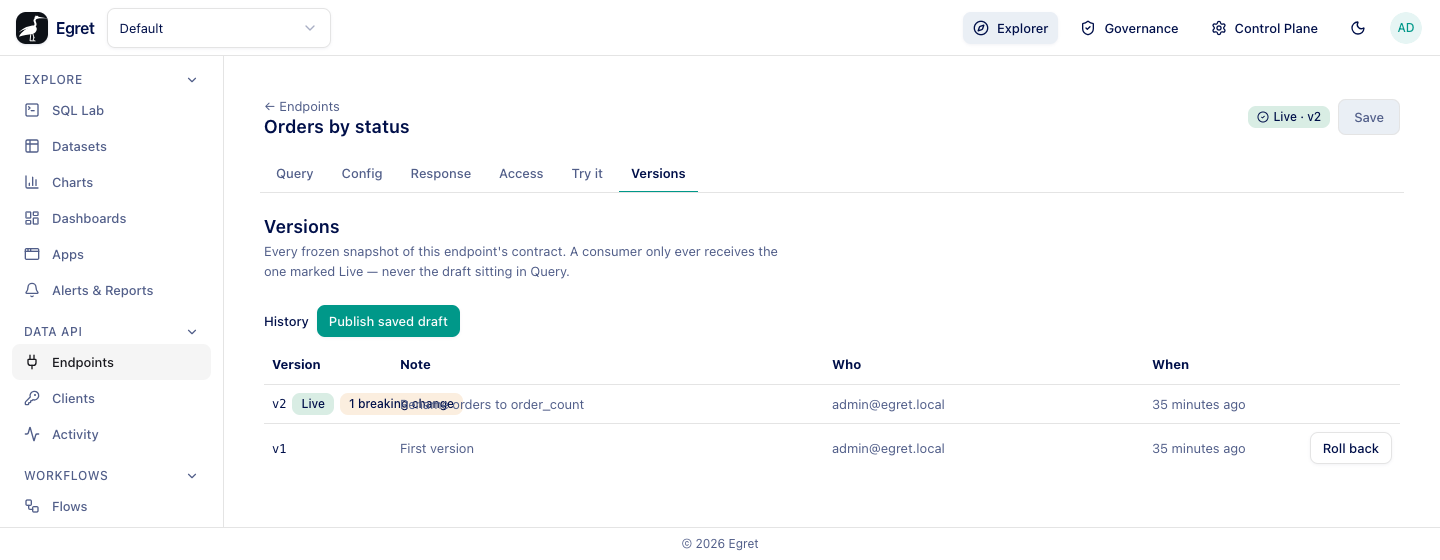
Publish an endpoint
- Open the endpoint and make sure there are no unsaved changes. Save first; Publish is disabled while changes are unsaved.
- Go to the Versions tab and press Publish saved draft.
- Read the dialog. It checks what the publish changes for anyone already calling the endpoint.
- Optionally write a Note describing the change, and press Publish.
A message confirms Published vN, and the header badge becomes Live · vN. The new version answers every call from that moment. The first publish of an endpoint reads Nothing is serving this endpoint yet, so there is nothing to break.
Publishing validates the draft first, with the same checks as Validate saved draft on the Config tab: one read-only SELECT, every {{ name }} declared, parameters bound safely, columns described by the engine. A refusal is shown in the dialog in red.
Publishing does not grant data access. A call runs as the service account against the workspace connection, so an administrator must also grant that account the underlying tables in the engine, or the contract has nothing to serve.
Versions
The Versions tab, History table, lists every version, newest first.
| Column | What it shows |
|---|---|
| Version | v1, v2 …, with a Live badge on the one being served. A version published with breaking changes shows a badge such as 1 breaking change (hover for the detail). A version compared against something other than its predecessor is marked compared against vN. |
| Note | The note you wrote when publishing. |
| Who | Who published it. |
| When | When, as a relative time. |
| Action | Roll back on every version except the live one. |
Version numbers are per endpoint and never reused.
Breaking changes
A change is breaking when a consumer built against the live version could stop working. Before you publish, the dialog compares the draft with the live version.
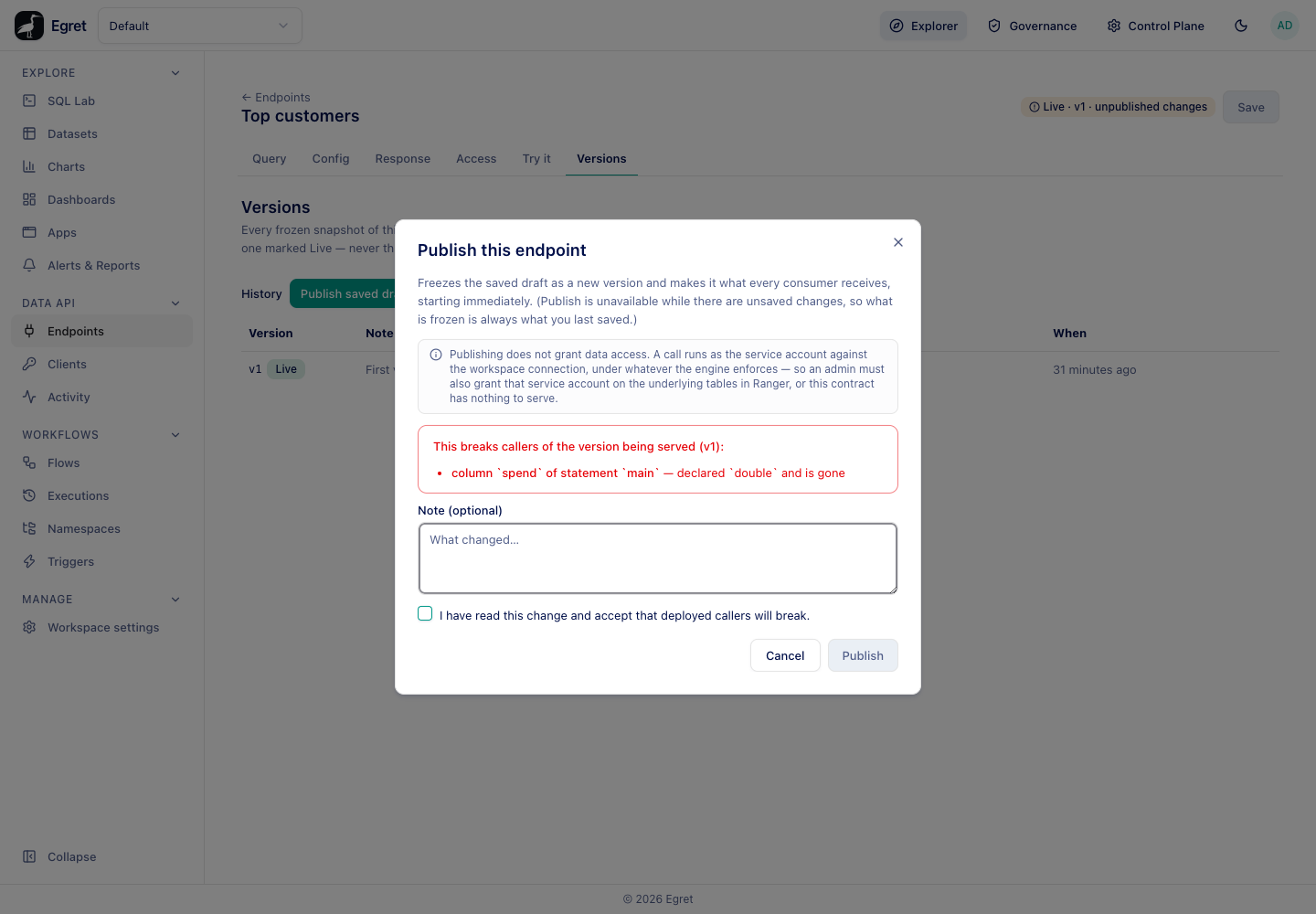
Examples Egret classifies as breaking, each with its own message:
| Change | Message |
|---|---|
| A column is dropped or renamed | column spend of statement main — declared double and is gone |
| The method or path changes | the endpoint's path: /x/probe becomes /orders/lookup |
| Shape, Naming or Envelope change | objects becomes arrays: every row changes between a JSON object and a positional array |
Adding a column and editing a statement's SQL without changing its columns are safe changes. The dialog says how many safe changes it found, or Nothing a caller can see changes.
When there are breaking changes the dialog lists them in red under This breaks callers of the version being served (vN) and the Publish button stays disabled until you tick I have read this change and accept that deployed callers will break.
Under the hood the acknowledgement is a token that POST …/validate issues for exactly those changes. A publish that breaks callers without it is refused (409 conflict) with the list of changes. The token cannot be reused: it is derived from the changes and the version currently live, so one issued for yesterday's change does not fit today's. A publish that breaks nothing and sends a token is refused too.
The version row keeps the record. 1 breaking change on v2 of the walk-through endpoint Orders by status shows that someone acknowledged the removal of the orders column.
Saving a new Path changes the URL served at once, before any publish. See Endpoints. Treat it as breaking even though it only becomes visible as such when you publish.
Roll back
Rolling back makes an earlier version the live one again. Consumers calling the endpoint's URL immediately receive that version's frozen contract.
- Open Versions.
- Press Roll back on the version you want back.
- Type
rollbackto confirm and press Roll back. The dialog says Every deployed client calling this endpoint's URL will immediately start receiving this version's frozen contract instead of the current live one. This does not delete anything — publish again to move forward once you're ready.
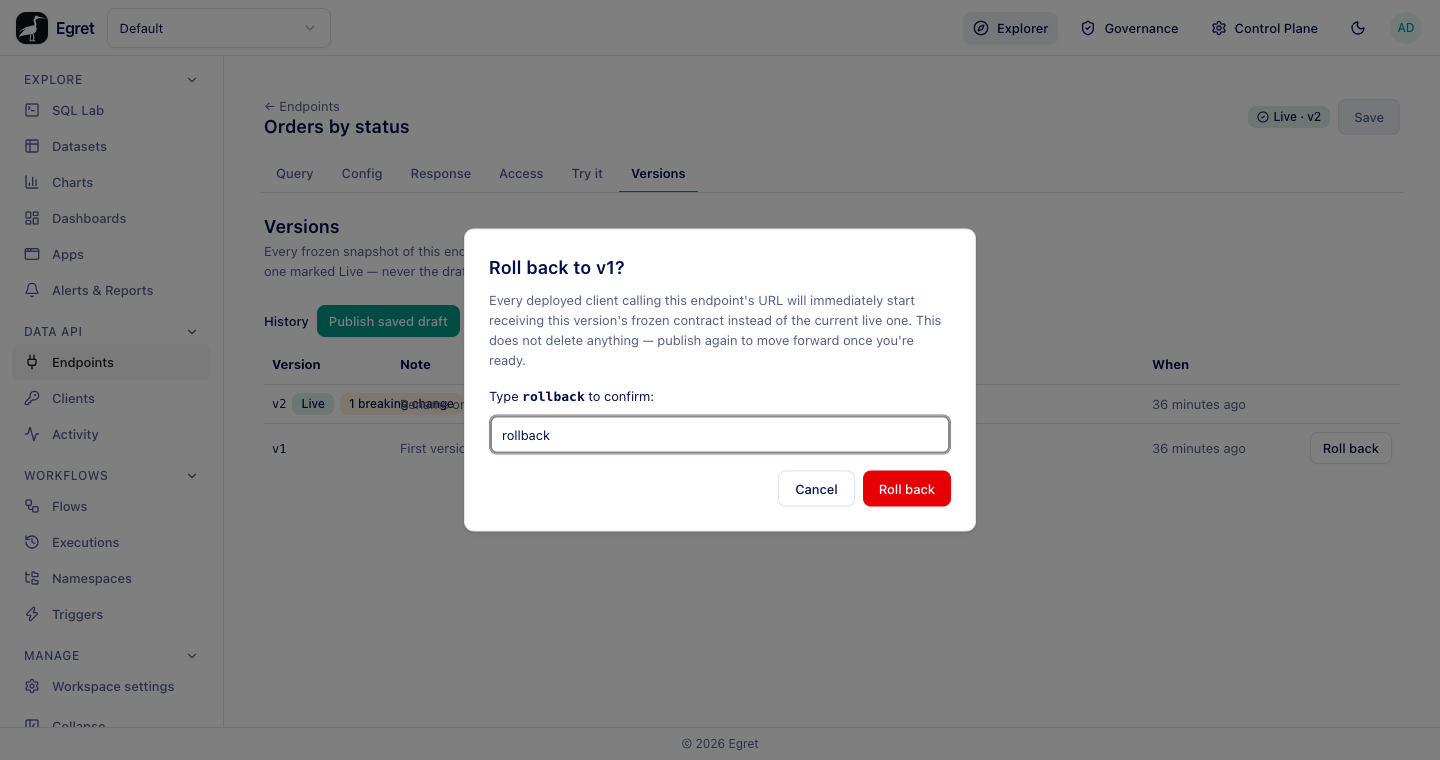
A message confirms Rolled back to vN. Nothing is deleted. The draft is untouched, so the header may read Live · v1 · unpublished changes when the draft is ahead of the version being served.
Rollback re-checks the rules whose inputs are live now, such as whether the connection is governed, and refuses if the old version could not be served safely today.
Pin a consumer to a version
A consumer that wants to keep calling a specific version while you publish others can send the X-Egret-Version header with the version number:
curl -s "$BASE/data-api/v1/default/orders/by-status" \
  -H "Authorization: Bearer $TOKEN" \
  -H "X-Egret-Version: 1"
In the walk-through, with v2 live, this returned the v1 contract (orders instead of order_count), and meta.version was 1. A pin chooses which frozen contract answers; the grant, the endpoint's state and the rate limit are still evaluated live. A version that was never published, or one above the live version (a rollback moved consumers off it), answers 409 version_unavailable. A value that is not a single positive integer answers 400 version_pin_invalid.
Disable, enable and delete
| Action | Where | Effect |
|---|---|---|
| Disable | Row menu in the Endpoints list | The endpoint stops serving (404 not_found) but keeps its live version and grants. |
| Enable | Row menu, on a disabled endpoint | Serves the version it had, with no new publish and no new check. Unavailable for an endpoint never published. |
| Move to Trash | Row menu | Only for a disabled or draft endpoint. A live one is refused: endpoint is live and cannot be moved to the trash; disable it first. |
| Restore | In Trash | The endpoint comes back disabled. |
| Delete permanently | In Trash | Removes the endpoint and its versions. Cannot be undone. |
An endpoint in the trash cannot be edited, published, rolled back, enabled or disabled, and its editor is read-only.
Limits and known issues
- The Roll back button needs the endpoint to be out of the trash.
- Saving a changed Path moves live traffic before publish.
- The breaking-change badge can overlap the version's note text in a narrow Version column.