Workflows
A workflow endpoint answers with the result of several steps: queries, scripts, calls to other endpoints of the workspace, and decisions that choose a branch. Draw it on a canvas: nodes that do not depend on each other run at the same time.
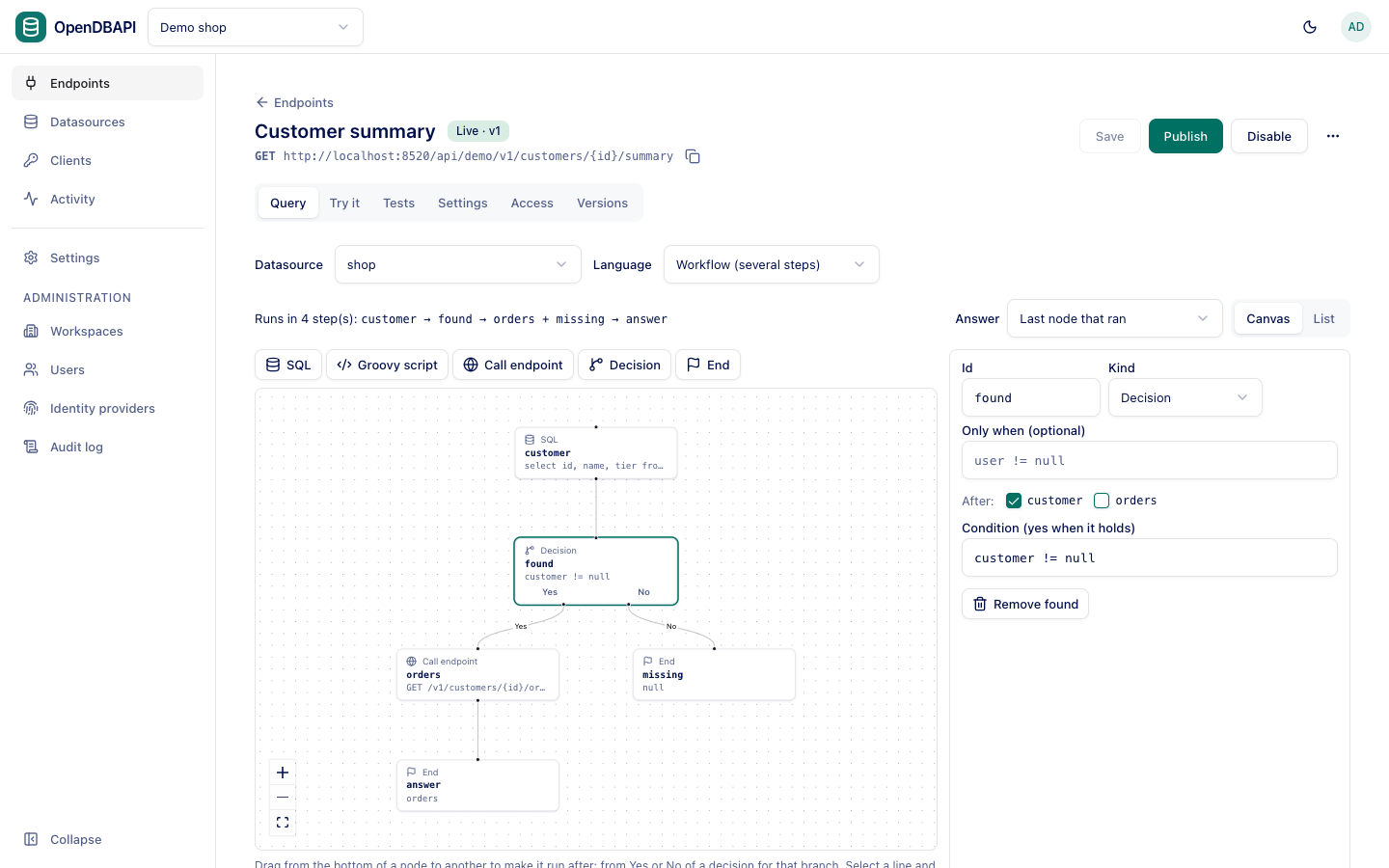
Create a workflow
- On the endpoint's Query tab, choose Workflow (several steps) in the Language menu. The current SQL
becomes the first node,
main. - Add nodes from the toolbar above the canvas: SQL, Groovy script, Call endpoint, Decision, End.
- Drag from the bottom of a node to another node to make the second run after the first. From a decision, drag from Yes or No.
- Click a node to edit it in the panel beside the canvas.
- Save, try it with Preview, and Publish.
Select a line and press Delete to remove it. The List tab above the canvas edits the same nodes as a list, which suits keyboards and screen readers.
The line above the canvas shows the order: Runs in 4 step(s): customer → found → orders + missing → answer. Nodes in
one step run in parallel.
Node kinds
| Kind | What it does | Its result |
|---|---|---|
| SQL | A SQL template, as in a SQL endpoint | All rows, First row (or null), Single value, or Rows changed (for writes) |
| Groovy script | A full-mode script with db | What the script returns |
| Call endpoint | Calls another endpoint of the workspace | That endpoint's data |
| Decision | A condition | true or false, which picks the Yes or No branch |
| End | An expression, e.g. orders | The value of the expression |
Every node has an Id (a lower-case letter, then letters, digits and _) and an optional Only when condition.
Passing results between nodes
A node reads the results of the nodes before it by id, and the request parameters by name:
- in SQL:
#{customer.id},#{id}; - in a script:
params.customer.id,params.id; - in conditions and expressions:
customer.id,orders[0].total,count[0].num == 0.
Branches and conditions
- A node after Yes of a decision runs only when the decision is true; after No, only when it is false. A node on the branch not taken does not run, and neither does anything after it.
- Only when skips one node when its condition does not hold; its result is
nulland the nodes after it still run. - An End node finishes a branch; nothing can come after it.
The answer
The Answer menu above the canvas picks the node whose result is the response's data. Last node that ran (the
default) is the last node, in list order, that ran and that nothing depends on. Usually that is the end node of the
branch taken.
Calling other endpoints
A Call endpoint node picks an endpoint of the workspace and gives each of its parameters an expression: a parameter
name (name), a field of an earlier node (customer.id), or a literal ('gold', 10). The called endpoint:
- runs its live version, with its own parameter checks, rules, datasource and data policies, as the same caller;
- runs inside the workflow's transaction when both use the same datasource and the workflow runs as one transaction;
- cannot change data when the workflow answers
GET.
Endpoints that call each other stop after three levels with 500 workflow_failed. A call that fails fails the workflow.
Transactions and parallel steps
With Transaction on (endpoint Settings), all nodes run in order on one connection and commit or roll back together. Without it, nodes of the same step run in parallel, each on its own connection. Preview and tests always run in one transaction that is rolled back.
Limits
- At most 20 nodes and 100 queries per request.
- Workflows answer JSON only: no pagination or streaming.
- A Groovy script node needs the script_author role.
- Validation checks the graph (unique ids, missing dependencies, cycles), renders each SQL node with sample values, and warns about a decision branch with nothing on it.