Shared objects
Workspace settings → Access → Shared objects is a workspace-wide roll-up of everything that has been shared with someone: dashboards, charts, datasets, folders, notebooks and saved queries, and who holds a grant on each. It is the place to audit sharing and to change it in one spot.
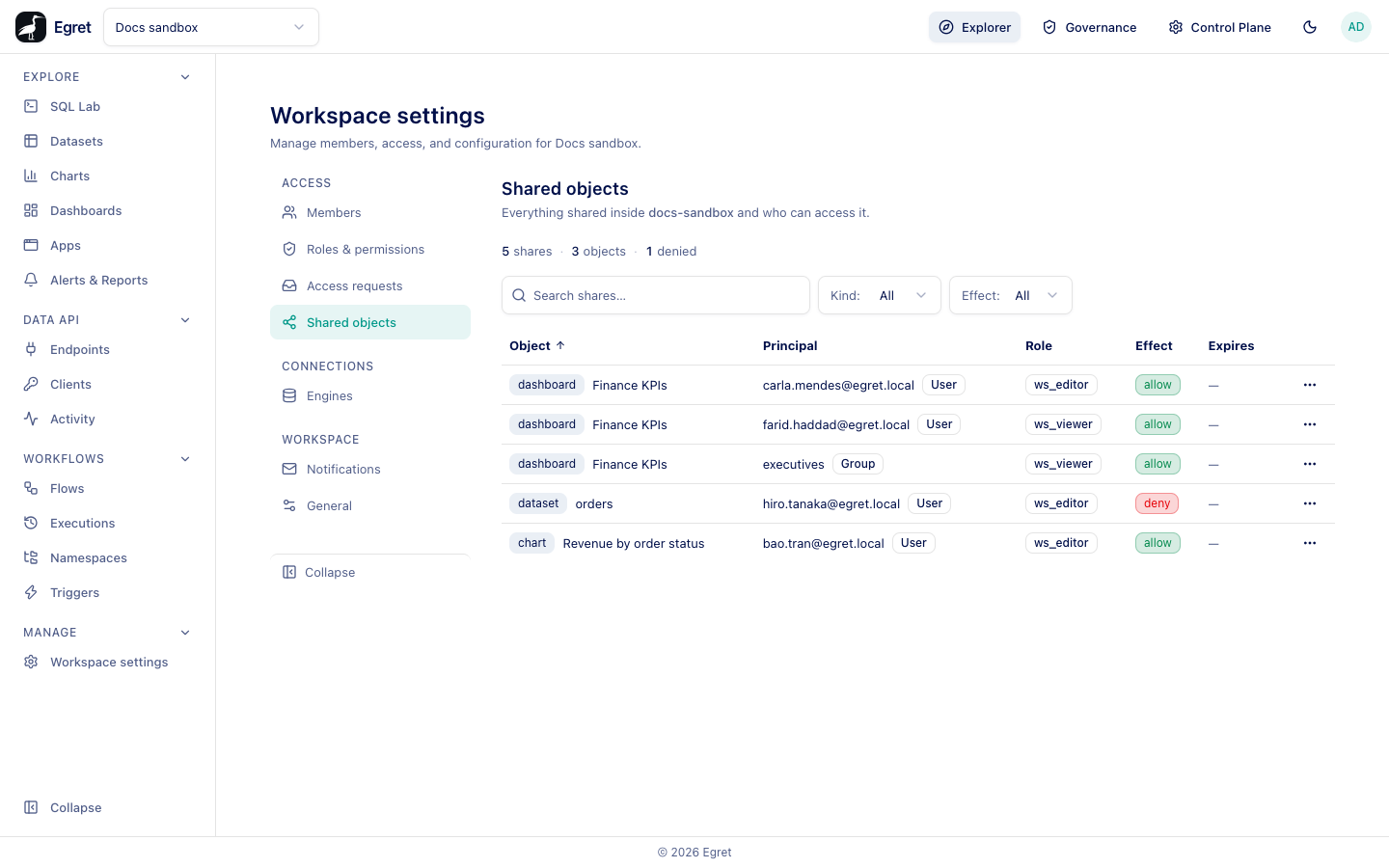
Only workspace admins can view shares; others see Only workspace admins can view shares. Until something is shared the page shows Nothing shared in this workspace yet.
The roll-up
There is one row per object and principal pair. A summary strip counts the shares, the objects and the denied shares. Two filters narrow the list: by object kind (only the kinds present are offered) and by effect (allow or blocked).
| Column | Meaning |
|---|---|
| Object | The kind badge (for example dashboard) and the object's name. |
| Principal | The user's email or group's name, with a User or Group badge. |
| Role | ws_viewer (can view) or ws_editor (can edit and manage). |
| Effect | Allow, or Deny for a blocked share: a deny blocks the principal on this object. |
| Expires | The expiry date, or a dash. An expired share shows an Expired badge. |
Columns are sortable. A null expiry sorts last.
Share an object
Sharing is done on the object, not on this page: open the object's Share control (for a dataset, chart, dashboard, folder, saved query or notebook), choose a user or group, a role, and optionally an expiry. The share then appears here.
You can also create a share through the API, which is how the demo's example was made:
curl -X PUT "$BASE/api/ws/docs-sandbox/objects/dashboard/$ID/grants" \
  -H 'Content-Type: application/json' -H "X-Egret-CSRF: $CSRF" -b "$COOKIES" \
  -d '{"principal_type":"group","principal_id":"data-team","role":"ws_editor","expires_at":"2026-12-31T00:00:00Z"}'
principal_id is a user's email, a group's name or a UUID. For a block, send role: "ws_editor" with effect: "deny".
Change or remove a share
Open the ⋯ menu on a row (Actions for <object>):
| Action | Does |
|---|---|
| Manage sharing… | Opens the object's own sharing dialog, where you can change roles, set expiry, block or remove principals. |
| Who can access? | Opens the Access Explorer for this object, so you see everyone who can reach it and why. |
Example
The dashboard Finance KPIs is shared with the group data-team as ws_editor until 2026-12-31, and with tester@egret.local as ws_viewer with no expiry. The page shows two rows, both for Finance KPIs, and one carries an expiry date.
Shares and workspace roles
A share adds access on one object for one user or group. Workspace roles (see Members) apply to the whole workspace, and shares add to them: the Access Explorer shows both kinds for a person, one as a workspace role and one as a shared object.
Limits and known issues
- The page is read-only; changes happen through the object's sharing dialog.
- Shares do not appear for the data plane. Table and column access is managed in Governance.