SQL Lab
SQL Lab is the interactive query editor. It is the default page when you open a workspace.
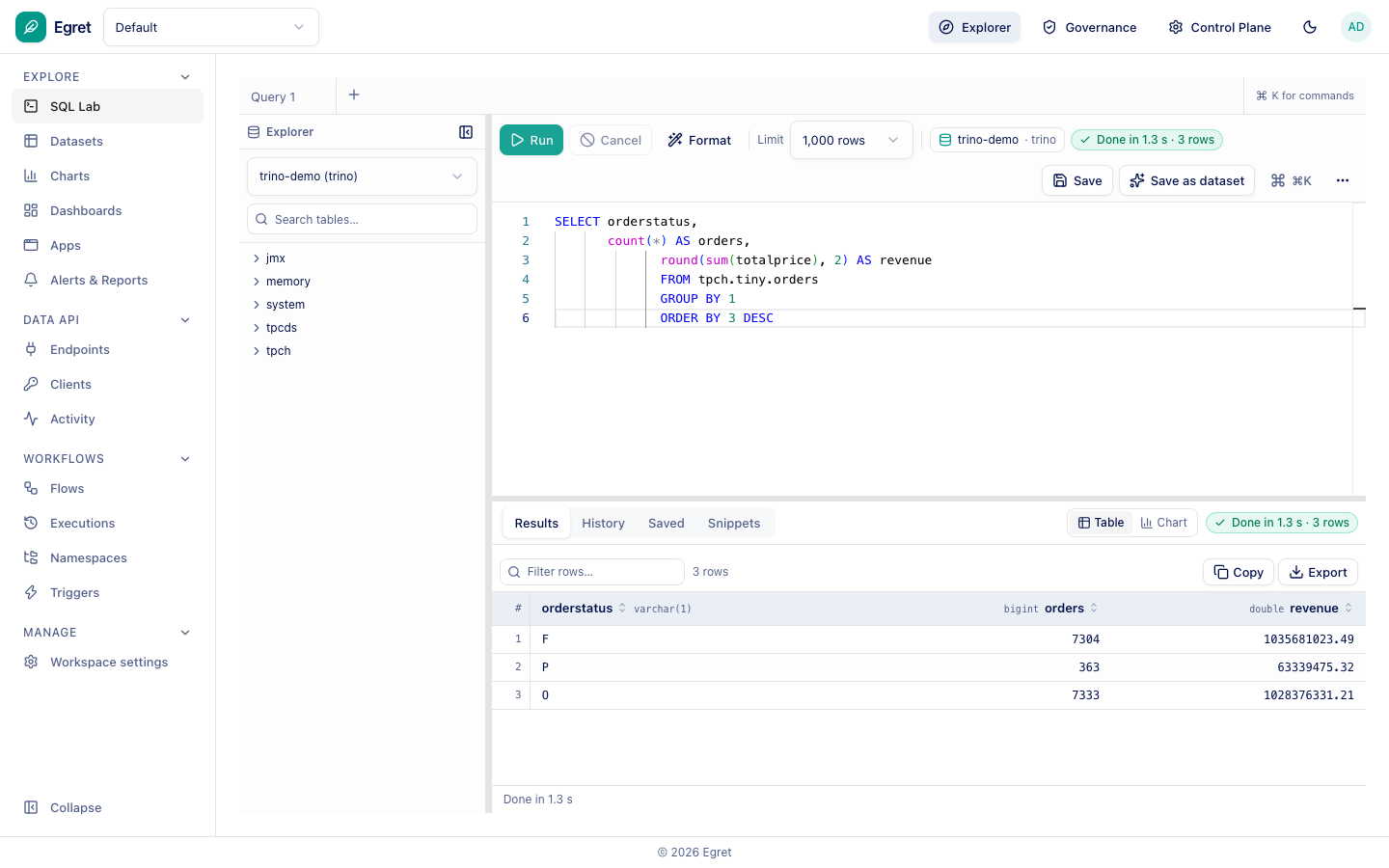
Run a query
- Pick a database in the schema browser (the left panel). It lists the engine's catalogs; expand one to browse schemas and tables, or use Search tables….
- Type SQL in the editor.
- Choose a Limit (default 1,000 rows) and press Run.
Results appear below the editor in a table with column types, a Filter rows… box, and Copy and Export actions. The status badge shows duration and row count, for example Done in 1.2 s · 3 rows. Switch the results between Table and Chart.
If a query fails, the error from the engine is shown in full with a Copy button.
Tabs, history and saved queries
Each tab (Query 1, +) is an independent editor. Below the editor, History lists past runs, Saved lists saved queries and Snippets holds reusable fragments.
Format and save
- Format reformats the SQL.
- Save stores the query.
- Save as dataset turns the query into a virtual dataset you can build charts on.
Running as the signed-in user
Whether queries run as the platform or as you depends on the database connection settings (Run queries as the logged-in user, Per-user delegation).