Publish and version an app
What viewers open is never your draft. It is a version: a frozen copy of the app's source taken when you publish. You can keep editing the draft without disturbing anyone, publish when you are ready, and go back to an earlier version when a release goes wrong.
Publish a draft
- Open the app's editor (⋯ → Edit).
- Save in the marimo editor with Ctrl+S or ⌘+S. Publishing freezes the saved draft, not what is on screen.
- Wait until the button shows the new revision (the header re-reads it every 5 seconds), then press Publish draft rev N.
A message confirms Published version N. The header badge changes from Draft only to Published vN, and the Apps list shows the same in Status.
The button publishes the revision it shows. If the draft has changed since then (a save you just made, a second tab, or someone else with edit access), Egret refuses with The draft changed while you were publishing. Save in the editor, then publish again. and nothing is published. On the demo stack, pressing Publish draft rev 1 a moment after Ctrl+S answered 409 (the draft changed since it was read, current_revision 2); a few seconds later the button read Publish draft rev 2 and publishing worked.
| Version numbers | 1, 2, 3 … per app, never reused. |
| What is frozen | The source at that draft revision. |
| Who can publish | Anyone with app:write on the app. |
| What viewers get | The latest version. Publishing makes it live immediately. |
Publishing needs the app to be out of the trash. A trashed app is refused (app is in the trash; restore it first).
Publishing does not check the app's queries or run it. A published app with a broken query fails for each viewer when they open it. Open the app yourself after publishing.
Version history
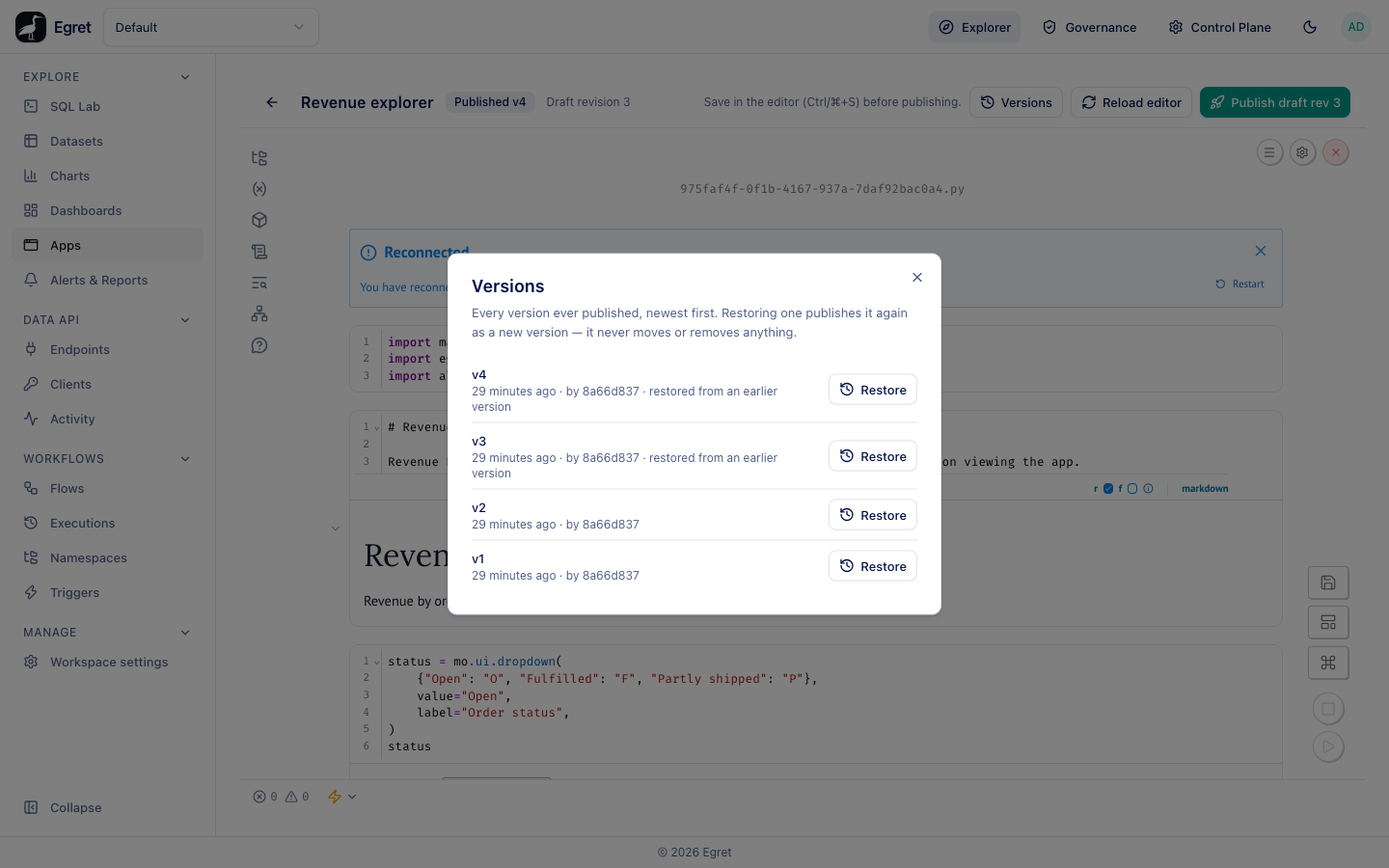
Press Versions in the editor header. The dialog says: Every version ever published, newest first. Restoring one publishes it again as a new version — it never moves or removes anything.
Each row shows the version number (v4), when it was published and by whom (as a shortened user id, for example by 8a66d837), restored from an earlier version for a restored one, and a Restore button. An app that has never been published shows Nothing has been published yet.
After you press Publish draft rev N, the Versions dialog on the same page still shows the old list (on a new app, Nothing has been published yet.) until you reload the page. The version was published; the Apps list and the header badge show it at once.
What a version records
The REST API returns these fields for each version:
| Field | Meaning |
|---|---|
version_no | The version number. |
from_revision | The draft revision the version was published from. Empty for a restored version. |
restored_from | For a version created by Restore, the version whose source it copied. |
published_by and published_at | Who published it and when. |
Roll back to an earlier version
Versions are append-only, so a rollback is a new publish of old source.
- Open Versions.
- Press Restore on the version you want back.
- A dialog titled Restore vN? asks you to confirm: This publishes vN's source again as a brand-new version. It does not move or remove any existing version — the app's history only ever grows. Press Restore this version.
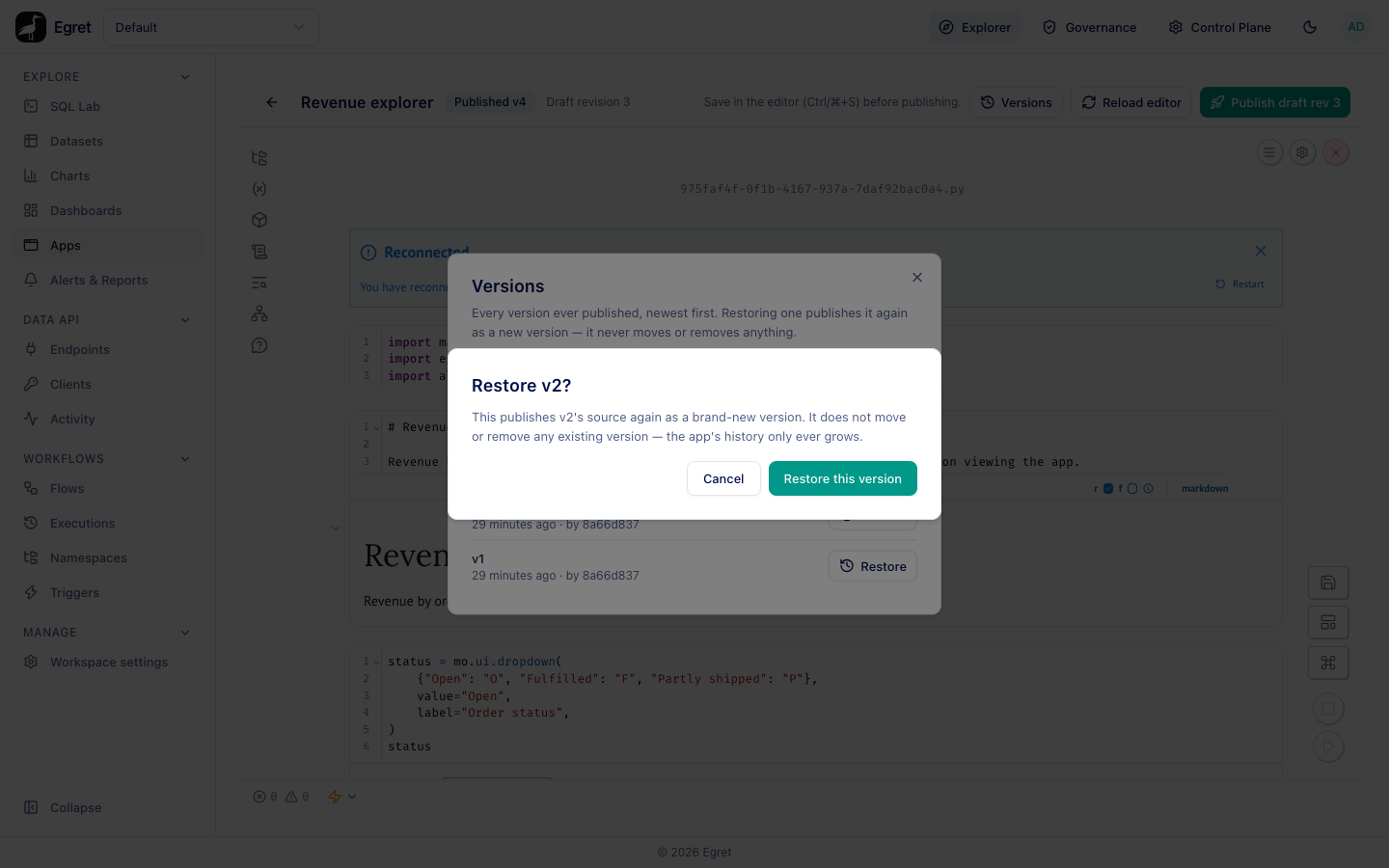
A message confirms Published version N, where N is the next number. The walk-through app Revenue explorer has four versions: v1 (a table), v2 (table and chart), v3 (restored from v1) and v4 (restored from v2). The latest, v4, is what viewers get.
Restoring does not change the draft. Your draft keeps its unpublished edits.
Opening a version
Viewers press Open and get the latest version. The REST API can also open a specific older version, which is useful for checking a release before restoring it: POST /api/ws/{workspace}/apps/{id}/ticket with {"mode": "run", "version_id": "…"}. The list and editor do not offer this.
API reference
The same operations over REST, using the session cookie and CSRF header like the rest of the product:
| Call | Purpose |
|---|---|
GET /api/ws/{ws}/apps/{id}/draft | The draft source and its revision. |
PUT /api/ws/{ws}/apps/{id}/draft | Save the draft. Needs If-Match: <revision>; a stale revision answers 409. |
POST /api/ws/{ws}/apps/{id}/publish | Publish the draft. Optional body {"expected_revision": N}. Answers 201 with the new version. |
GET /api/ws/{ws}/apps/{id}/versions | The version list, newest first. |
GET /api/ws/{ws}/apps/{id}/versions/{version_id} | One version with its source. |
POST /api/ws/{ws}/apps/{id}/versions/{version_id}/restore | Publish an old version again. |
A save without If-Match is refused: If-Match with the draft revision is required.
Limits and known issues
- Publishing without saving first publishes the last saved draft. A brand-new app published straight away publishes the starter notebook.
- There is no unpublish. To stop viewers opening an app, move it to the Trash.
- The Versions dialog is stale after a publish until the page is reloaded, and shows the publisher as a shortened id (KI-027).