Audit log
The audit log is the append-only record of authorization decisions and changes on the platform: who did what, to which object, and whether it was allowed. Control Plane → System → Audit log reads it, newest first. It is visible to platform admins only.
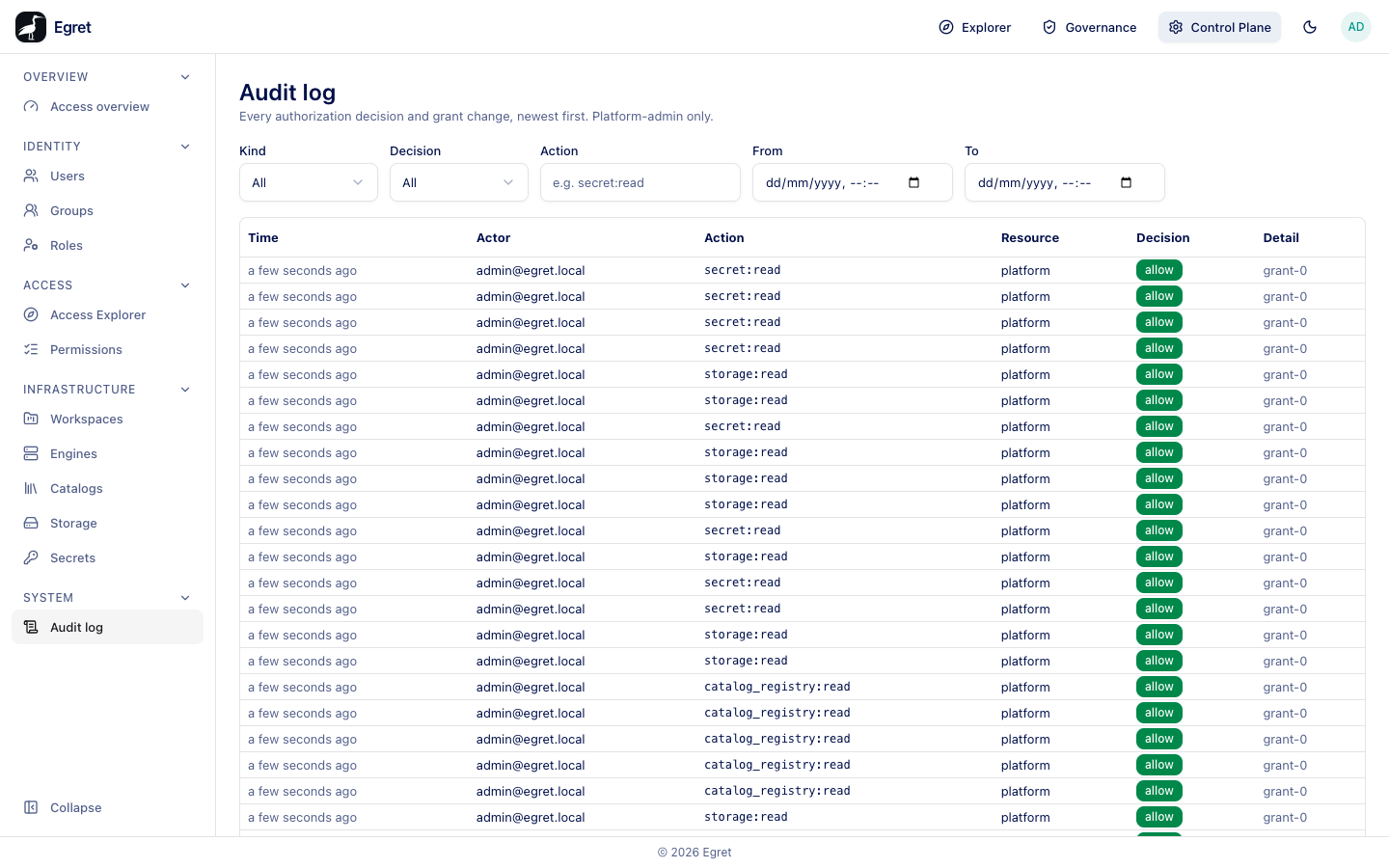
Read the log
The page shows a table with six columns:
| Column | Meaning |
|---|---|
| Time | When it happened, relative. |
| Actor | The user's email, or a short id for an account the page cannot resolve (for example a service account). |
| Action | What was attempted, in the form thing:action, for example secret:read, member:add, perm_rule:create. |
| Resource | What it was about: the resource type and id, for example workspace (e76a8865-…) or platform. |
| Decision | allow or deny for an authorization decision, a dash for a recorded change. |
| Detail | The reason, or the JSON detail of a change, for example the grants that allowed a decision (grant-0) or the fields of an update. |
Every page loads 100 rows. Load more fetches the next 100 using a keyset cursor. Changing any filter starts again from the newest row.
Two kinds of entry
| Kind | What it records | Decision | Example |
|---|---|---|---|
| Decision | An authorization check: the actor asked to do something and the policy engine answered. | allow or deny, with the grants that decided. | secret:read on platform, allow, grant-0 |
| Mutation | A change that was made. | A dash. | member:add, object_grant:put, perm_rule:create, tag:assign |
Decisions are recorded for the platform's role-based checks. Impersonation is recorded as the mutations impersonation.start (with the reason) and impersonation.end, with the admin as the actor; the decisions made while impersonating are recorded under the impersonated user, with nothing that names the admin. Governance changes also appear on the Governance overview's Recent changes; the audit log keeps the raw entries.
Filter the log
The filter bar sits above the table.
| Filter | Options |
|---|---|
| Kind | All, Decision, Mutation. |
| Decision | All, Allow, Deny. |
| Action | An exact action, for example secret:read. A partial word such as secret matches nothing. |
| From and To | A date and time range (your browser's local time). |
The same filters work in the API: GET /api/control-plane/audit accepts kind, decision, action, actor, workspace, from, to, cursor and limit.
Find out who did something
- Set Kind to Mutation.
- Type the Action, for example
member:add. - Read Actor and Time, and open the Detail for the change.
Investigate a refusal
- Set Decision to Deny.
- Narrow with From and To around when the person tried.
- Read Action, Resource and Detail. An empty reason list means no grant matched.
Related views
- A workspace's Activity tab shows the entries for one workspace (see Workspace details).
- Governance → Overview → Recent changes shows governance changes only.
Limits and known issues
- The Action filter is an exact match.
- Some changes, such as role assignments and catalog tags, are recorded after they commit and can be missing if the audit writer was overloaded.
- The log is read-only. There is no export in the UI.