Inputs and outputs
Inputs are the values a flow asks for when it starts. Outputs are what a task hands to the tasks after it. This page covers both: how to declare an input, every input type, how a value reaches your tasks, and how to read task outputs.
Declare inputs
Inputs are a list at the top level of the flow. Each one has an id and a type:
id: greet-customer
namespace: docs.demo
inputs:
  - id: customer
    type: STRING
    displayName: Customer name
    description: Who to greet.
    defaults: Ada
  - id: orders
    type: INT
    defaults: 3
tasks:
  - id: say_hello
    type: io.kestra.plugin.core.log.Log
    message: "Hello {{ inputs.customer }}, you have {{ inputs.orders }} orders."
Read an input anywhere an expression is allowed as {{ inputs.<id> }}.
| Key | What it does | Default |
|---|---|---|
id | The name, unique in the flow. Use letters, digits and _; an id with a dash must be read as inputs['my-input']. | none |
type | One of the types below. | none |
displayName | The label in the run form. | The id |
description | Help text under the control. | none |
required | Whether the run form insists on a value. | true |
defaults | The value used when none is given. | none |
prefill | A value the run form starts with. It is not applied when no value is sent. | none |
values | The allowed choices of a SELECT or MULTISELECT. | none |
itemType | The type of the items of an ARRAY or MULTISELECT. | none |
allowedFileExtensions | For FILE: the extensions accepted. | any |
dependsOn | Accepted from Kestra and not evaluated. | none |
Input types
| Type | The run form shows | Value in expressions |
|---|---|---|
STRING | A text box. | Text. |
INT | A number box that accepts whole numbers. | A number, so {{ inputs.orders + 1 }} works. |
FLOAT | A number box. | A number. |
BOOL | A switch. | true or false. |
DATETIME, DATE, TIME | A date-time, date or time picker. | The ISO text, for example 2026-10-19T08:30:00Z. Use the date filter to format it. |
DURATION | A text box that expects an ISO-8601 duration such as PT1H. | The text. |
EMAIL | A text box that checks for an email address. | Text. |
URI | A text box that expects a scheme such as https://. | Text. |
SECRET | A masked box. | The text. See Secret inputs. |
SELECT | A drop-down of values. | The chosen text. |
MULTISELECT | A multi-choice list. | A list. |
ARRAY | A list of rows of itemType. | A list, so {{ inputs.list | length }} works. |
JSON | A JSON text area. | An object, so {{ inputs.payload.a }} works. |
YAML | A YAML text area. | Text in testing: {{ inputs.cfg.key }} failed with an undefined value. |
FILE | A file upload. | An internal-storage URI. |
ION, FORM and REUSABLE_INPUTS inputs are accepted in the YAML (the last two are Kestra Enterprise types) but the run form cannot enter them.
Defaults and the run form
An input left out of the request gets its defaults: value. The run form fills each control from prefill: or defaults:. When the form has a required input with no default and no value, it shows Enter a value for this input. and does not start the run.
The API, a schedule, a webhook and a Flow trigger start a flow without checking required, the type or the allowed values. In testing, an INT input given "abc" ran with the text abc, and a flow with a required input and no value started and then failed when a task read the missing input. The validator, min, max, before, after and jsonSchema keys of Kestra inputs are accepted and ignored. Check values in the flow if they matter.
Secret inputs
A SECRET input is masked in the run form, and stays masked after the run starts:
- Every read shows
******in its place: the answer to Run, the execution's Overview tab, the executions lists, the topology and the API responses (GET …/executions,…/executions/{id},…/graph,…/logs, and the replay and resume answers). - The run logs and a failed run's message are masked too: a log line that contains the value shows
******instead. - The real value is stored encrypted (AES-256-GCM) with the server's
secrets.master_key, and only the worker opens it, so{{ inputs.<id> }}still renders the real value in a task. A Replay uses the stored value, and a loop iteration and a retry keep it; aSubflowchild masks the inputs that its own flow declares asSECRET. - Executions stored before this masking existed are masked at the first start of the upgraded server, together with the log lines they wrote.
- A server without
secrets.master_keycannot store the value, so a start that would store one is refused with 400: the flow declares SECRET input(s) …, and this deployment cannot store a secret value: set secrets.master_key. See Configuration keys.
What is not masked, the same rule as for secret() values: the outputs of a task (for example a Return of the input), the rendered values of a task, and a value the flow passes on into a non-SECRET input of another flow. Do not copy a secret input into an output. The secret() function that reads workspace secrets resolves only on Kestra plugin tasks; see Expressions.
Start with inputs
- From the page: press Run and fill in the form. See Flows.
- From a trigger: a
ScheduleorWebhooktrigger takes aninputs:map. See Triggers. - From the API:
POST /api/ws/{workspace}/workflows/flows/{id}/executionswith a JSON body{"inputs": {...}}. The body'sinputsmust be an object. A file input needsmultipart/form-data, one part per input id.
curl -b cookies.txt -H "X-Egret-CSRF: $CSRF" -H "Content-Type: application/json" \
  -X POST "http://egret.localtest.me:8080/api/ws/default/workflows/flows/$FLOW_ID/executions" \
  -d '{"inputs": {"customer": "Grace", "orders": 7, "vip": true, "channel": "sms"}}'
A string sent for an INT, FLOAT, BOOL, JSON, ARRAY or MULTISELECT input is parsed as JSON. Every other type keeps its string.
Task outputs
Most tasks produce outputs, which later tasks read as {{ outputs.<task id>.<name> }}. The task catalogue lists each task's output names. A task's outputs exist only after that task has finished.
tasks:
  - id: summary
    type: io.kestra.plugin.core.debug.Return
    format: "{{ inputs.customer }} via {{ inputs.channel }}"
  - id: echo
    type: io.kestra.plugin.core.log.Log
    message: "Summary was: {{ outputs.summary.value }}"
Common outputs:
| Task | Output | Meaning |
|---|---|---|
debug.Return | value | The rendered format. |
output.OutputValues | values | The map you declared, for example {{ outputs.sum.values.total }}. |
storage.Write | uri | The stored file's internal-storage URI. |
storage.Size | size | Bytes. |
kv.Get | value | The stored value. |
flow.Subflow | executionId, state, outputs | The child execution. outputs is empty today. |
To publish your own values, use OutputValues:
- id: sum
  type: io.kestra.plugin.core.output.OutputValues
  values:
    total: "{{ inputs.a + inputs.b }}"
See outputs on an execution
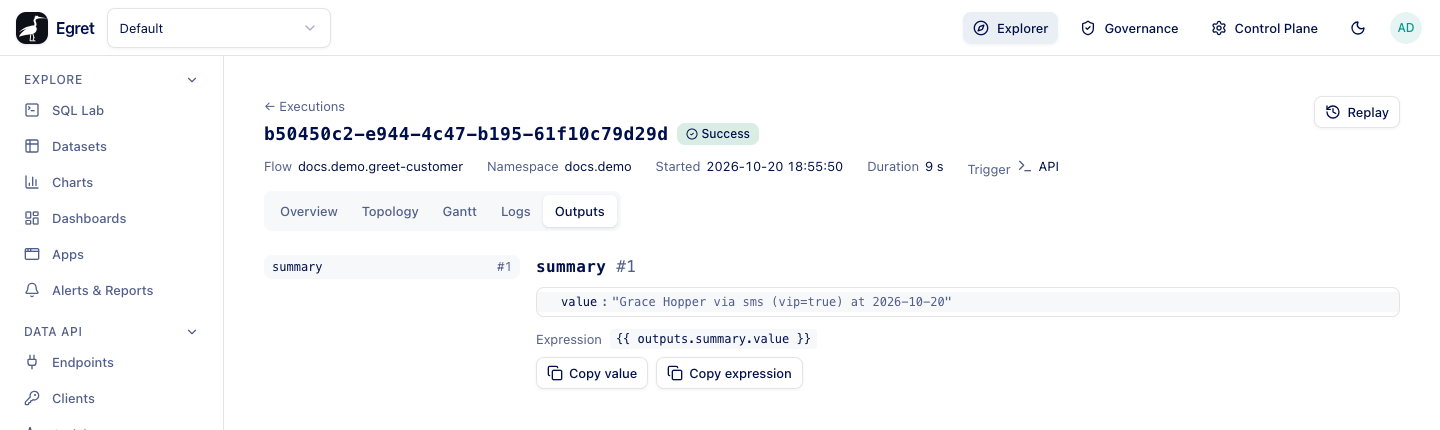
The Outputs tab of an execution lists each task run that produced outputs, with the values and two buttons: Copy value and Copy expression. The expression is ready to paste into another task. See Execution details.
Flow outputs
A flow can declare outputs: with an id, a type and a value. The engine accepts them but does not compute them yet: no output appears on the execution, and a parent flow that calls the flow as a Subflow sees outputs as an empty map, so {{ outputs.sub.outputs.total }} fails. Pass data between flows with the KV store (KV store) or with namespace files until this is implemented.
Limits and known issues
- Only the run form validates inputs. Server-side validation of
required, types andvaluesis not implemented. - The outputs and rendered values of a task that uses a
SECRETinput are not masked; only the inputs and the logs are (KI-246). YAMLinputs are not parsed into an object in expressions.- Flow
outputs:are not evaluated.