KV store
The KV store holds small named values that flows share: a counter, the time of the last run, an email address, a threshold. Each namespace has its own store. Flows read a value with kv('key') or the Get task, and write it with Set. You can also edit the keys by hand on the KV tab of a namespace.
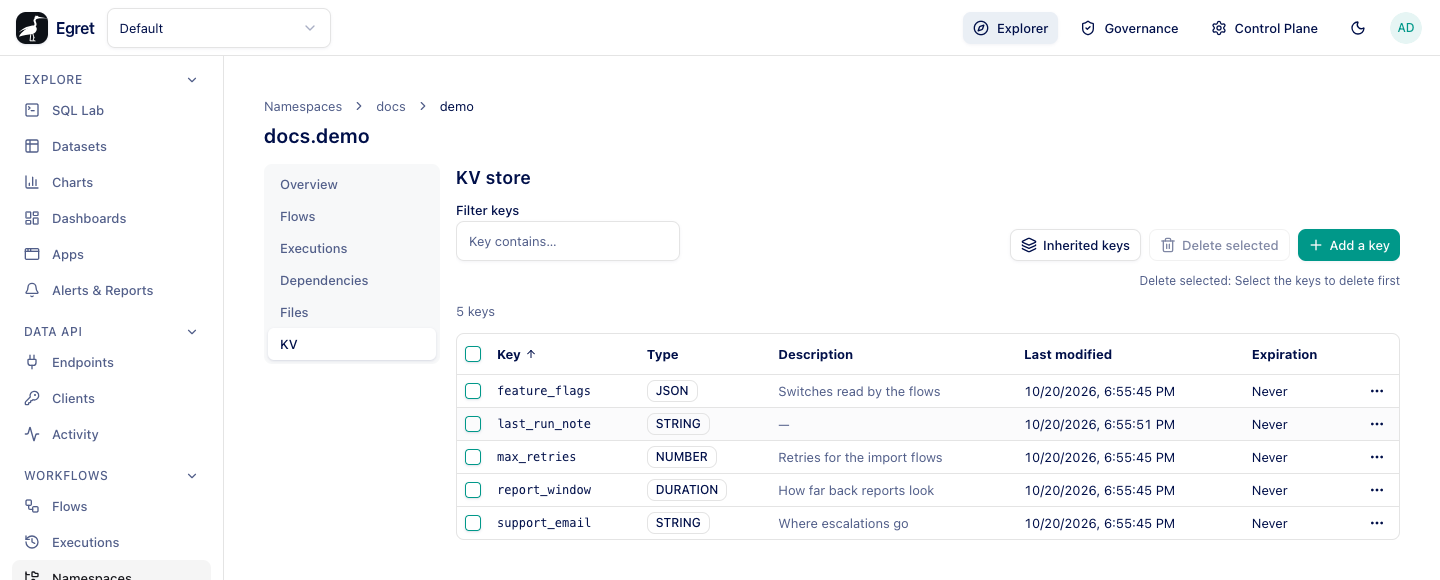
Open the KV tab
Go to Workflows → Namespaces, open a namespace and choose KV. The table lists the namespace's live keys:
| Column | Meaning |
|---|---|
| Key | The key name. Sortable; the arrow shows the direction. |
| Type | STRING, NUMBER, BOOLEAN, DATETIME, DATE, DURATION or JSON. |
| Description | Free text, or a dash. |
| Last modified | When the latest revision was written. |
| Expiration | When the key expires, or Never. |
Filter keys (Key contains…) narrows the table. The line above the table counts the keys, for example 5 keys. A key that has expired no longer appears.
Add a key
-
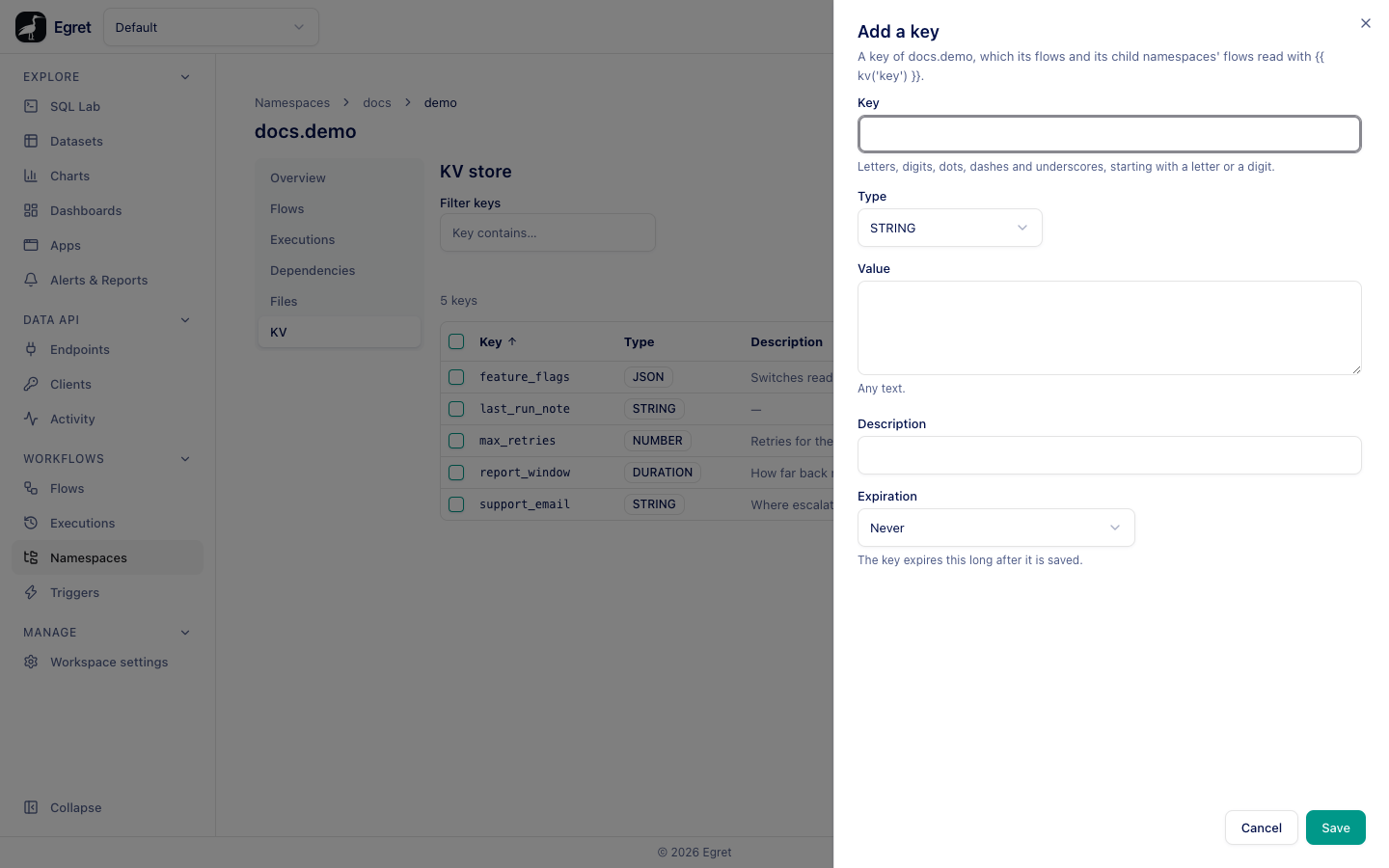
Press Add a key.
-
Fill in the drawer:
Field What it does Key Letters, digits, dots, dashes and underscores, starting with a letter or a digit, at most 350 characters. Type The value type. The Value control changes with it: a switch ( trueorfalse) forBOOLEAN, a text box with an ISO-8601 hint (PT1H30M) forDURATION, a text area for the rest.Value The value. For STRINGit is Any text.Description Optional text. Expiration Never, 5 minutes, 1 hour, 1 day, 7 days, 30 days or Custom TTL, an ISO-8601 duration such as PT12H. The key expires that long after it is saved. -
Press Save. A toast says Saved the key “support_email”.
Edit, copy and delete
Each row has a menu (⋯):
| Action | What it does |
|---|---|
| View value | Shows the stored value with its description, revision number and expiry. |
| Copy expression | Copies {{ kv('key') }} so you can paste it into a flow. |
| Edit | Opens the drawer for the key. When you leave the Expiration alone it offers Keep the current expiration. |
| Delete | Deletes the key after a confirmation. |
Select rows with the check boxes to enable Delete selected. Edit and delete need workflow:manage; reading needs workflow:read.
Every save writes a new revision; the earlier values stay until the key is purged. Deleting a key hides it; writing it again continues the revision numbers.
Inherited keys
Inherited keys opens a drawer with the keys of the parent namespaces. A flow in docs.demo that reads kv('support_email') finds the key in docs.demo, and if it is not there, in docs. The drawer lists those keys with the namespace each comes from (Key, Namespace, Type, Description, Last modified). It says No inherited keys when no parent namespace holds a live key. When a flow asks for a key from a particular namespace, kv('key', 'docs'), the lookup does not walk up.
Use the store in a flow
| Need | Use |
|---|---|
| Read in an expression | {{ kv('key') }}, {{ kv('key', 'other.namespace') }} |
| Read as a task | io.kestra.plugin.core.kv.Get with output value |
| Write | io.kestra.plugin.core.kv.Set (create or replace) or Put (update an existing key) |
| List keys | io.kestra.plugin.core.kv.GetKeys with a prefix |
| Delete | io.kestra.plugin.core.kv.Delete or PurgeKV |
id: kv-roundtrip
namespace: docs.demo
tasks:
  - id: save
    type: io.kestra.plugin.core.kv.Set
    key: last_run_note
    value: "written by {{ flow.id }}"
    kvType: STRING
  - id: read_back
    type: io.kestra.plugin.core.kv.Get
    key: last_run_note
  - id: show
    type: io.kestra.plugin.core.log.Log
    message: "KV says: {{ outputs.read_back.value }} / {{ kv('last_run_note') }}"
This run logged KV says: written by kv-roundtrip / written by kv-roundtrip, and the key last_run_note then appeared in the KV tab with type STRING.
A key that is missing makes kv() and Get fail unless you pass errorOnMissing: false.
Set options
Property of Set | What it does |
|---|---|
key, value | The key and the value. |
kvType | The type: STRING, NUMBER, BOOLEAN, DATETIME, DATE, DURATION, JSON. |
ttl | An ISO-8601 duration after which the key expires, for example PT1H. |
overwrite | Whether to replace an existing key. |
kvDescription | The description shown in the table. |
namespace | Defaults to the flow's own namespace, the only one a flow may write. |
Use the API
# write
curl -b cookies.txt -H "X-Egret-CSRF: $CSRF" -H "Content-Type: text/plain" \
  -H "description: Where escalations go" -H "ttl: PT24H" \
  -X PUT --data 'support@example.com' \
  "http://egret.localtest.me:8080/api/ws/default/workflows/namespaces/docs.demo/kv/support_email"

# list
curl -b cookies.txt "http://egret.localtest.me:8080/api/ws/default/workflows/namespaces/docs.demo/kv"
The type is inferred from the body: 3 became a NUMBER and P7D a DURATION in testing. A ttl header is an ISO-8601 duration; a negative or malformed one is refused.
Limits and known issues
- A key name is at most 350 bytes. A
NUMBERhas at most 1 000 digits. A TTL is at most 1 000 years. - The most that is read into an expression is
workflow.storage.max_read_bytes(10 MiB by default). secret()inside the value ofSetorPutis refused when you save, so a secret is never stored in clear.- A flow writes only to its own namespace; it can read the keys of any namespace in the workspace.