Ranger plugin
Every engine enforces egret's policies through an Apache Ranger plugin that downloads its policy profile from egret. For an engine egret provisions, the plugin is configured for you. For an engine you run yourself, egret gives you the files to install, says what it assumes and what you must supply, and shows which plugins have downloaded.
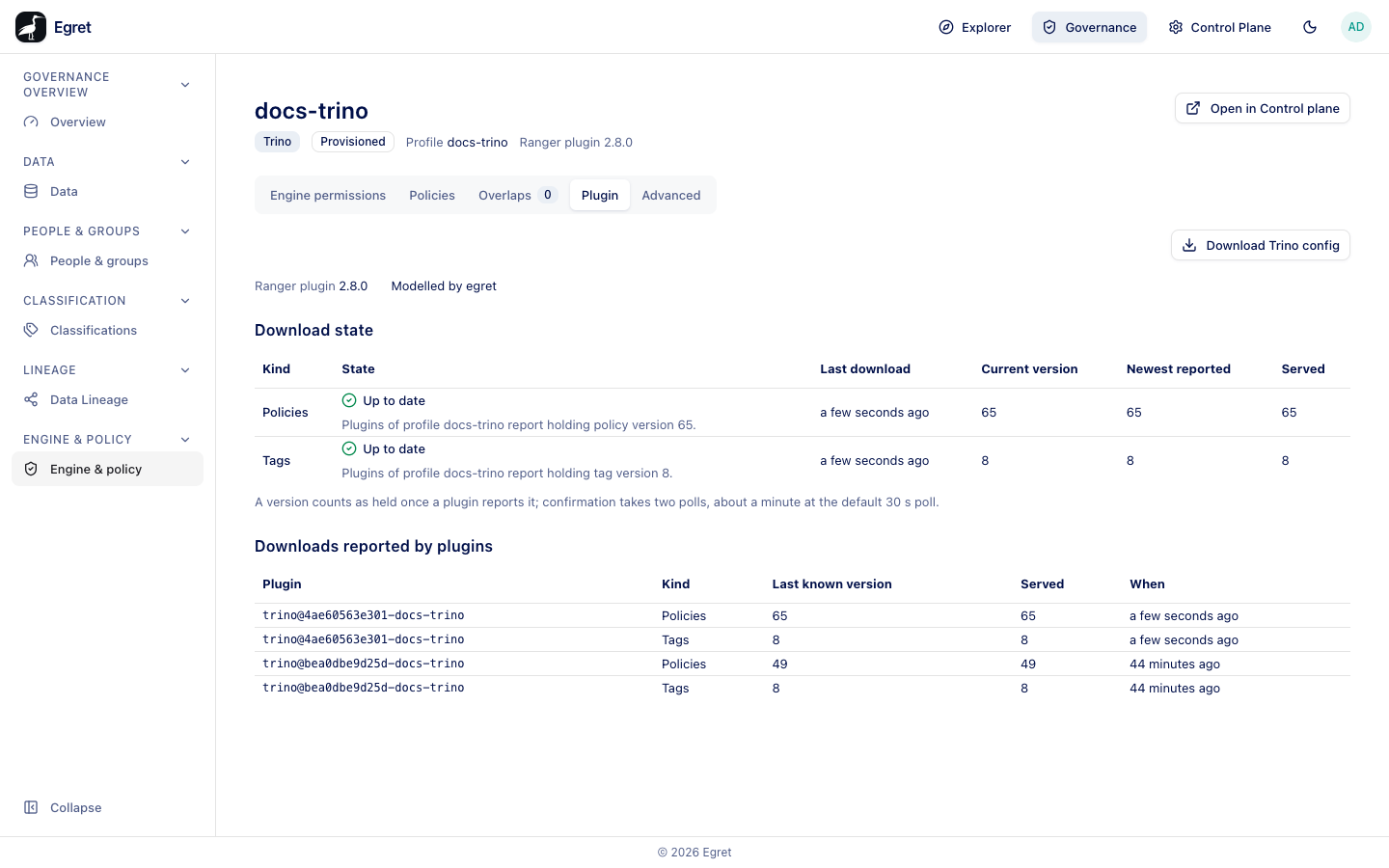
The Plugin tab in Governance
The Plugin tab of an engine in Governance → Engine & policy shows whether the engine's plugins hold the current policy set:
- The declared Ranger plugin version and whether egret models it (Modelled by egret).
- Download state: one row each for Policies and Tags, with the State (for example Up to date: Plugins of profile docs-trino report holding policy version 65.), Last download, Current version, Newest reported and Served. A version counts as held once a plugin reports it; confirmation takes two polls, about a minute at the default 30 s poll.
- Downloads reported by plugins: each plugin instance (for example
trino@4ae60563e301-docs-trino), the kind, the last known and served version, and when. A provisioned engine that was restarted shows its old container's plugin as well, with an older version. - Download Trino config downloads the plugin files.
For an external engine the state reads egret does not judge external engines: it does not run them and cannot tell whether they should be polling., and the list says No plugin has downloaded from this profile in the last 24 hours. until your engine downloads.
A provisioned engine needs nothing else: egret installs and configures the plugin. The tab shows only for an engine bound to a policy profile.
Install the plugin on an external engine
The installation files are on the engine's Plugin config tab in the Control Plane (Control Plane → Engines → <engine> → Plugin config). With no profile bound it reads engine … is bound to no policy profile: bind a profile first.
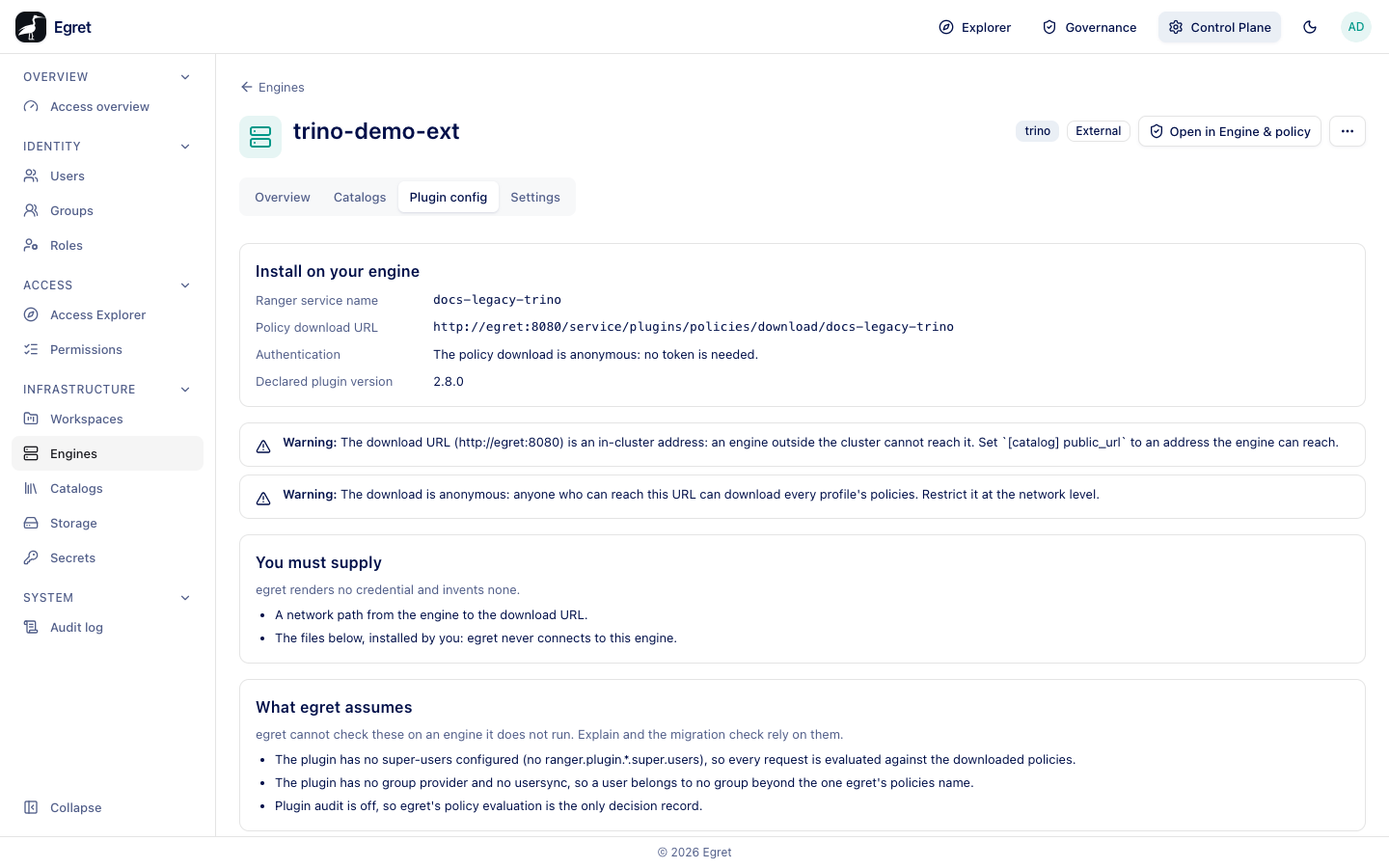
- Open the external engine in the Control Plane and select Plugin config.
- Note the Ranger service name (the profile name) and the Policy download URL.
- Copy the files under Files:
access-control.propertiesandranger-trino-security.xmlfor Trino. Each has Copy and Download buttons. - Install them on the coordinator, restart it, and make sure the engine can reach the download URL.
- Check the Governance Plugin tab: the plugin appears under Downloads reported by plugins once it has downloaded.
Install on your engine
| Field | Meaning |
|---|---|
| Ranger service name | The profile name the plugin asks for, for example docs-legacy-trino. |
| Policy download URL | <public url>/service/plugins/policies/download/<profile>. |
| Authentication | Whether egret requires a bearer token on the download, for example The policy download is anonymous: no token is needed. Egret does not show or issue a token. |
| Declared plugin version | The Ranger plugin version recorded for the engine. |
Warnings
The tab raises warnings when something will stop the download:
- The download URL is a loopback, unspecified or in-cluster address, so an engine elsewhere cannot reach it. The URL comes from the
[catalog] public_urlsetting. On the demo stack it ishttp://egret:8080: The download URL (http://egret:8080) is an in-cluster address: an engine outside the cluster cannot reach it. - The download is anonymous: anyone who can reach this URL can download every profile's policies. Restrict it at the network level.
- Egret requires a bearer token on
/service, and a stock Ranger plugin cannot send it, so the download is refused (401) unless something in front of egret adds the token or exempts the engine.
You must supply
egret renders no credential and invents none. You provide:
- A network path from the engine to the download URL.
- The files shown, installed by you. Egret never connects to the engine.
- A way to present egret's bearer token on the download, for example a proxy that adds it.
What egret assumes
Egret cannot check these on an engine it does not run. Explain and the migration check rely on them:
- The plugin has no super-users configured (no
ranger.plugin.*.super.users), so every request is evaluated against the downloaded policies. - The plugin has no group provider and no usersync, so a user belongs to no group beyond the one egret's policies name.
- Plugin audit is off, so egret's evaluation is the only decision record.
If any assumption is false on your engine, explain can answer Allowed where the engine refuses, or the reverse. A super-user in the plugin config is checked before every policy.
Plugin versions
Egret proves migrations and explains access only for Trino with plugin 2.5.0 or 2.8.0 and StarRocks with 2.8.0 or 2.9.0. Another version is recorded as you declare it, and those features refuse. The governance overview flags an unmodelled version as a finding.
Plugin settings in the Control Plane
The Control Plane engine page has the installation view on Plugin config (external engines only), and its Settings tab sets the declared plugin version. See Engine detail.
Limits and known issues
- On the demo stack the download URL is
http://egret:8080, which only containers on the demo network can reach, and the download is anonymous. Both warnings are expected there. The demo Trinotrino-demohas no Ranger plugin, so registering it astrino-demo-extenforces nothing. - Egret does not know whether an external engine ever downloaded its profile.