Migrate policies
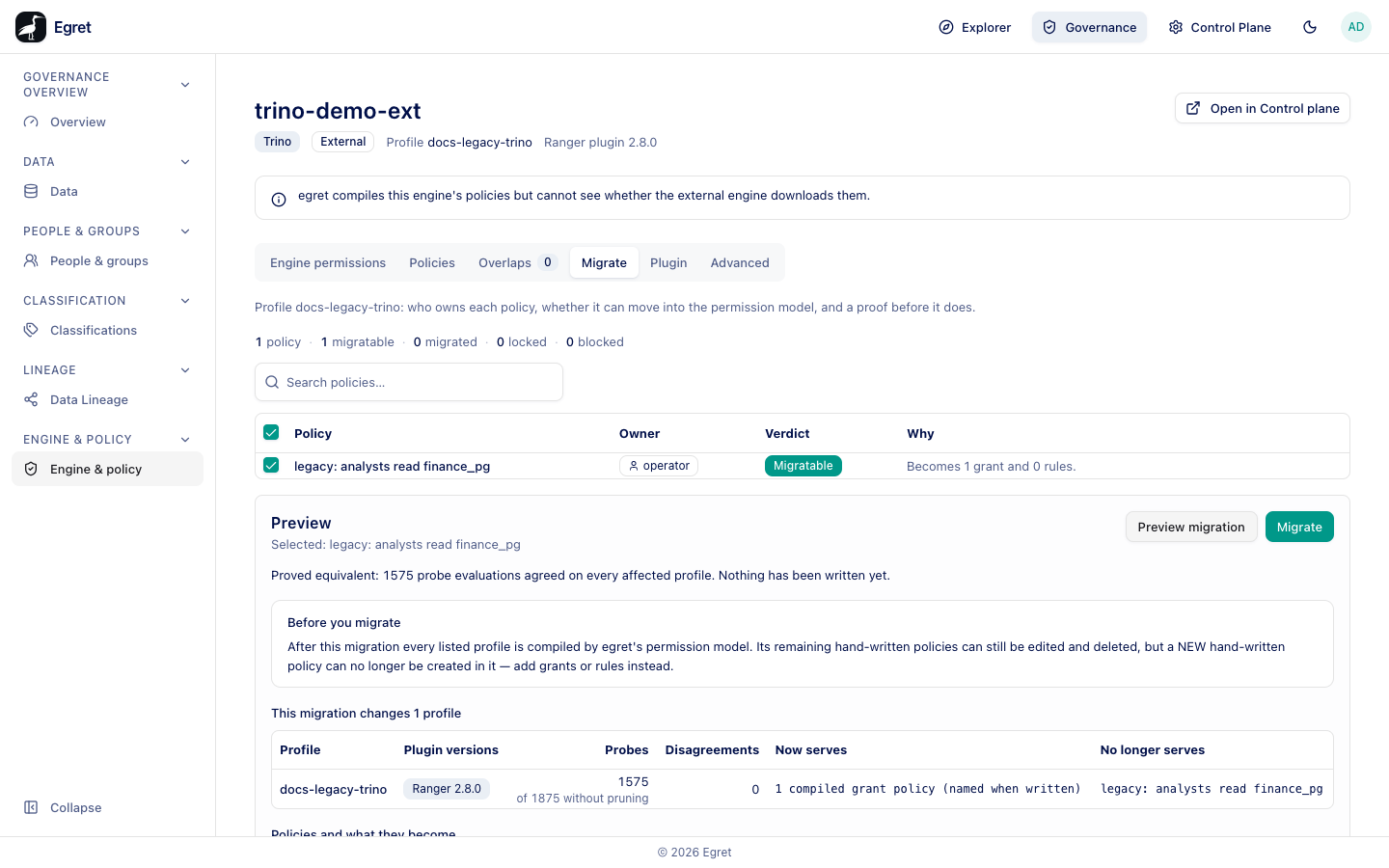
The Migrate tab moves hand-written Ranger policies into egret's permission model: grants and rules that egret compiles and manages. It appears on an engine page only while the profile holds a hand-written policy. It is built to be safe: every migration is proved equivalent before it is written, and each migrated policy can be undone.
Previewing, migrating and undoing all need policy:update. A reader sees the list but no controls.
Why migrate
A hand-written policy is outside egret's model. The Data and People pages cannot show it, explain marks it Outside the permission model, and egret does not check it for overlaps. Once migrated, the same access is a grant or rule you can edit from the Governance pages, and egret recompiles it with everything else.
The policy list
The tab lists every policy in the profile with:
| Column | Meaning |
|---|---|
| Policy | The policy name. Switched off appears under a disabled one. |
| Owner | Who owns the policy: operator for a hand-written one, compiler for one egret compiled. |
| Verdict | Migratable, Migrated, Locked or Blocked. |
| Why | The server's sentence explaining the verdict. |
The tab opens with Profile <profile>: who owns each policy, whether it can move into the permission model, and a proof before it does. A summary counts the policies and how many are migratable, migrated, locked and blocked. An empty profile shows No policies in this profile with There is nothing to migrate: this profile holds no policies. Search policies… filters the list.
| Verdict | Meaning |
|---|---|
| Migratable | Egret can express the policy as grants and rules. You can select it. |
| Migrated | Already migrated. The original is switched off and a generated grant or rule replaces it. Undo migration reverses it. |
| Locked | Cannot be selected; the Why column says why. |
| Blocked | Egret cannot express the policy in the model. The Why column says what stops it. |
Every sentence explaining a verdict, a blocker, a disagreement or a refusal comes from the server verbatim, so the screen never tells you something different from what the server enforces.
Migrate policies
- Tick the migratable policies you want. The line below the table reads Selected: … or No policy selected.
- Press Preview migration. Egret runs a dry-run migration and compares the engine's decisions before and after on a set of probe requests.
- Read the result. A proved migration says Proved equivalent: N probe evaluations agreed on every affected profile. Nothing has been written yet.
- Read Before you migrate (notices), the profiles it changes and, if any, Disagreements.
- Press Migrate. There is no further confirmation. The page says The migration is written. See it in Recent changes; the policy's verdict becomes Migrated, and the compiled policy that replaces it is listed as Locked with the owner compiler.
Migrate is enabled only by a proved, current preview of the exact selection. Otherwise the reason is shown:
- Select at least one migratable policy, then preview it.
- Preview the current selection before migrating.
- The selection changed since that preview — preview it again before migrating.
- The preview was refused, so this selection cannot be migrated.
- The preview did not prove this migration, so it cannot be migrated.
The profiles a migration changes
A grant compiles into every profile that serves its catalog, and a tag rule into every profile sharing the tag service, so a migration can change more than the profile on screen. The preview lists them under This migration changes N profile(s) with the columns Profile, Plugin versions, Probes, Disagreements, Now serves and No longer serves; profiles other than the current one are marked Also changed. Policies and what they become sums it up, for example legacy: analysts read finance_pg: 1 grant, 0 rules.
Disagreements
A disagreement is a probe request the engine would answer differently after the migration, per plugin version and access type. Migrate stays disabled unless the preview proves equivalence. Leave such a policy hand-written.
Example
On the demo stack the external engine trino-demo-ext downloads the profile docs-legacy-trino, which holds the hand-written policy legacy: analysts read finance_pg (user member-sso, select on finance_pg.*.*.*).
- With the permissions
select,useandshow, the policy was Blocked: Access typeusehas no equivalent in egret's permission model on this engine: egret grants only read and write, each a fixed set of Ranger access types, and spelling is matched exactly (SELECTis notselect). Removeusefrom the policy, or keep the policy hand-written. - With
selectonly it was Migratable: Becomes 1 grant and 0 rules. The preview said Proved equivalent: 1575 probe evaluations agreed on every affected profile. Nothing has been written yet., with This migration changes 1 profile (docs-legacy-trino, Ranger 2.8.0, 1575 of 1875 without pruning probes, 0 disagreements). - After Migrate the row said This policy was migrated into egret's permission model on … by admin@egret.local (1 grant(s), 0 rule(s), proved on 1575 probe evaluations) and switched off; the model now enforces what it did.
The same policy on the catalog tpch_bench could not be proved: tpch_bench is also served by the provisioned engine docs-trino, so the proof had to cover both profiles, and the preview said The gate could not prove this migration. Nothing was written. proving this migration needs 48735 probe evaluations across 2 profile(s), 2697570 units of work …, over the limit of 1300000. A grant compiles into every profile that serves its catalog, so a hand-written policy on a widely served catalog may be too large to prove.
Undo a migration
On a migrated policy press Undo. The dialog Undo the migration of “<policy>”? says This deletes the grants and rules the migration created and switches the original policy back on. It is refused if any of them has been edited since. Press Undo migration. The page then says, for example, Undid “legacy: analysts read finance_pg”: deleted 1 grant and 0 rules, and switched the original back on. Every profile the migration recompiled stays compiled by egret, so no new hand-written policy can be created in it.
If the profiles changed since the preview, a migration reports Migrating found that the profiles changed since the preview and writes nothing.
Limits and known issues
- Migration is proven for Trino with plugin 2.5.0 or 2.8.0 and StarRocks with 2.8.0 or 2.9.0. For another plugin version the tab refuses.
- A policy naming a group or role in a way the model cannot express is Blocked.