Tagging data and BI objects
A tag does nothing until it is applied. This page covers how to apply a tag to the tables and columns of an egret catalog and to BI objects, and how to write a tag-based rule so a mask or row filter follows the tag wherever it is applied.
Tag a table or a column
Tags attach to tables and columns in egret-managed catalogs (Iceberg warehouses). Tagging needs the permission to update catalogs (catalog_registry:update) and tag:read to list the tags.
- Open Governance → Data and select the table.
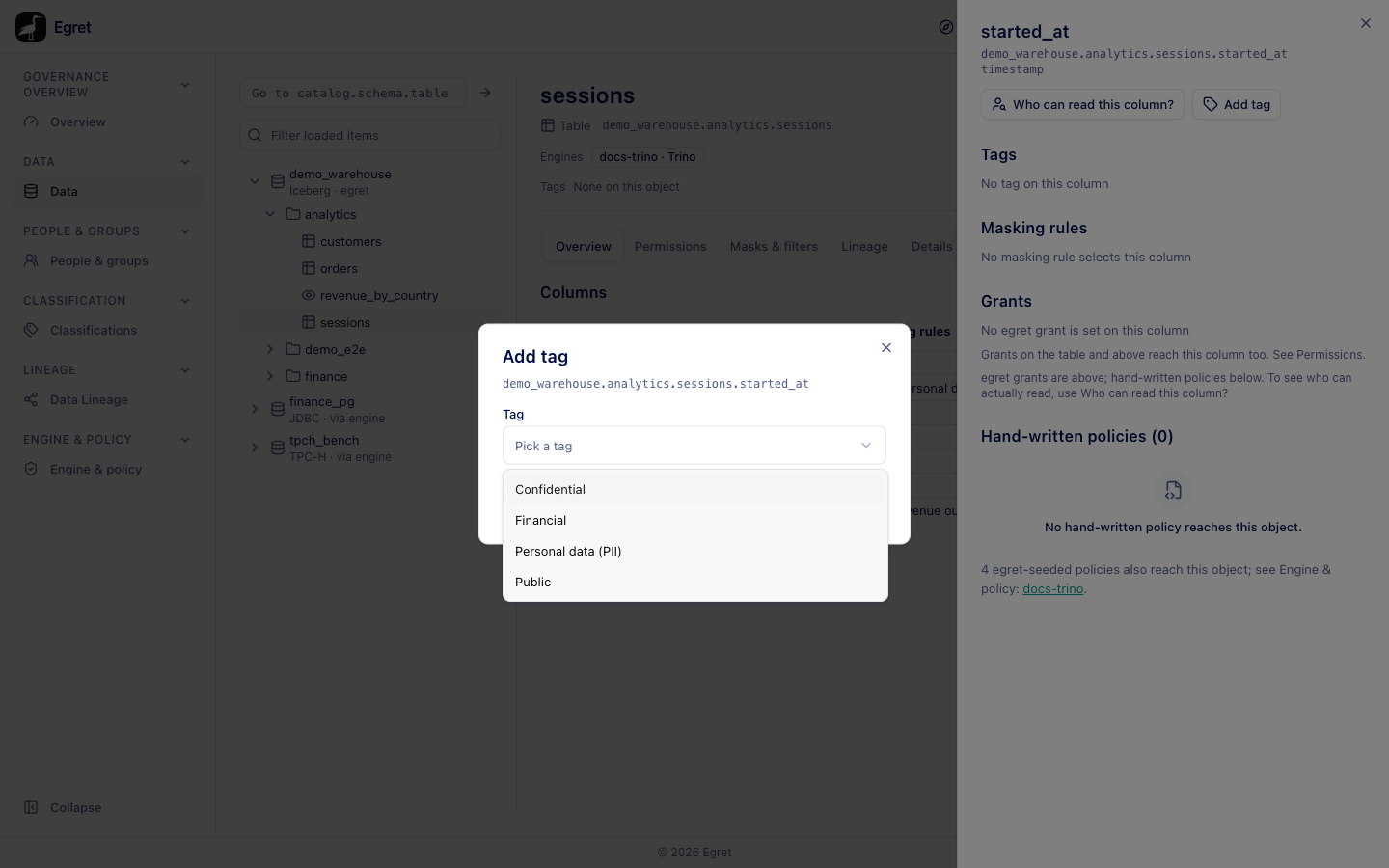
- To tag the table, press Add tag in the header. To tag a column, select the column in Columns and press Add tag in the column panel.
- In Add tag, open Tag and choose a tag. Tags already on the object are not offered; if there are none left the dialog says Every tag is already on this table (or column). With no tags defined it says No tags are defined yet.
- Press Add tag. A toast says Tag added.
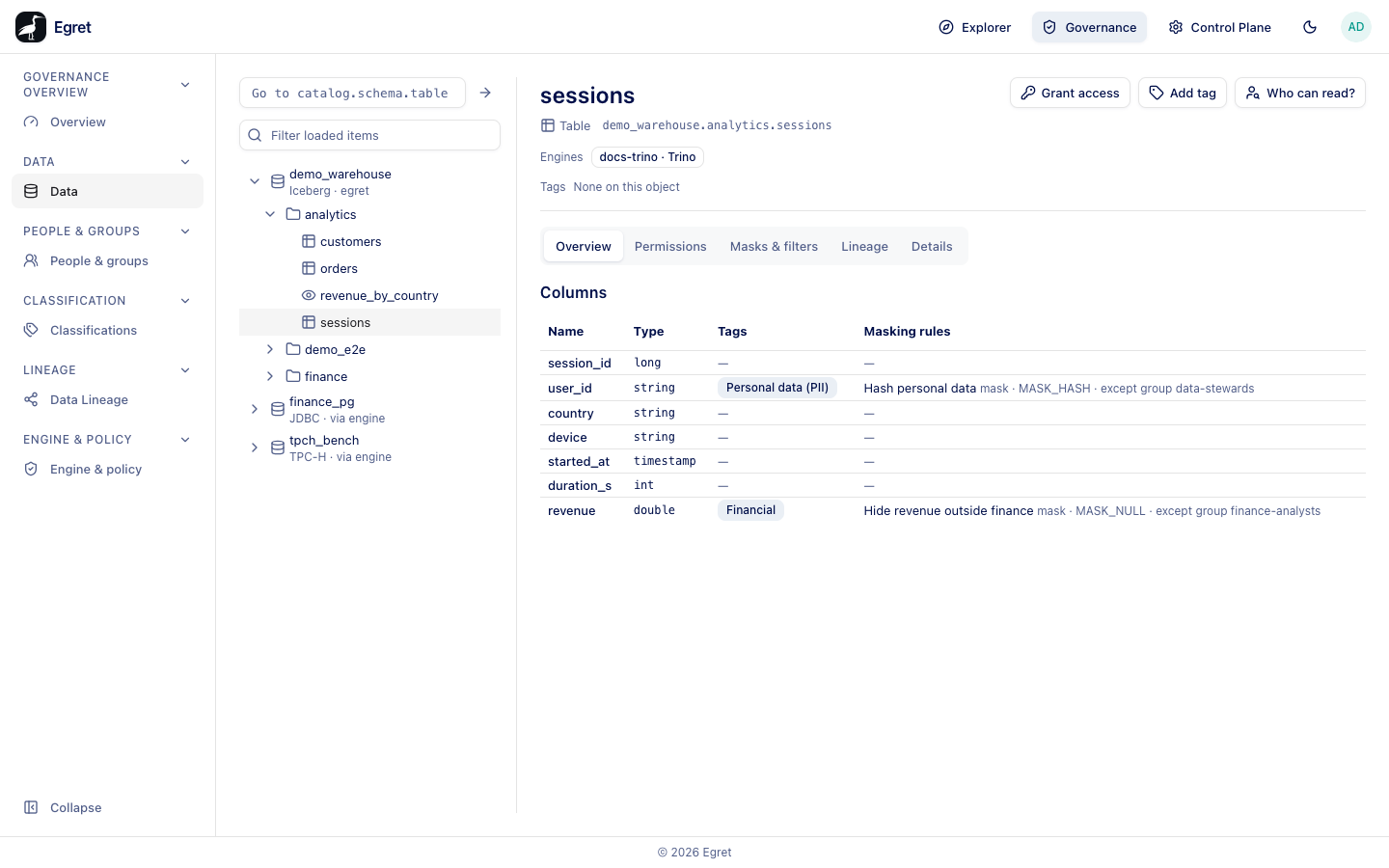
The tag then appears in the Tags column of the table's Columns list, in the object header for a table-level tag, and in the column panel. You can also tag from Control plane → Catalogs → <catalog> → Browse, where each table and column has a tag control.
A tag applied to a table reaches its columns for policy purposes: engines roll tags up the resource hierarchy. A tag applied to a column does not show up when you explain access for the table. Ask about the column.
On a catalog egret does not manage the button is disabled with Tags can be added to egret-managed catalogs only.
Tag a BI object
Datasets, charts and dashboards are tagged from their own list or page: open the object's actions and choose Tags, which opens Tags for "<name>" with the description Classify this dataset with tags. Pick a tag in Add tag and remove one with its Remove <tag> button. The count shows in the BI objects column of the Classifications list.
Rules that select a tag
A rule can select by tag instead of by path. It then applies to every table or column that carries the tag, now and in the future. This is how you mask all personal data without listing each column.
- Open any table, select Masks & filters, and press Add rule.
- Choose Kind (Mask a column or Filter rows), name it, and set the Mask type or Filter expression.
- Set Selects by to Tag, search for the tag, and pick it.
- Preview, then Create.
The rule shows under By tag on every tagged table, for example Hash personal data — tag Personal data (PII) — mask · MASK_HASH — On column user_id, and in the engine's Policies tab as a masking policy on tag: Personal data (PII). The tag page's Mask & filter tab lists every rule selecting the tag, with columns Rule, Kind, Reaches this tag and Exempt.
On the demo stack the rule Hash personal data (Hash, exempt group data-stewards) made member-sso read user_id as a 64-character hash such as B25935C0F9C4BB9A…. It took effect after the next plugin download, within a minute of saving.
A tag rule is catalog-unscoped: it recompiles every Trino and StarRocks profile an engine uses. A compile failure on any profile fails the save and rolls the rule back. The preview names the profiles first.
Engines match a rule by its tag's name, so a rule written on another tag with the same name also applies. A Trino profile must have a tag service for tag policies to compile; egret refuses to bind a profile without one to an engine.
Tag rules and explain
Who can read? lists the Tags that could decide here for the target. Tags populate only when the target names both a schema and a table, and a tag on a column does not appear when you ask about its table.
Examples
- Mask every personal column: tag the columns Personal data (PII), add one mask rule by that tag with type Hash, exempt the
data-stewardsgroup (the demo setup). - Restrict reads: add a clearance to Confidential so only the
data_stewardrole can read objects carrying it (the demo setup onfinance.invoices).
Limits and known issues
- The tag page counts tagged BI objects only; data tags are visible on the Data page.
- A mask by tag on a column type the mask cannot apply to returns an engine error rather than a masked value.