Clearance
A clearance makes a classification tag a gate. Once a tag has a clearance, only principals who hold one of the required roles, or belong to one of the required groups, can open objects carrying the tag. A tag with no clearance only labels; it restricts nobody.
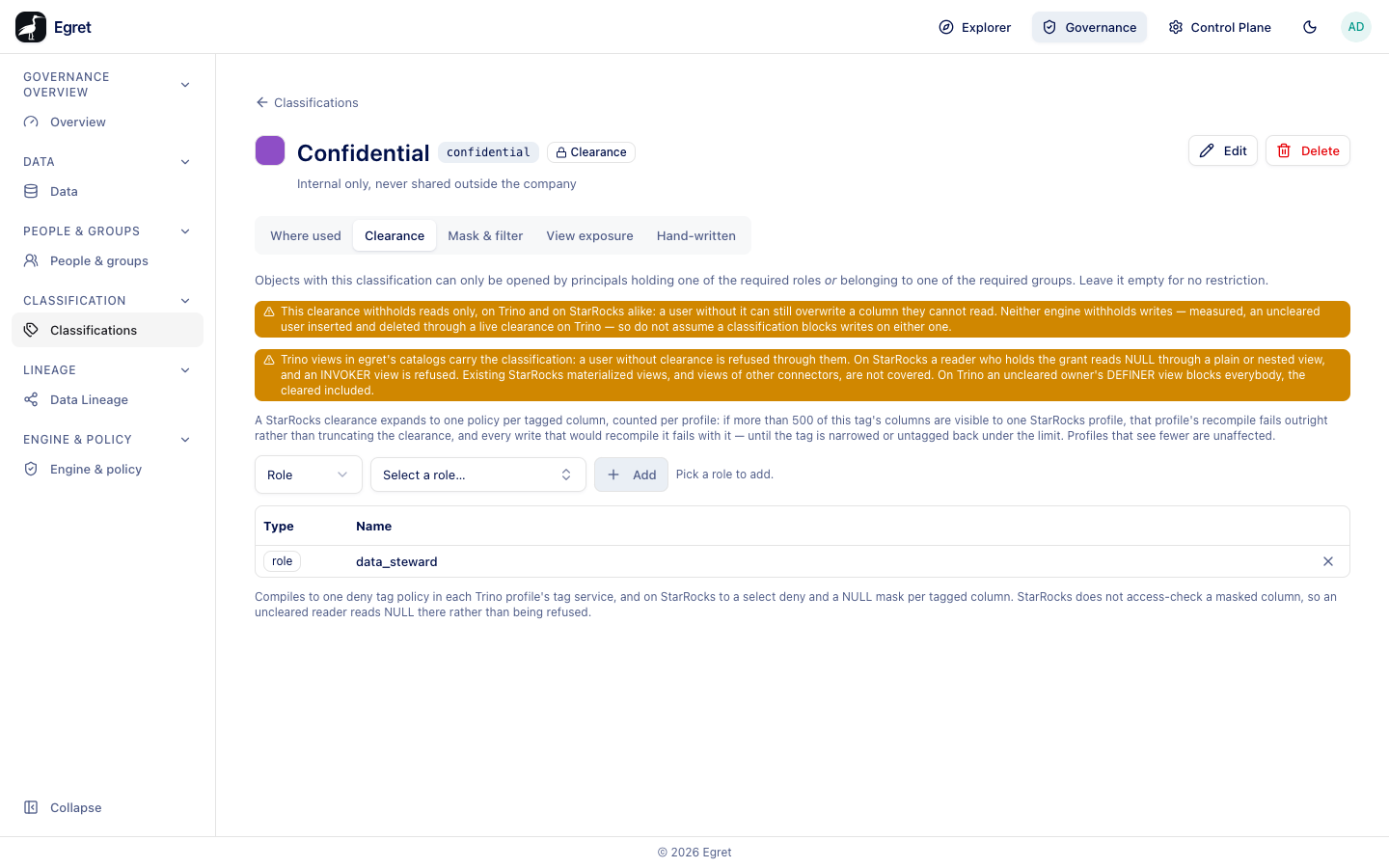
Add a clearance
- Open Governance → Classifications and select the tag.
- Open the Clearance tab and choose the type: Role or Group.
- Search and pick the role or group (Select a role…, or Search groups…).
- Press Add. The tag's header now shows a Clearance badge with a lock, and the list's Clearance column counts the requirement (1 role). The page adds the warnings described below.
Add several rows to require "any of these". To lift the gate, remove all rows. The toast says Clearance cleared, and the section reads Not gated — anyone can open objects with this tag.
The table lists each requirement with its Type and Name and a remove button.
How a clearance is enforced
A clearance is enforced in two places, which behave differently:
| Where | Roles | Groups |
|---|---|---|
| On object access in the platform (opening an object that carries the tag) | Enforced. | Enforced. |
| In the query engine (SQL Lab, notebooks, any client) | Enforced: the role's holders are written into a deny policy by username. | Not enforced. |
Egret serves the engine no group names (no group provider, no usersync), and a role name does not reach it either, so only the enumerated usernames of a required role's members do. When a group is among the requirements the page shows:
Not enforced in the engine: no group provider or usersync means a group name never reaches Trino or StarRocks, and a role name does not either — only a required role's enumerated members do. A group requirement is enforced on object access only; opening the object is gated, but reading the same data through SQL Lab or a notebook is not.
If a clearance names only groups, egret saves it but warns Clearance saved but not enforced in any engine.
What a clearance does not do
- Writes are not withheld. Once gated, the page warns This clearance withholds reads only, on Trino and on StarRocks alike: a user without it can still overwrite a column they cannot read. Measured, an uncleared user inserted and deleted through a live clearance on Trino.
- Views. Trino views in egret's catalogs carry the classification, so a user without clearance is refused through them. On StarRocks, a reader who holds the grant reads NULL through a plain or nested view, and an INVOKER view is refused. Existing StarRocks materialized views, and views of other connectors, are not covered. On Trino an uncleared owner's DEFINER view blocks everybody, the cleared included. See View exposure.
- Materialized views. With a role clearance, users not cleared for every classification on an engine cannot create any materialized view on that engine, even over unclassified data.
Roles held through a group do not count in the engine
A person who holds the required role only through a group is Not cleared in the engine: the required role is held through a group, and engines count only roles held directly. Give the role to the user directly. An expired role assignment is Not cleared too, though engines may apply it until the next recompile. Each person's clearances are listed on their People & groups page.
A StarRocks limit
A StarRocks clearance expands to one policy per tagged column, counted per profile. If more than 500 of a tag's columns are visible to one StarRocks profile, that profile's recompile fails outright rather than truncating the clearance, and every write that would recompile it fails with it, until the tag is narrowed or untagged back under the limit.
What the engine does
On the demo stack the tag Confidential is on the table demo_warehouse.finance.invoices, and its clearance requires the role data_steward. member-sso has a grant to read the schema finance, but SELECT count(*) FROM demo_warehouse.finance.invoices answers Access Denied: Cannot select from columns [] in table or view invoices. The platform admin gets the same answer: platform admins are not exempt from a clearance unless they hold the role directly. Farid Haddad, who holds data_steward directly, is listed as cleared.
Check who is cleared
- The tag page's Clearance table lists what is required.
- A person's Clearances tab shows Cleared or Not cleared, with the reason, for each gated tag.
- The Governance overview raises an Info finding for classifications with no clearance: N classifications have no clearance: they gate nothing.