Register an external engine
Register an external engine when you run Trino or StarRocks yourself and want egret to manage its data-access policy. Egret does not provision, restart or monitor a registered engine. It holds a record, so that a policy profile can be bound to the engine and you can read the Ranger plugin configuration to install on it.
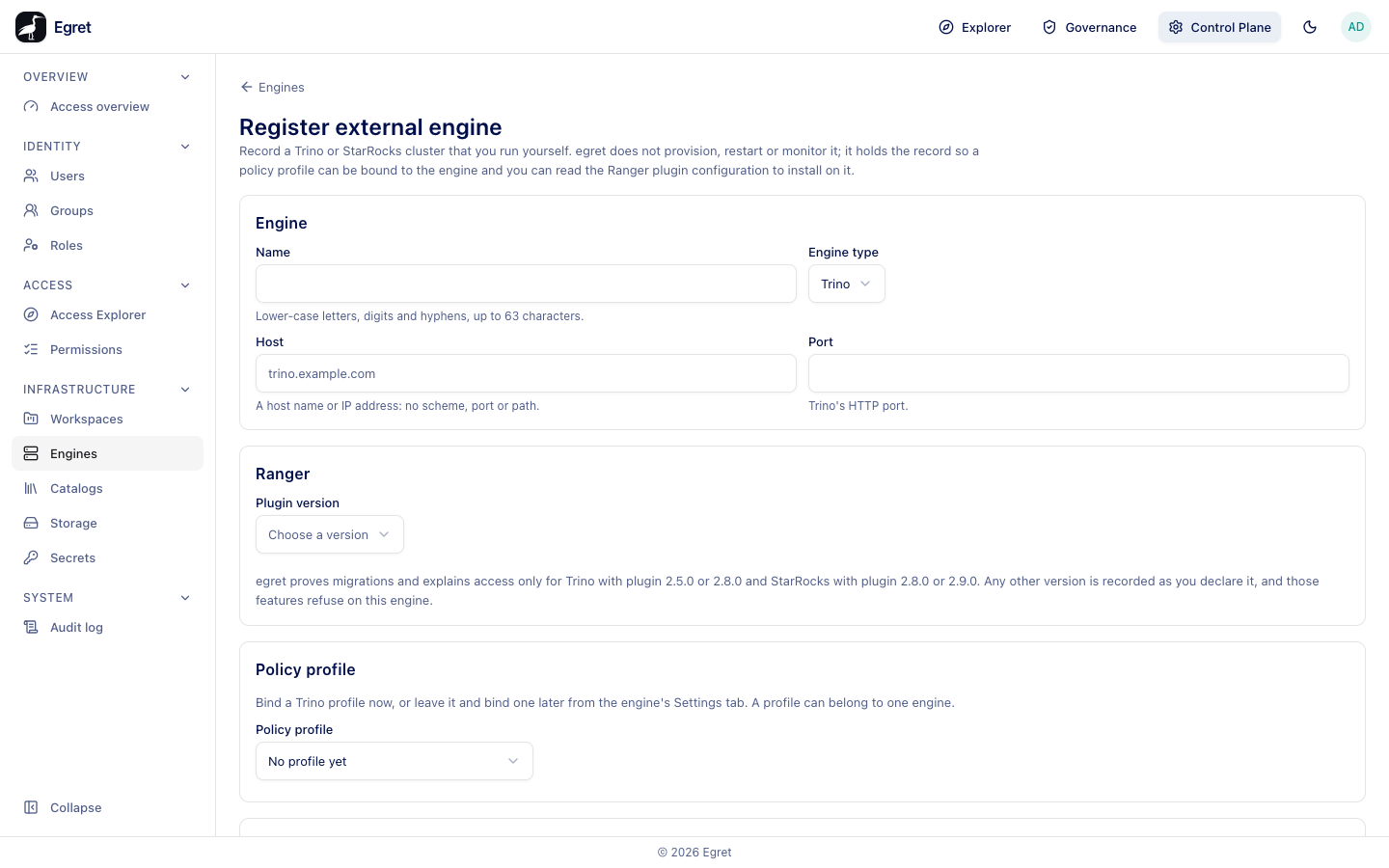
You need engine:create. Binding a profile also needs policy:read, and declaring catalogs needs catalog_registry:read.
Register an engine
- Go to Control Plane → Infrastructure → Engines and press Register external engine.
- Fill in the Engine section: Name, Engine type, Host and Port.
- Under Ranger, choose the Plugin version.
- Under Policy profile, bind a profile or leave No profile yet.
- Under Catalogs, tick the registry catalogs the engine serves.
- Press Register engine.
The button stays disabled until the form is valid. The hint under it reads Enter a name, a host, a port and a plugin version (the version as x.y.z) to register.
Fields
Engine
| Field | Meaning |
|---|---|
| Name | Lower-case letters, digits and hyphens, up to 63 characters. |
| Engine type | Trino or StarRocks. |
| Host | A host name or IP address: no scheme, port or path. |
| Port | Trino's HTTP port, or for StarRocks the FE query port (usually 9030). |
Ranger
| Field | Meaning |
|---|---|
| Plugin version | The Ranger plugin version running on the engine. The list offers 2.5.0 and 2.8.0 for Trino, plus Other…, which asks for Other plugin version (three numbers, like 2.6.0: Write the version as three numbers, like 2.6.0.). |
Egret proves migrations and explains access only for Trino with plugin 2.5.0 or 2.8.0 and StarRocks with 2.8.0 or 2.9.0. Any other version is recorded as you declare it, and those features refuse on this engine.
Policy profile
Bind a Trino profile now, or leave it and bind one later from the engine's Settings tab. A profile can belong to one engine. The list shows No profile yet, then each Trino profile, marking those already taken (for example docs-trino — bound to docs-trino). It does not say which profiles have a tag service, so a profile you created with New profile is offered although it cannot be bound. A profile already bound to another engine cannot be chosen again. If binding would make two mask or row-filter rules decide one column differently, egret refuses and changes nothing, and the form says Nothing was changed. Resolve one of the two, then try again.
A Trino profile created in the console has no tag service and cannot be bound. Use a profile with a tag service (see Engines and policy).
Catalogs
Declare which registry catalogs this engine serves, so grants on them reach its profile. egret does not create these catalogs on your engine — create them there with the same names. Without catalog_registry:read the list is replaced by Listing catalogs needs the catalog_registry:read permission, which your account does not have. You can register the engine now and declare catalogs later.
After you register
You land on the engine's Plugin config tab. Without a profile it says conflict: engine <name> is bound to no policy profile: bind a profile first Bind a policy profile on the Settings tab, then come back. The tabs are Overview, Catalogs, Plugin config and Settings. Then:
- Settings: bind a policy profile that has a tag service, and press Save changes.
- Plugin config: copy the files to your engine and restart it (see Ranger plugin).
- Catalogs: declare more catalogs, or detach.
- In Governance → Engine & policy, grant engine permissions and review policies.
If a warning appears on Plugin config, read it before leaving; it names settings, such as an unreachable download URL, that will stop the engine from downloading policy.
Example: register the demo Trino
On the Docker demo stack the seeded Trino (trino-demo, port 8080) can be registered as an external engine:
- Register external engine, Name
trino-demo-ext, Engine type Trino, Hosttrino-demo, Port8080. - Plugin version
2.8.0, Policy profile No profile yet, ticktpch_benchunder Catalogs. - Register engine.
Binding the console-created Trino profile docs-external-policy at this point fails with bad request: policy profile 5 (docs-external-policy) has no usable tag service …, so the example binds a profile pair created through the API (a tag profile and a Trino profile whose config.tagService names it) afterwards on Settings. The demo Trino has no Ranger plugin installed, so the record is for policy authoring only: nothing is enforced on that engine.
Limits and known issues
- Egret holds a record only: it does not monitor the engine, so the page shows no health status.
- An engine name cannot be changed after registration; remove the record and register again.
- The message after registering keeps the raw
conflict:prefix of the API error.