Namespace files
Namespace files are files stored with a namespace: scripts, SQL, small data files. Flows in the namespace read them, so you can keep a script in one place and use it from several flows. This page covers the Files tab of a namespace and the same files inside the flow editor.
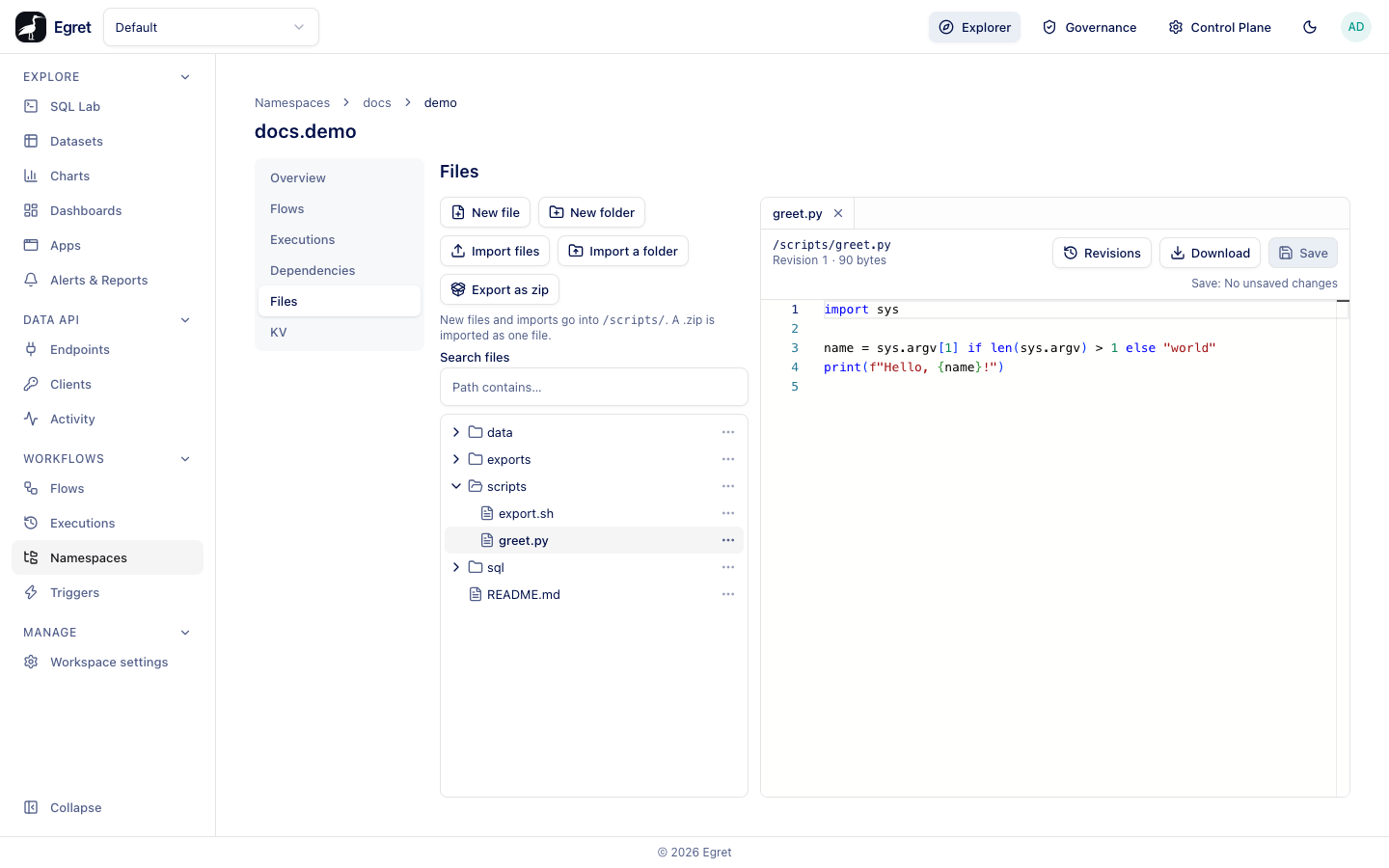
Open the Files tab
- Go to Workflows → Namespaces and open a namespace.
- Choose Files in the side menu.
On a namespace with no files the tab says No files yet. Files here are scripts and data this namespace's flows read, for example through namespaceFiles on a script task. It offers New file and Import files.
Create and import files
| Button | What it does |
|---|---|
| New file | Asks for a name and creates an empty file in the current folder. |
| New folder | Creates a folder in the current folder. |
| Import files | Uploads one or more files from your computer. A .zip is stored as one file, not unpacked. |
| Import a folder | Uploads a whole folder with its structure. |
| Export as zip | Downloads every file of the namespace as a zip. |
A line under the buttons says where new files go, for example New files and imports go into /scripts/. It is the folder you last selected in the tree, or /. Importing a file that already exists asks whether to overwrite it.
Browse and edit
The left side is a tree of folders and files. Search files filters by Path contains…. Select a file to open it in a tab on the right; you can have several open. A text file opens in a code editor with its path, its revision number and size (Revision 1 · 62 bytes), and Revisions, Download and Save buttons. Save is disabled while there are no changes (Save: No unsaved changes). An image file shows a preview, and another binary file says is a binary file, so it cannot be shown here and offers a download.
Each row has an actions menu (⋯):
| Action | What it does |
|---|---|
| Rename | Changes the name. Every revision keeps its number. |
| Move to… | Moves the file or folder. Type a folder that does not exist yet to create it. |
| Revisions | Opens the history of the file (files only). |
| Download | Saves the file (files only). |
| Copy path | Copies the path, such as /scripts/greet.py. |
| Delete | Deletes the file or the folder and everything in it, after a confirmation. |
Rename, move and delete are disabled with a reason when you only have workflow:read.
Revisions
Every save writes a new revision; earlier ones are kept. Revisions opens a drawer listing them. You can open an old revision and restore it, which writes it as a new revision (Restored revision 2 of greet.py as a new revision) and leaves the history intact. If somebody saved the file after you opened it, Save asks whether to overwrite or reload instead of silently replacing their change.
Use files in a flow
A namespace file has a path such as /scripts/greet.py. Flows use it in these ways:
- Core tasks:
DownloadFilescopies namespace files into the execution, andUploadFilescopies execution files into the namespace;DeleteFilesandPurgeFilesremove them. The reference is in the task catalogue. - Script tasks:
namespaceFileson a script task or onWorkingDirectorymakes files available in the task's directory, andinputFilesacceptsnsfile:///URIs. - The flow editor: the Files tab of the editor shows this tree, so you can edit a script in a tab beside the flow's YAML and save each separately.
id: namespace-file-download
namespace: docs.demo
tasks:
  - id: download
    type: io.kestra.plugin.core.namespace.DownloadFiles
    namespace: docs.demo
    files:
      - /data/targets.csv
  - id: show
    type: io.kestra.plugin.core.log.Log
    message: "Downloaded {{ outputs.download.files | keys | first }}"
The DownloadFiles and UploadFiles tasks were run on the Docker demo stack, and the example above prints Downloaded /data/targets.csv. Passing a namespace file to a script task needs a container runner, which the demo stack does not have, so that use is described from the source.
Limits and known issues
- A namespace may hold at most
workflow.storage.max_namespace_filesfiles (10 000 by default). A listing or search that goes past it fails and names the cap. - A path may be at most 512 bytes. A single file is limited by
workflow.storage.max_file_bytes(1 GiB by default). - Files are always served as binary data; the editor decides from the extension and the bytes whether to show them as text.
- A running flow writes files only to its own namespace.