Retries, errors and timeouts
Tasks fail: a source is down, a query times out, a value is missing. This page shows how to retry a task, stop one that takes too long, run a handler when something fails, and let a flow carry on after a failure. Every example was run on a demo instance and the results below are what the Logs and Gantt tabs showed. The flaky-import, error-blocks, allow-failure-block and timeout-and-runif flows were run again on the Docker demo stack and ended the same way (Failed, Failed, Warning, Warning).
How a failure moves through a flow
- A task ends
FAILED(after its retries, if any). - The tasks after it in the same block are skipped.
- The
errors:list of the enclosing flowable task runs, if it has one. Then the flow-levelerrors:runs. - The execution ends
FAILED. Anerrorshandler reports or cleans up, but it does not turn the failure into a success.
Use allowFailure when you want the flow to continue.
Retry a task
Add retry: to any task. The task runs again after a delay until it succeeds or the attempts run out.
id: flaky-import
namespace: docs.demo
tasks:
  - id: import_rows
    type: io.kestra.plugin.core.execution.Fail
    errorMessage: "Source system returned 503"
    retry:
      type: constant
      interval: PT1S
      maxAttempts: 3
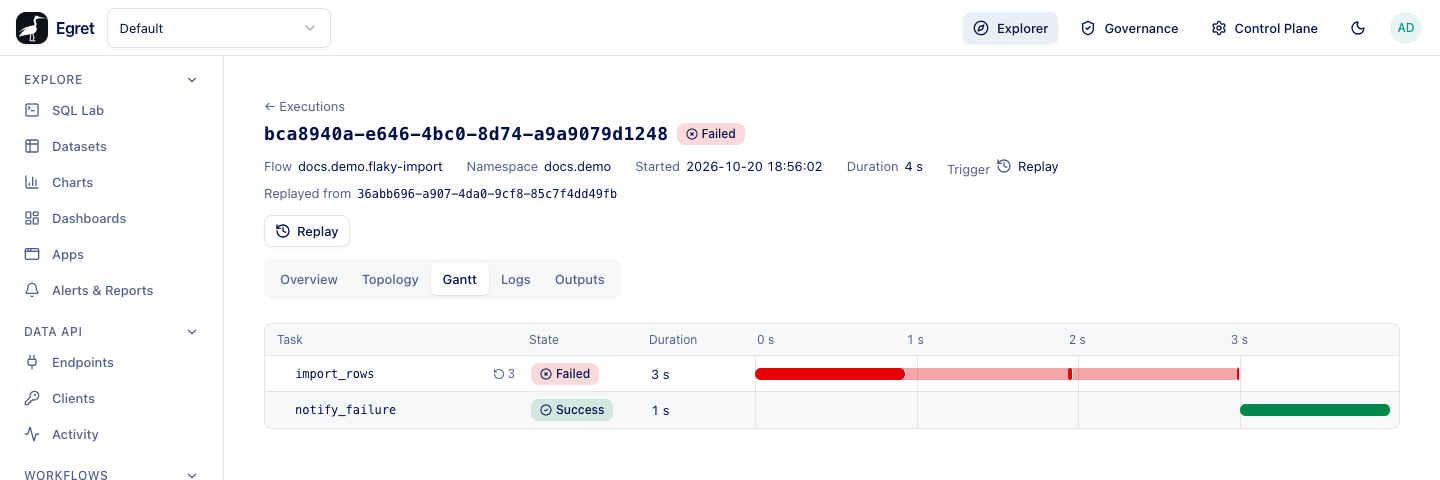
The task above fails three times, one second apart. The Gantt tab draws each attempt on the task's bar and shows the retry count, and the Logs tab numbers the lines Attempt 1, Attempt 2 and Attempt 3. The task's history reads FAILED, RETRYING, RUNNING, FAILED, … and ends FAILED.
The three retry types, and behavior, are in the YAML reference. warningOnRetry is accepted and has no effect.
Retry the whole flow
A flow-level retry: starts a new execution when the flow fails:
retry:
  type: constant
  interval: PT2S
  maxAttempts: 3
  behavior: CREATE_NEW_EXECUTION
An always-failing flow with this policy produced three executions: two ended RETRIED and the last FAILED, each linked to the one before.
Stop a task that takes too long
timeout: takes an ISO-8601 duration. When it passes the task is stopped and fails.
- id: slow_call
  type: io.kestra.plugin.core.flow.Sleep
  duration: PT30S
  timeout: PT3S
  allowFailure: true
The run logs Timeout after 00:00:03.000 as an error on slow_call and moves on, because of allowFailure. Without it the execution would fail. Script tasks in containers get a default timeout from workflow.container_default_timeout_s (3 600 seconds) when no timeout: is set.
Run a handler on failure
errors: is a list of tasks that run when something fails. Put it at the top level of the flow to handle any failure, or inside a flowable task (Sequential, Parallel, If, Switch, Dag, AllowFailure) to handle failures in that block.
tasks:
  - id: guarded
    type: io.kestra.plugin.core.flow.Sequential
    tasks:
      - id: risky
        type: io.kestra.plugin.core.execution.Fail
        errorMessage: step failed
    errors:
      - id: handle_block_error
        type: io.kestra.plugin.core.log.Log
        level: WARN
        message: handled inside the block
errors:
  - id: flow_error
    type: io.kestra.plugin.core.log.Log
    level: ERROR
    message: "Run {{ execution.id }} failed in {{ flow.id }}"
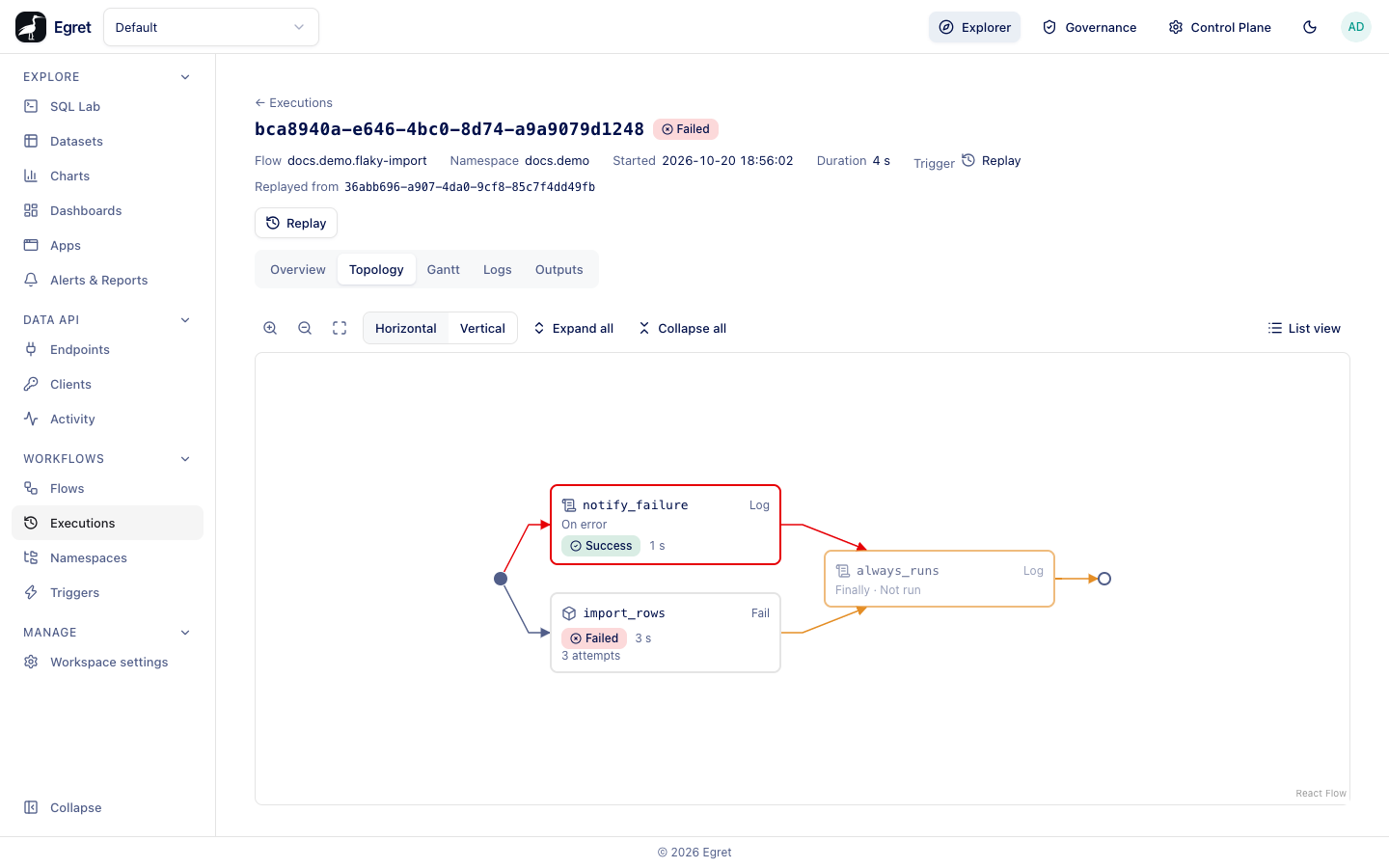
In this run risky failed, handle_block_error logged its warning, the block ended FAILED, and flow_error ran last. The execution topology draws error tasks on their own branch, labelled On error.
Kestra flows often write {{ errorLogs() }} in an error handler. It fails here with The 'errorLogs' function is not implemented yet, and the handler task fails with it. Use {{ execution.id }}, {{ flow.id }} and {{ task.id }} in the message and read the details in the Logs tab.
Continue after a failure
There are two ways to let a flow survive a failed step.
allowFailure: trueon a task. If the task fails the run goes on and the execution endsWARNING. A timed-out task withallowFailureis a warning too.AllowFailurearound a block of tasks. If any child fails, the rest of the block is skipped, the block ends in a warning and the next task after the block runs. See Flow control.
Skip or disable a task
| Key | Effect |
|---|---|
runIf: "{{ expression }}" | The task runs only when the expression is true. Otherwise it ends SKIPPED and the flow continues. |
disabled: true | The task is never run and has no task run at all. |
- id: only_on_prod
  type: io.kestra.plugin.core.log.Log
  message: Skipped when runIf is false
  runIf: "{{ vars.env == 'prod' }}"
Clean up with finally
finally: is the list of tasks that always runs at the end, whether the work succeeded or not.
- Inside an
AllowFailureblock,finally:works: its tasks ran after the failed child and before the next task. - At the top level of a flow, and on every flowable except
AllowFailure,finally:is accepted when you save and never runs. The execution's topology marks the tasks Finally · Not run. afterExecution:at the top level is accepted and never runs.
Do your cleanup in the errors: list for now, or in a task placed after an AllowFailure block.
The editor does not warn about a top-level finally: or afterExecution:. If a flow depends on a cleanup step, check the topology of its first run.
Kill, resume and replay
A running execution can be killed, a paused one resumed and a finished one replayed. See Run actions.
Limits and known issues
- Flow-level
finally:andafterExecution:do not run, and the editor does not warn about them. errorLogs(),render()andwarningOnRetrydo not work yet. See Expressions.Pausedoes not accepterrorsorfinally.- Flow-level
concurrency:andsla:are not enforced, so a flow cannot cancel or queue a second run, and a maximum duration is not checked.