Grants
A grant says who can read or write which part of a catalog. Grants are the main way you give people access to data in the query engines. You create them on the Permissions tab of the Data page, from a person's page, or from the grant dialog's Grant access button.
Anatomy of a grant
| Part | Meaning |
|---|---|
| Effect | Allow or Deny. A deny grant is marked with a Deny badge in lists. |
| Actions | Read, Write, or both. Ranger has no "write": egret evaluates it as insert and delete on Trino, and as insert, update and delete on StarRocks. |
| Scope | A catalog, narrowed to a schema, a table and a column. Each narrower level is optional. |
| Principals | Who the grant is for: Include (users, groups or roles) and Exclude (principals removed from the include set). |
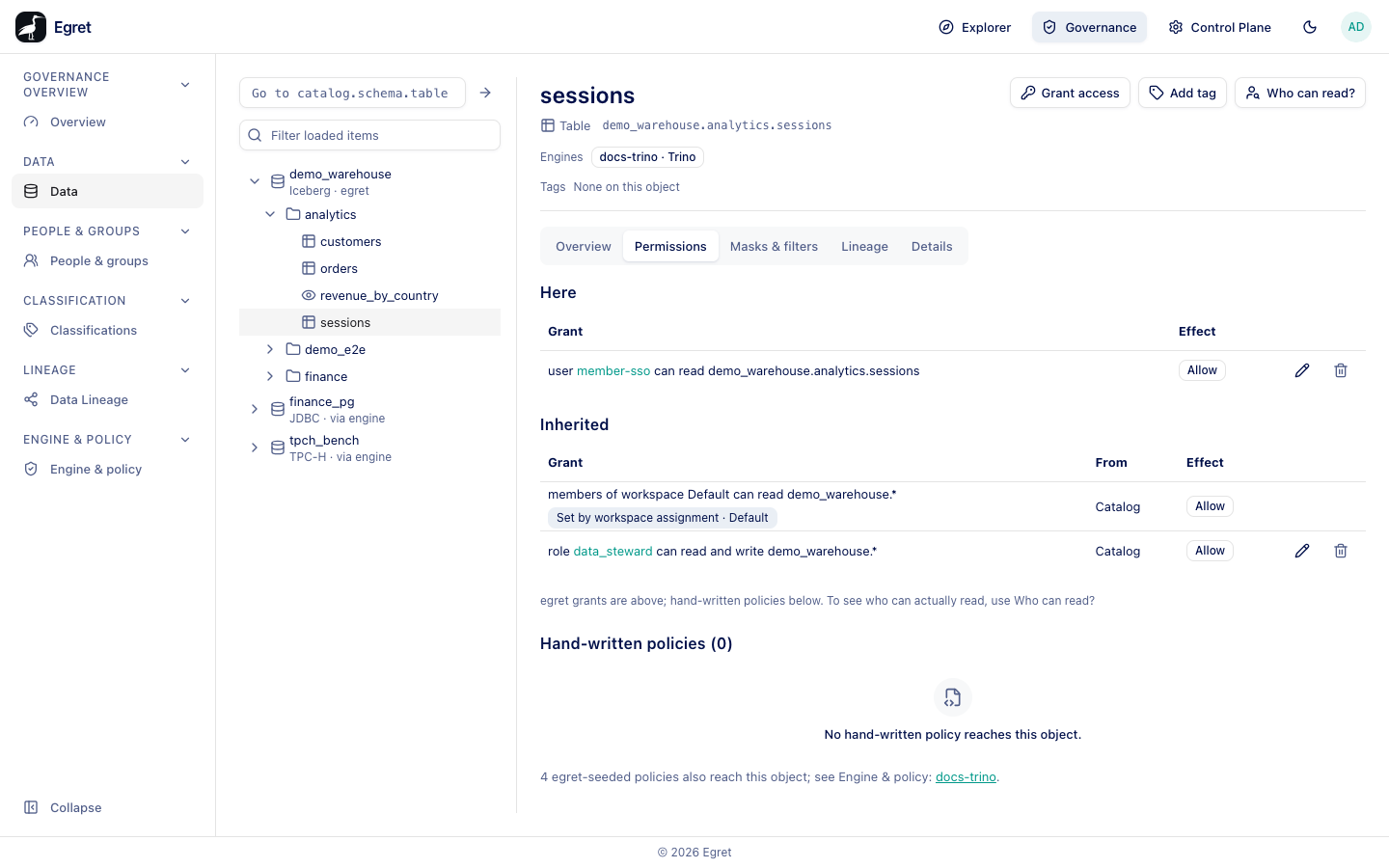
Grants are written as sentences in lists, for example user member-sso can read demo_warehouse.analytics.sessions. A level whose value is a pattern (*, ord*, order?) is quoted in the sentence, and the engine matches it as a glob.
Read the Permissions tab
The tab opens with the sentence Lists egret grants. Hand-written and egret-seeded engine policies are not listed here; Who can read? gives the engines' answer. It groups grants by how they reach the object:
| Group | What it holds |
|---|---|
| Here | Grants whose scope is exactly this object. |
| Inherited | Grants on a parent: the schema, or the catalog. The From column says which (Catalog, Schema). |
| Matching a pattern | Grants whose scope contains a pattern. They name every value they match, so they are never listed as Here. The Pattern column shows the value. |
Grants set by a workspace assignment appear under Inherited with the label Set by workspace assignment · Default. They cannot be edited here; change the catalog's workspace assignment in the Control Plane instead.
Each row has Edit and Delete icon buttons. Both need the policy:update permission; without it the page says so.
Create a grant
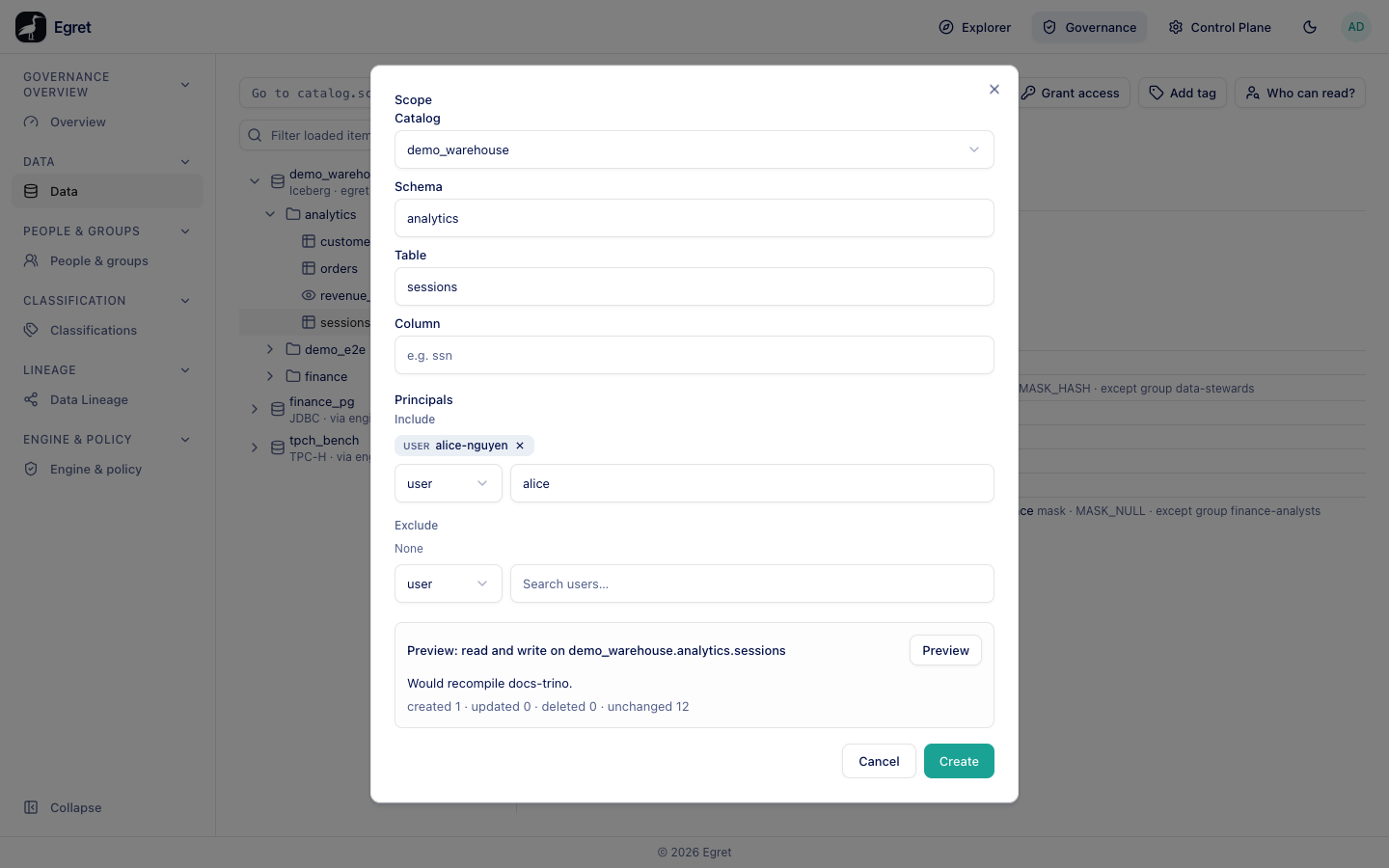
- Open Governance → Data and select the table, for example
demo_warehouse.analytics.sessions. - Press Grant access. The dialog opens as New grant with the catalog, schema and table already filled in.
- Leave Effect as Allow. Under Actions, keep Read ticked.
- Under Principals → Include, choose a kind (user, group or role), then search.
- A user who already has an engine username is added by selecting the match. For a user who has none yet, the match shows Allocate username and add: press it. Confirm Allocate and add in the dialog Allocate a username to Member SSO? Egret reports Member SSO was allocated a username and added, stored as member-sso. The username is kept even if you close the form without saving.
- Press Preview. The preview names the profiles that would be recompiled, for example
docs-trino, and how many policies would be created, updated, deleted or left unchanged. - Press Create. You see Grant created.
Check the grant in SQL Lab
The engine applies the grant at its next policy download (the plugin polls every 30 seconds). On the demo stack, after this grant member-sso read demo_warehouse.analytics.sessions through the engine docs-trino, and a table with no grant for her answered Access Denied: Cannot select from columns [] in table or view customers.
The dialog fields
| Field | Notes |
|---|---|
| Effect | Allow or Deny. Default Allow. |
| Actions | Read and Write check boxes. Default Read. At least one is required: Choose at least one action. |
| Scope → Catalog | A dropdown of registered catalogs. Required: Choose a catalog. |
| Scope → Schema | Free text, for example sales. Disabled until a catalog is chosen. |
| Scope → Table | Free text, for example orders. Disabled until a schema is entered. |
| Scope → Column | Free text, for example ssn. Disabled until a table is entered. |
| Principals → Include | Users, groups and roles. A role is typed by name (Role name) and added with Add. At least one is required: Include at least one principal — a grant that includes nobody would compile to nothing. |
| Principals → Exclude | Principals removed from the grant, same pickers. |
Preview before you save
Create (or Save changes when editing) stays disabled until you have run Preview on the current form. Changing anything afterwards marks the preview stale (The form changed since that preview — run it again before saving.). The preview runs the real write in a transaction that is rolled back, so it reports the same compile result and the same errors the save would. Anything the compiler skipped is listed with its reason.
If saving fails, the server's message is shown verbatim at the top of the dialog; it names the rule, profile or ceiling that refused it.
Edit and delete a grant
Press Edit on a row to reopen the dialog as Edit grant; the button is Save changes. The edit replaces the whole grant and keeps its id. Press Delete to remove it. The confirmation says This grant is permanently removed and every profile it reaches recompiles. A pattern grant states how far it reaches, for example every table matching "ord"*.
The single grant page
Every grant has its own page at /governance/grants/<id>, reached from links in explain results, the overlap report and the People pages. It shows the grant's Effect, Actions, Scope, Principals and Except set, with Edit and Delete. A workspace-assignment grant shows The workspace assignment sync writes this grant; change the workspace's catalog assignment to change it. A deleted id shows No grant has this id; it may have been deleted.
Principals and what reaches the engine
Users are written to the engine by username. Groups and roles are expanded to their current members' usernames when the grant is compiled, because engines do not receive group or role names. Membership changes recompile at the next compile, not instantly. See How permissions work.
A grant on a catalog that no engine serves compiles into a profile no engine downloads. Check the Engines line of the object header: No engine attached means the grant is stored but enforced nowhere.
Limits and known issues
- The grant dialog offers kinds user, group and role only. The fourth kind that exists internally (workspace members) is written by egret itself.
- A grant whose principals include nobody is refused, both by the form and by the API, so an edit can never silently revoke a grant.