Provision an engine
Add engine starts a Trino or StarRocks cluster, attaches registry catalogs to it and configures it in one step. Egret then monitors its status, binds a policy profile and the Ranger plugin automatically, and can restart, reconfigure or delete it.
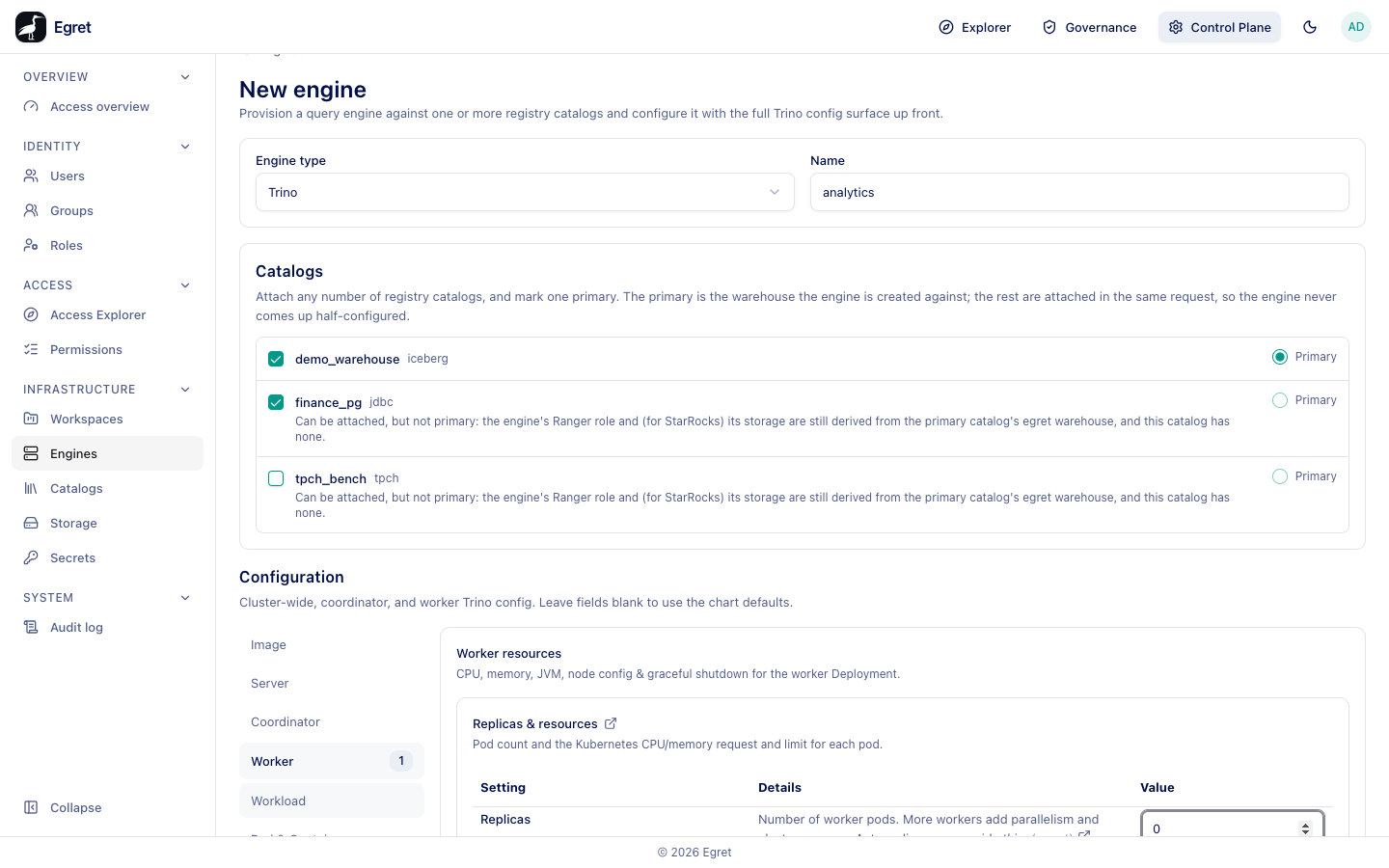
You need engine:create and engine:provision. Egret runs the engine where its provisioner points: on Kubernetes (Deployments and Services in the engine namespace) or, with the Docker provisioner, as containers on the Docker host.
Create an engine
- Go to Control Plane → Infrastructure → Engines and press Add engine.
- Keep the Engine type (Trino) or choose StarRocks, and type a Name: lower-case letters, digits and hyphens.
- Under Catalogs, tick the catalogs to attach and mark exactly one Primary. The text says Attach any number of registry catalogs, and mark one primary. The primary is the warehouse the engine is created against; the rest are attached in the same request, so the engine never comes up half-configured. Until one is primary the form says Mark one catalog primary to create the engine. Only an egret warehouse can be primary; a catalog such as
tpch_benchsays Can be attached, but not primary. - Under Configuration, adjust what you need. Leave a field blank to use the default.
- Press Create engine.
The engine page opens with the status provisioning. It turns running when the coordinator answers. Measured on the demo stack: 72 seconds for the first engine on a Docker host that already had the image, and 38 seconds for a restart.
For a small engine, open Worker and set Replicas to 0: the coordinator then schedules the work itself. Left blank, the engine gets the default worker count. On the demo stack a blank value started one worker container next to the coordinator.
The Configuration sections (Trino)
The form shows Cluster-wide, coordinator, and worker Trino config. Leave fields blank to use the chart defaults. The sections are listed on the left; a number next to a section counts the values you set in it.
| Section | What it configures |
|---|---|
| Image | The container Image (default trinodb/trino:483@sha256:…), Image pull policy and Image pull secrets (names of Kubernetes docker-registry secrets in the engine namespace). |
| Server | config.properties, node.properties, log.properties and the Event listener for the whole cluster, plus Fault-tolerant execution (retry failed tasks and queries, spooling exchange data to S3). |
| Coordinator | Replicas & resources (replicas, CPU and memory request and limit), JVM (fixed -Xmx/-Xms or a percent of the memory limit, extra jvm.config lines), Per-node memory, Health probes, Init & sidecar containers, Volume mounts, Pod options, Coordinator placement and Additional exposed ports. |
| Worker | The same as the coordinator, plus Graceful shutdown (drain a worker before it stops). Replicas is the number of worker pods or containers. |
| Workload | Resource groups (resource-groups.json) and Session properties (session-property-config.json). |
| Pod & Containers | Service account & environment, Security contexts, Deployment (rollout strategy and annotations) and Environment from sources. |
| Autoscaling | Off by default; a HorizontalPodAutoscaler or a KEDA ScaledObject for the workers. |
| Security & Exposure | Password users, JWT authentication, Per-user delegation and Ingress exposure. |
Add property opens a searchable list of known Trino properties with their area and type, for example query.max-run-time (duration) or query.max-memory (size); you can also type a custom key. The form validates known keys before you save.
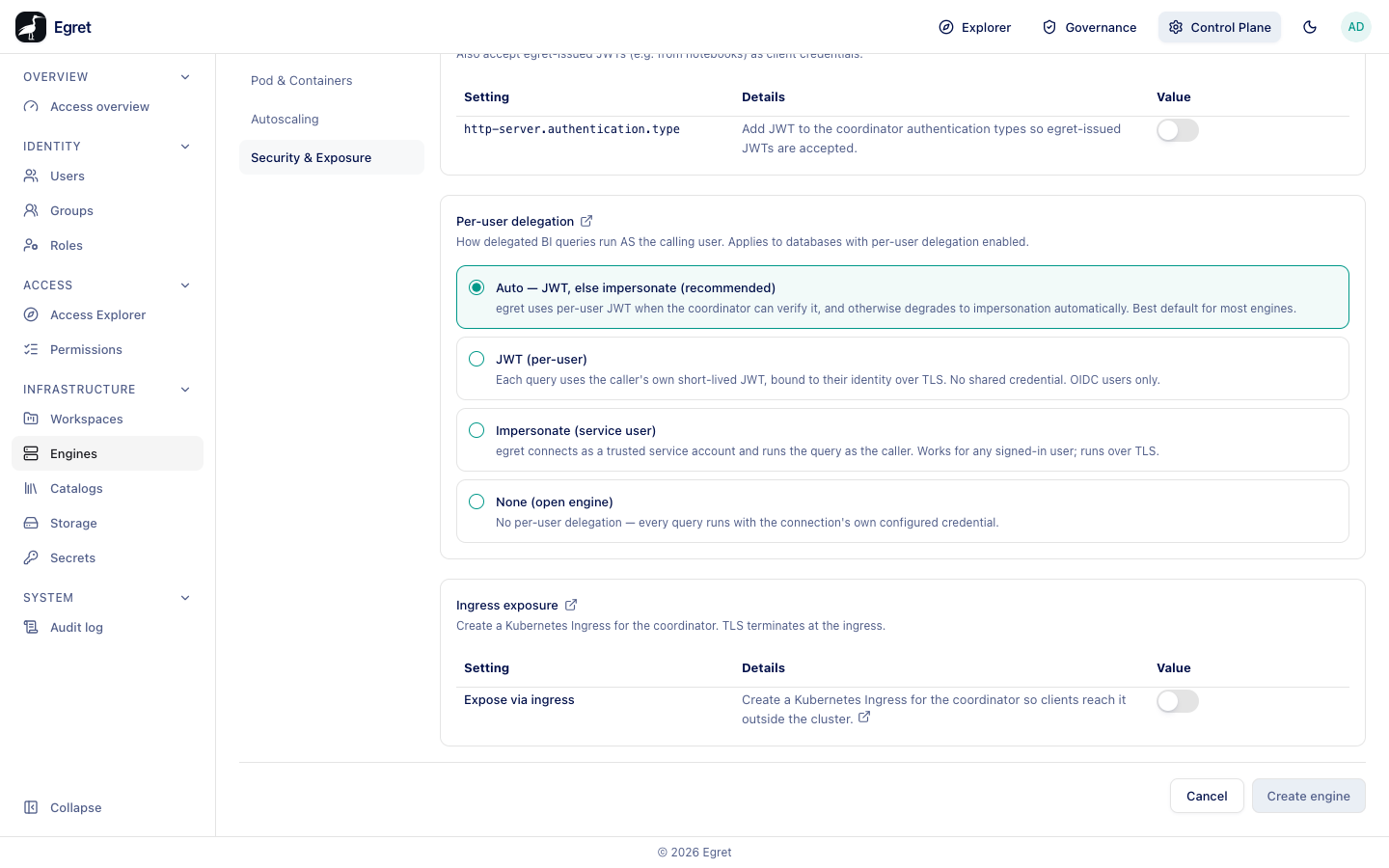
Security & Exposure
| Setting | Meaning |
|---|---|
| Password users | Each user signs in with a username and the password held in the selected egret secret (hashed server-side). For clients that cannot use JWT. |
| JWT authentication | Also accept egret-issued JWTs (e.g. from notebooks) as client credentials. An engine needs JWT before it can be assigned to a workspace. |
| Per-user delegation | How queries from SQL Lab, charts and dashboards run as the calling user (below). |
| Ingress exposure | Create a Kubernetes Ingress for the coordinator. TLS terminates at the ingress. With Expose via ingress on you set Host, Ingress class, Ingress TLS cert and Annotations. |
The delegation modes:
| Mode | What it does |
|---|---|
| Auto — JWT, else impersonate (recommended) | The default. Egret uses a per-user JWT when the coordinator can verify it, and otherwise falls back to impersonation. |
| JWT (per-user) | Each query carries the caller's own short-lived JWT. No shared credential. OIDC users only. |
| Impersonate (service user) | Egret connects as a trusted service account and runs the query as the caller. Works for any signed-in user. |
| None (open engine) | Every query runs with the connection's own credential. |
On the demo stack the default mode ran queries as the signed-in person in both cases: an SSO user (member-sso) and the local admin@egret.local account. SELECT current_user returned member-sso for the SSO user, and the grants, masks and row filters written in Governance applied to each of them (see Masks and row filters).
StarRocks
A StarRocks engine has its own configuration screen with sections such as Replicas & resources, JVM, Per-node memory, Health probes, Graceful shutdown, Resource groups and Session properties, plus a Security section for authentication and delegation. Attaching or detaching a catalog on StarRocks creates or drops it on the FE in place, without rolling the pods. StarRocks engines need the Kubernetes provisioner.
What happens next
- Egret starts the cluster, creates a policy profile with the engine's name (for example
docs-trino, with the tag servicedocs-trino_tag) and binds it. - The attached catalogs are applied to the engine (state applied on the Catalogs tab).
- Assign the engine to a workspace on its Workspaces tab. It then appears in the workspace's SQL Lab as a database with the engine's name, and in Workspace settings → Engines under Provisioned by egret.
- The Governance area lists the engine under Engine & policy, and grants on its catalogs reach it.
If the engine fails to start, its page shows The engine failed to start. with the reason, and the Governance overview raises an engine failed finding.
Kubernetes and Docker
The Docker provisioner runs the same Trino image with the same configuration files, but some settings have no meaning outside Kubernetes. Egret refuses them instead of ignoring them: creating an engine with an ingress host answers bad request: engine provisioning failed: not supported by the Docker engine provisioner: ingress, and nothing is created. The table follows the demo stack guide; the ingress refusal was checked on the demo stack.
| Setting | Kubernetes | Docker |
|---|---|---|
Replicas, image, config.properties and the other property files, JVM, JWT, password users, delegation | Yes | Yes |
| CPU and memory limits | Pod limits | Container limits |
| CPU and memory requests, health probes, placement | Yes | Accepted, no effect |
Ingress, autoscaling, ConfigMap and Secret mounts, init and sidecar containers, image pull secrets, additional exposed ports, shareProcessNamespace | Yes | Refused with an error that names the setting |
| StarRocks engines | Yes | Refused |
| Pod logs, log follow and the shell (Logs, Exec) | Yes | Not available (see Engine detail) |
The demo's Docker provisioner only starts images from trinodb/trino, with no published ports, no mounts and all capabilities dropped, on the network egret-demo_default. Read an engine's log with docker logs egret-engine-egret-engines-<name>-coordinator.
Limits and known issues
- A Trino catalog attach or detach restarts the coordinator, so queries in flight are lost.
- Right after creation the Overview strip can show the default worker count (
Worker 2) even when you set Replicas to0; it shows the real count after the first save of the settings. - The engine monitor lists no queries on Trino 483 engines (see Engine detail).