Write an app
You write an app in marimo's own editor, opened inside Egret. This page covers the Egret side of authoring: the editor page, how the draft is saved, the egret_marimo Python module that queries data, and what the apps runtime allows. Behaviour inside marimo itself is marimo's, documented at marimo.io.
Open the editor
Open Explore → Apps, open the ⋯ menu of an app and choose Edit, or press + App to create one and land in its editor. Pressing the name of a draft-only app also opens the editor.
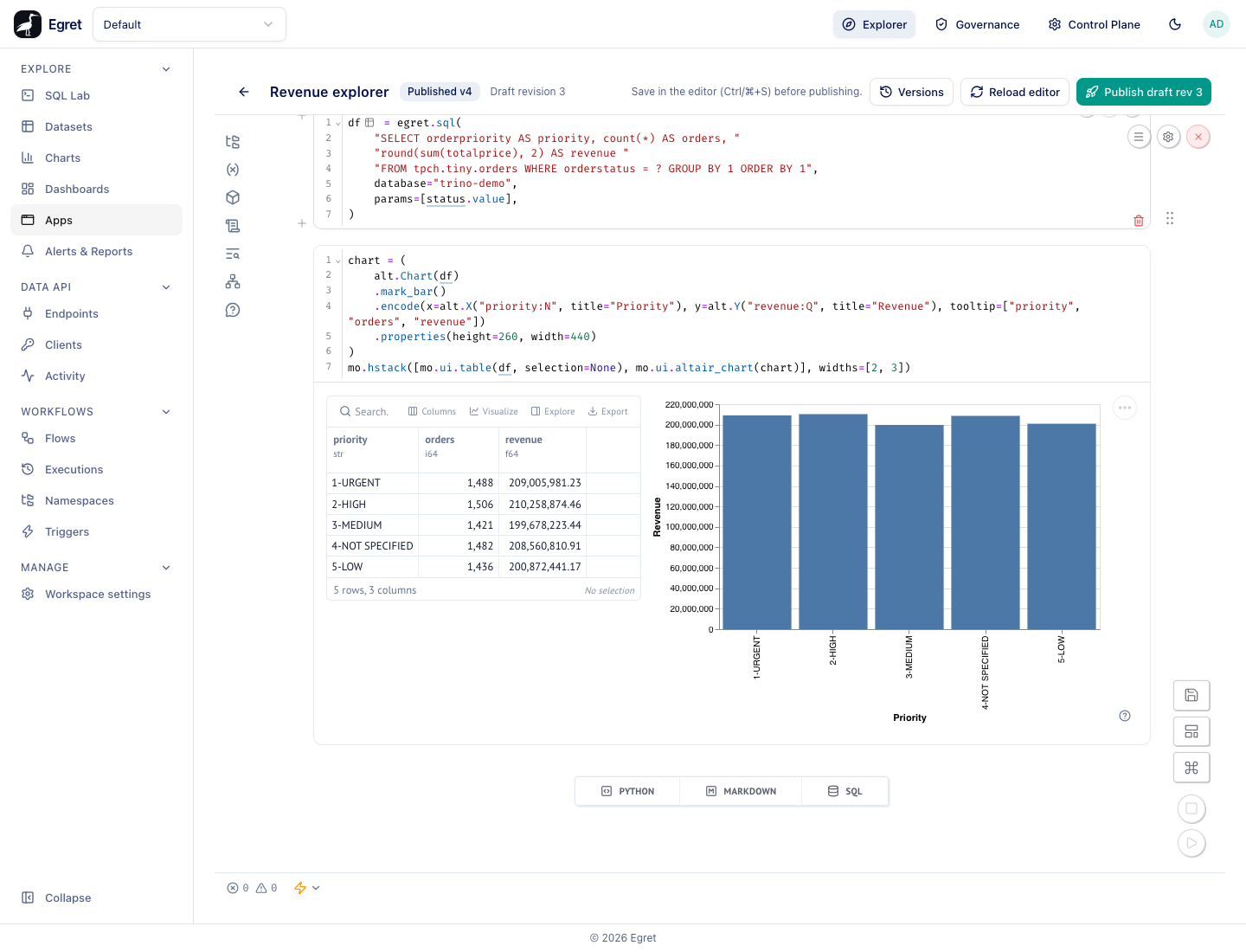
The page has an Egret header and the marimo notebook in an iframe below it.
| Header element | What it shows or does |
|---|---|
| Back arrow | Returns to the Apps list. |
| App name and badge | Draft only until the first publish, then Published vN. |
| Draft revision N | The draft's revision number. It increases every time the draft is saved. The header re-reads it every 5 seconds. |
| Save in the editor (Ctrl/⌘+S) before publishing. | A reminder: publishing freezes the saved draft. |
| Versions | Opens the version history. See Publish and version an app. |
| Reload editor | Reloads the iframe with a fresh session. Use it if the editor stops responding. |
| Publish draft rev N | Publishes the saved draft as a new version. |
While the editor starts you see Starting your editor… and The first open after a while can take up to a minute. The first time an author opens an edit session Egret starts one marimo process for that author in that workspace; it is shared by every app that author edits there and stopped after 30 minutes of inactivity by default. Opening the editor again within that time shows marimo's Reconnected — You have reconnected to an existing session. banner.
Opening the editor does not run the notebook. Cells that have not run are marked stale; press marimo's run button (bottom right) to run them all, or run one cell with its own ▶ button. The editor is marimo's own interface, not Egret's, so it does not use Egret's theme beyond light or dark.
If the editor cannot open, the page shows one of these messages instead:
| Message | Meaning |
|---|---|
| You can't edit this app | You lack permission to write this app, or to run queries in this workspace. Ask a workspace admin. |
| App not found | The app was deleted or belongs to another workspace. |
| This app can't be opened right now | The app is in the trash. |
| Apps are not set up on this deployment | The apps origin is not configured. An operator needs to set apps.origin. |
Egret's proxy in front of marimo refuses some of marimo's own endpoints on purpose: the language server (/api/lsp), the package manager (/api/packages), data-source discovery (/api/datasources) and usage reporting (/api/usage) answer 403. So there is no autocomplete or hover help, and marimo's package and data-source panels do not work. The browser console shows these 403s and Language server initialization failed; they are expected.
The draft
The source of an app is one Python file, stored as the draft in the database. Saving in marimo (Ctrl+S or ⌘+S) updates the draft and increases its revision. Two rules protect it:
- One author at a time per revision. A save names the revision it started from. If someone else saved in between, Egret answers
409withthe draft changed since it was readand the current revision, instead of overwriting. Reload the editor and merge by hand. There is no real-time collaboration and no locking. - 1 MiB of source at most. A larger save is refused with
413.
The draft can also carry the grid layout marimo keeps beside the source.
Query data with egret_marimo
Apps import the egret_marimo module, already installed in the app image. The image is a fixed set of packages; you cannot install more at runtime, so that egress can be closed to Egret only.
import egret_marimo as egret
| Function | What it does |
|---|---|
egret.connect(database, dialect="sql") | Returns a DB-API 2.0 connection for the database named database (its name in Workspace settings → Engines). marimo SQL cells list it and can use it. |
egret.sql(query, database, params=()) | Runs query and returns a Polars DataFrame. params is a list of values bound to ? markers in order. |
egret.databases() | Returns (name, engine) pairs for pickers, for example [('trino-demo', 'trino')]. Edit mode only: a viewer's session gets a 403, because listing a workspace's databases is an admin act. An app that needs the names when viewed carries them in its source. |
For example, the query cell of Revenue explorer, shown in the screenshot above:
status = mo.ui.dropdown(
    {"Open": "O", "Fulfilled": "F", "Partly shipped": "P"},
    value="Open",
    label="Order status",
)
status
df = egret.sql(
    "SELECT orderpriority AS priority, count(*) AS orders, "
    "round(sum(totalprice), 2) AS revenue "
    "FROM tpch.tiny.orders WHERE orderstatus = ? GROUP BY 1 ORDER BY 1",
    database="trino-demo",
    params=[status.value],
)
Changing the dropdown re-runs the query cell and everything that depends on it, as marimo always does.
Charts
The image includes altair and plotly, but not numpy or pandas. Use Altair, which reads a Polars DataFrame directly, and wrap the chart in mo.ui.altair_chart:
import altair as alt

chart = (
    alt.Chart(df)
    .mark_bar()
    .encode(x=alt.X("priority:N", title="Priority"), y=alt.Y("revenue:Q", title="Revenue"))
    .properties(height=260, width=440)
)
mo.ui.altair_chart(chart)
plotly.express cannot be imported (Plotly Express requires numpy to be installed); plotly.graph_objects works with plain lists, for example go.Bar(x=df["priority"].to_list(), y=df["revenue"].to_list()).
Errors
A failed query raises GatewayError with a status and a detail; the message reads egret gateway error <status>: <detail>. SessionExpired is raised when the viewer's session token has expired; the viewer reloads the app. A network failure raises GatewayError with status 0.
marimo's own rule applies to every cell: a name may be defined in one cell only. Prefix scratch names with an underscore (_r, _e) to keep them local to a cell, or marimo refuses to run the cell (This cell redefines variables from other cells).
What the gateway allows
Every egret.sql call goes to Egret's query gateway with the session's token. The gateway checks, in order:
- The token is valid and unexpired, otherwise
401. - The caller's rate limit: 20 calls per token per 2 seconds by default, otherwise
429. - The person is still an active user, the app is not deleted and the workspace has Apps enabled.
- The person may read the app (run mode), or may write it and run queries (edit mode).
- The database name exists in the token's workspace. An unknown name and a name in another workspace give the same
404 not found: database. - The SQL is read-only: exactly one statement that is positively known to read.
These were run from an app on the demo stack:
| Query | Answer |
|---|---|
DELETE FROM memory.default.t | 400 invalid input: data apps may only read data: this statement kind is not allowed |
SELECT 1; SELECT 2 | 400 invalid input: exactly one statement is allowed per query, got 2 |
SELECT 1 on database nope | 404 not found: database |
SELECT current_user AS u on trino-demo | [('egret',)]: the connection's own user, because trino-demo does not run queries as the signed-in person (see Access and data). |
Also refused, with a message that starts data apps may only read data:: table functions (Trino's TABLE(catalog.system.query(...)) can pass arbitrary SQL to the underlying database), MySQL executable comments (/*! … */), # comments, comments with a nested /*, and quoting forms the engine may read differently. SQL that cannot be parsed is refused too, because it cannot be shown to be read-only.
| Gateway limit | Default |
|---|---|
| Rows returned per query | 10,000 |
| Engine timeout per query | 60 seconds |
| Calls per token | 20 per 2 seconds |
| Token idle lifetime | 30 minutes (sliding) |
| Token absolute lifetime | 8 hours |
These are operator settings under [apps] (max_rows, timeout_secs, rate_max, rate_window_secs, session_idle_secs, session_absolute_secs). Only Trino and StarRocks connections can be queried.
Limits and known issues
- No autocomplete: the language server is refused by design (see the note above).
- No packages can be installed from an app; the image is fixed and has no
numpyorpandas, soplotly.expressdoes not work. - There is no real-time co-editing; the second author to save gets a
409. - Publish draft rev N right after Ctrl+S can answer
409because the header refreshes the revision only every 5 seconds; see Publish and version an app.