Run history
Every run of an alert, Data API alert or report writes a row to its run log, whether it fired or not. The run log is the answer to "why didn't I get a message?": a schedule that wrote nothing is indistinguishable from a scheduler that never ran, so every outcome is recorded.
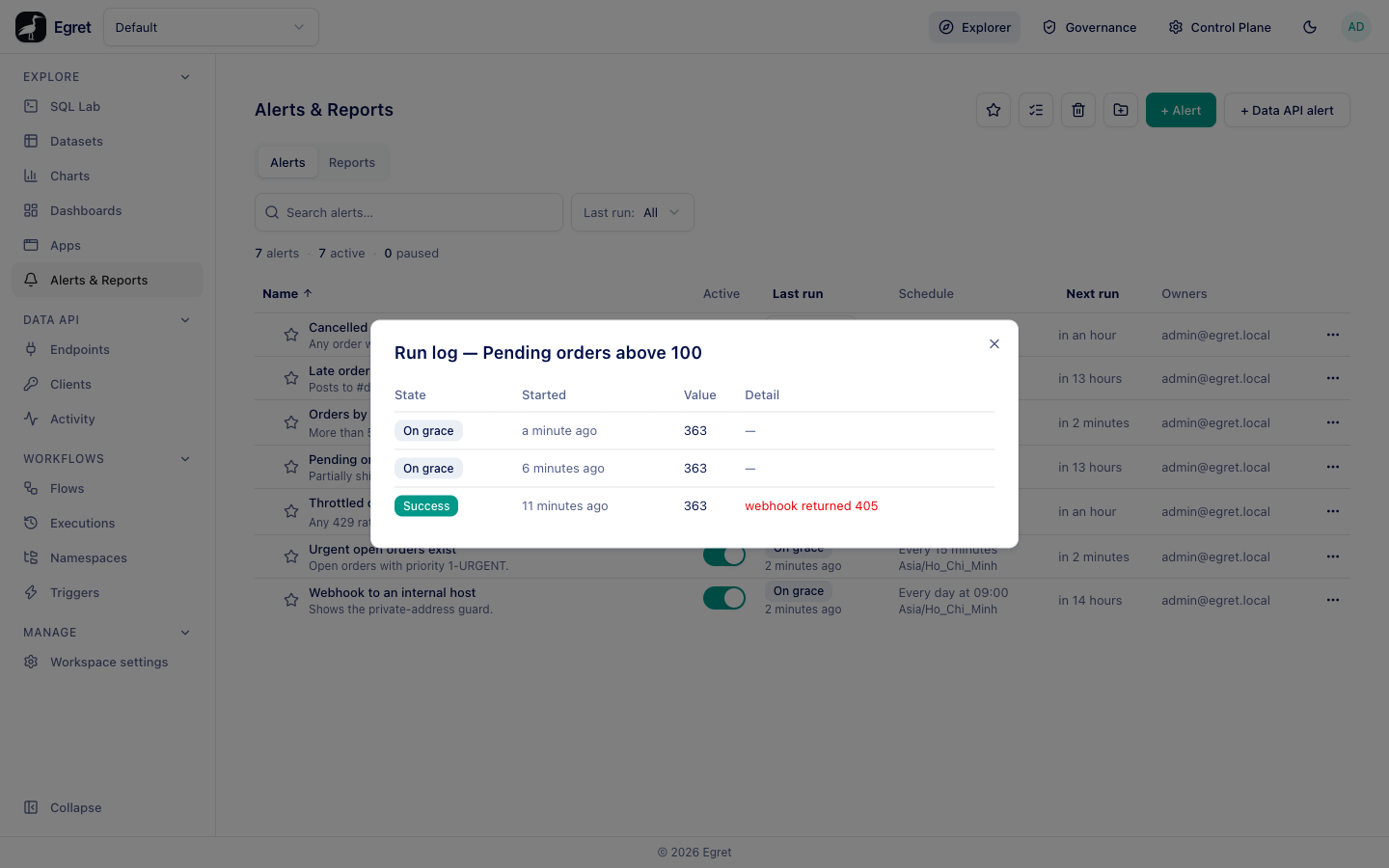
Open the run log
Two places show it:
- In the list, open the ⋯ menu on a row and choose Run log. The dialog is titled Run log — name.
- Open the item. Recent runs under the editor shows the last five runs, newest first.
Each row has four columns.
| Column | What it shows |
|---|---|
| State | The outcome of the run. |
| Started | When the run began, for example 8 minutes ago. |
| Value | The number the run measured: the first column of the first row for an alert, the metric for a Data API alert. Empty for a report. |
| Detail | An error or delivery message, shown in red. Notification sent when the message went out without an error, and — when nothing was sent. |
Run states
| State | Meaning | Notification sent |
|---|---|---|
| Success | The run completed and the condition was met (for a report, it ran). If delivery then failed, the reason appears in Detail. | Yes, unless delivery failed |
| Not triggered | The run completed and the condition was not met, or the query returned no rows or a null, or Don't send when there are no rows applied. | No |
| On grace | The condition was met, but the item already fired within its grace period. | No |
| Error | The run could not complete: the query failed, the first column was not a number, or a report could not be rendered. Detail has the reason. | No |
| Working | A run is in progress, or a worker died mid-run and the run has not yet been reclaimed after the working timeout. | No |
The state labels in the API are success, noop, grace, error and working.
Success means the item fired, not that the message arrived. An alert whose condition was met but whose email server is missing is Success, with the failure in Detail. Read Detail before assuming a message was sent.
Examples from a real run log
These runs were captured on the Docker demo stack, where email goes to Mailpit and the renderer is running:
| Item | State | Value | Detail |
|---|---|---|---|
Pending orders above 100 (condition > 100, email and a webhook to a public host) | Success | 363 | webhook returned 405 (the email arrived) |
| Pending orders above 100, run again within the grace period | On grace | 363 | — |
Cancelled orders spike (> 0) | Not triggered | 0 | — |
| Urgent open orders exist (value is not null and not zero) | Success | 1488 | Notification sent |
Orders by status error rate, a Data API alert (> 0.05) | Success | 0.27 | Notification sent |
| Late orders to Slack, with no workspace Slack app | Success | 64 | no slack bot token is configured for this destination |
Webhook to an internal host (http://mailpit:8025/hook) | Success | 7304 | webhook host resolves to a blocked address (172.24.0.5): private |
| Executive summary snapshot, a PNG report | Success | — | Notification sent |
| Sales performance weekly digest, a two-dashboard PDF report | Error | — | render failed: error sending request for url (http://renderer:8080/render) |
Captured earlier on a workspace without SMTP or renderer, the other messages you may see are smtp is not configured for this workspace (with Success), query failed: engine: line 2:8: Column 'nope' cannot be resolved and alert query must return a number or NULL in its first column, got "O" (both Error).
Why didn't I get a message?
Work down this list.
- Is it active and scheduled? The list shows Paused for an item whose Active switch is off, and Next run for one that will run.
- What did the last run record? Open the run log.
- Not triggered: the condition was not met. Check the Value against your threshold, and check that the query returns a number in its first column.
- On grace: it fired recently. Wait out the grace period, or lower it.
- Error: read Detail. The query, the first column, the renderer or the engine failed.
render failed: error sending request …means the renderer could not be reached or did not answer within 30 seconds; see Reports. - Success with a Detail message: the condition was met and delivery failed. A missing SMTP server, a missing Slack app, a webhook to a blocked or failing address, or a non-
2xxresponse is recorded here.
Run now
Run now (in the row menu) runs the item once and shows the state in a message, for example Ran now: Success. It writes a run-log row like any run.
A manual run is recorded in the run log, but the Last run column in the list and the status badge on the item's page show only the result of the last scheduled run. After Run now alone they can still read Never run; open the run log to see the manual run.
Retention
Finished runs are kept for the item's Run log retention (days), 90 by default. See Schedules and limits.
Limits and known issues
- When several destinations fail, only the first failure is recorded in Detail.
- Value is empty for reports, and in the run log dialog of a report the Value and Detail headings run together (KI-171).
- The list's Last run and the header badge ignore manual runs (KI-032), so test an item with Run now and read the run log, not the list.