Check access
The Check access tab on a person, group or role page asks the engines a precise question: can this principal perform this action on this target? It uses the same evaluator as Explain access, but lets you choose any catalog, schema, table or column and either action.
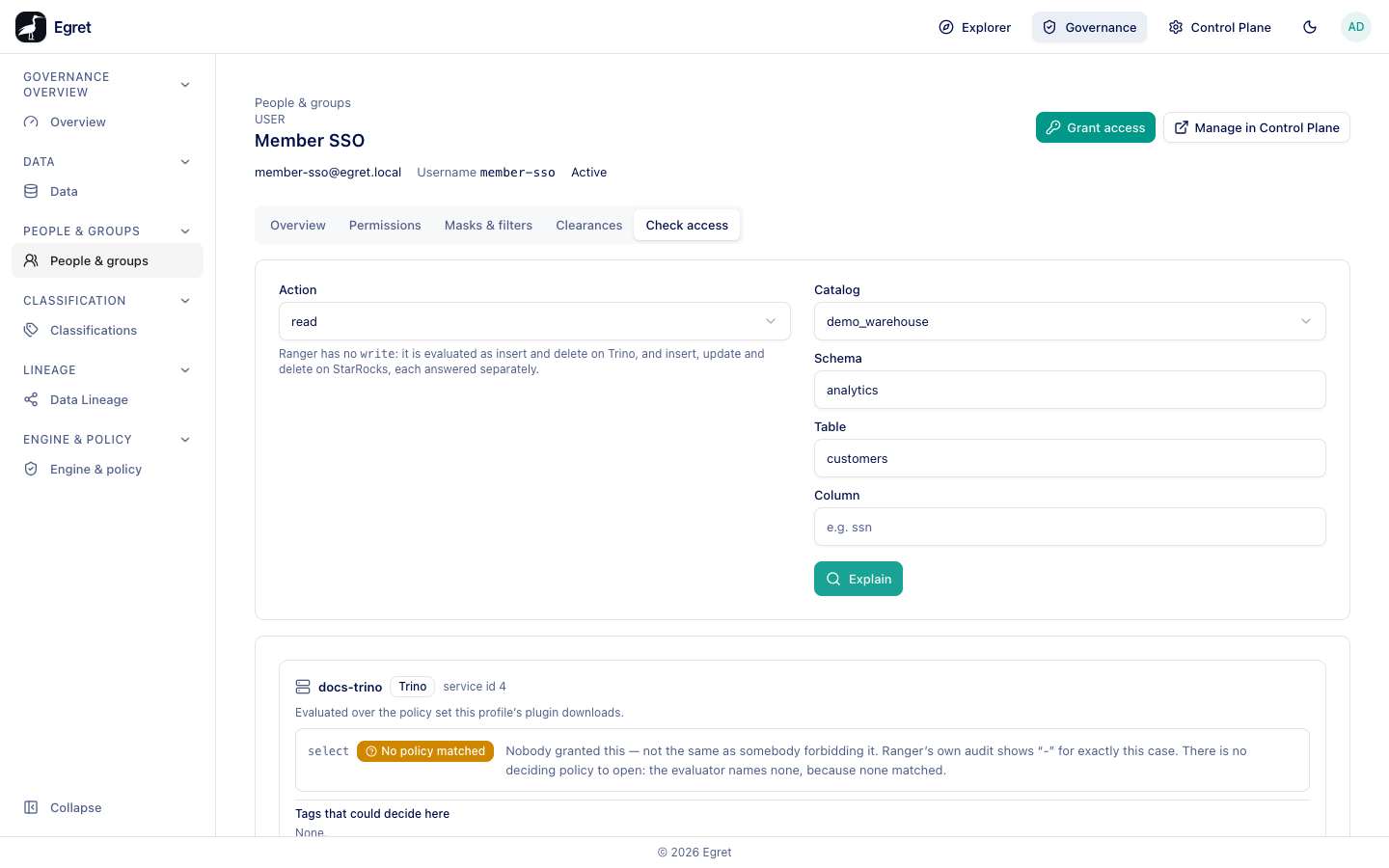
Check access needs policy:read. A user with no username cannot be checked: the tab says No username yet, so no engine knows this user. Grant them something first so a username is allocated.
Check a user's access to a column
- Open Governance → People & groups, then the user.
- Select the Check access tab.
- Under Action, choose read or write. Ranger has no write; it is evaluated as insert and delete on Trino, and as insert, update and delete on StarRocks, each answered separately.
- Under Target, pick the Catalog from the dropdown, then type the Schema, Table and Column as needed. Each field unlocks after the one before it; the button reads Explain needs a target catalog. until a catalog is chosen.
- Press Explain.
The result is the same per-profile answer as the Data page's Who can read?: a verdict (Allowed, Refused by a deny item, Refused by deny-all-else, No policy matched, Undecidable), the deciding grant or policy, and the tags that could decide. See Explain access for what each means.
On the demo stack, read on demo_warehouse.analytics.customers for member-sso answers No policy matched on docs-trino (Nobody granted this — not the same as somebody forbidding it.), while demo_warehouse.analytics.sessions answers Allowed with View grant and the Ranger policy perm-grant-d7441a5e-…. A query on customers as her is refused by the engine.
Check a group or role
For a group or role the tab asks about every member. The result counts members allowed by every profile, refused by at least one, undecidable, and masked, with a Refused only filter. A group with no members asks nobody.
The check dialog
The shield button at the top right of the People list (Check access) opens the same form as a dialog where you also choose the user, so you can run a check without opening the person's page first.
When the answer is surprising
| Symptom | Likely cause |
|---|---|
| No policy matched for someone you granted | The grant is on a catalog no engine serves, or the person's group was granted but they have no username yet. |
| Allowed but the person sees masked values | Masks on Trino are not reported by explain. Check the table's Masks & filters tab. |
| Allowed from a policy marked Outside the permission model | A hand-written Ranger policy decides. Egret does not manage it. |
| Undecidable | The engine's super-user list, plugin version or tag assignment is not known. The reason names it. |
Limits and known issues
- Check access evaluates the policy set the profile serves now. An engine may still enforce an older download until its next poll.
- Only engines whose plugin version egret models are checked (Trino 2.5.0 and 2.8.0; StarRocks 2.8.0 and 2.9.0).