Schedule triggers
A schedule trigger starts a flow at times given by a cron expression: every 15 minutes, weekdays at 9:00, the first of the month. The scheduler (EGRET_WORKFLOW__SCHEDULER_ENABLED) evaluates every schedule and creates an execution for each tick that is due.
Add a schedule
Add a trigger of type io.kestra.plugin.core.trigger.Schedule under triggers: and save the flow.
id: nightly-heartbeat
namespace: docs.demo
description: Logs a heartbeat on a schedule.
tasks:
  - id: beat
    type: io.kestra.plugin.core.log.Log
    message: "Heartbeat from {{ flow.id }} at {{ now() | date('HH:mm:ss') }}"
triggers:
  - id: every_minute
    type: io.kestra.plugin.core.trigger.Schedule
    description: Fires once a minute (UTC)
    cron: "* * * * *"
    timezone: UTC
Within a minute the Triggers page shows the trigger with its Next run, and each tick creates an execution whose Trigger is Schedule. This flow logged Heartbeat from nightly-heartbeat at 16:30:00 on every tick.
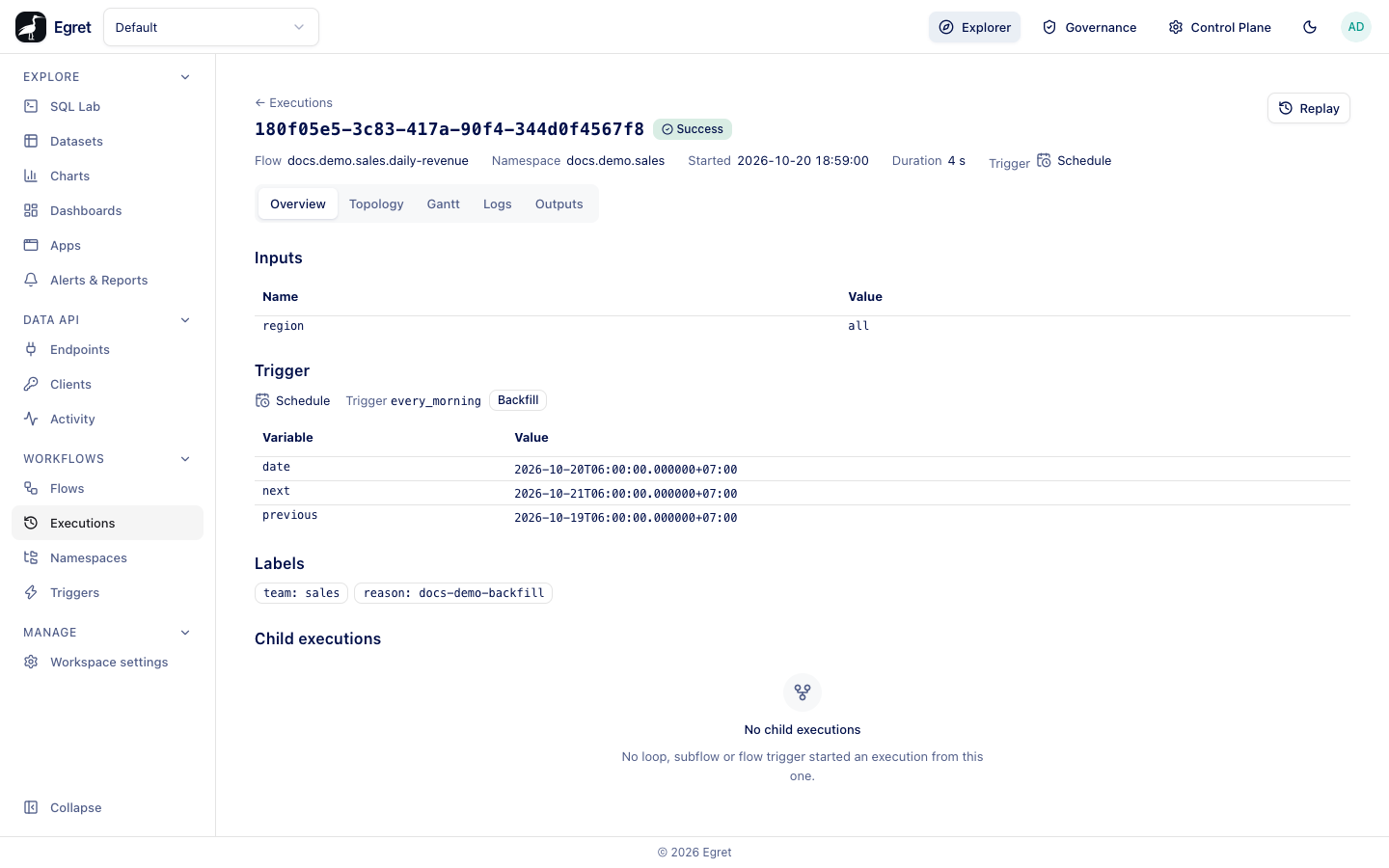
The screenshot is a run of docs.demo.sales/daily-revenue, whose every_morning schedule fires at 06:00 in Asia/Ho_Chi_Minh; its date variable carries the zone's offset (+07:00).
Properties
| Property | What it does | Default |
|---|---|---|
id | The trigger's name, unique in the flow. Changing it starts a new schedule from now. | required |
cron | A cron expression: five fields (minute, hour, day of month, month, day of week). | required |
withSeconds | true to read a sixth, leading field with seconds precision. | false |
timezone | An IANA zone such as Asia/Ho_Chi_Minh. | UTC |
recoverMissedSchedules | What to do with ticks missed while the schedule was off: ALL, LAST or NONE. | ALL |
inputs | Input values for each run, as a map of plain values. | none |
description | Free text. | none |
disabled | true switches the trigger off in the YAML. | false |
Not supported: when and lateMaximumDelay are refused, and stopAfter, labels and allowConcurrent are accepted and ignored.
Cron expressions
The expressions below were accepted and their next run was computed by a demo instance on 19 October 2026 at about 17:03 UTC.
| Expression | Meaning | Next run |
|---|---|---|
*/15 * * * * | Every 15 minutes | 17:15 |
0 9 * * MON-FRI | 9:00 on weekdays | 20 October 09:00 |
30 2 1 * * | 02:30 on the first of the month | 1 November 02:30 |
0 0 * * 0 | Midnight on Sundays | 25 October 00:00 |
@hourly, @daily | Macros | next hour, next midnight |
*/10 * * * * * with withSeconds: true | Every 10 seconds | the next tenth second |
A bad expression is not rejected when you save. For cron: "60 * * * *" the trigger goes off the queue and the Triggers drawer shows the Last error invalid cron: minutes: value 60 not in range [0, 59]. Fix the flow and save it again.
Time zones
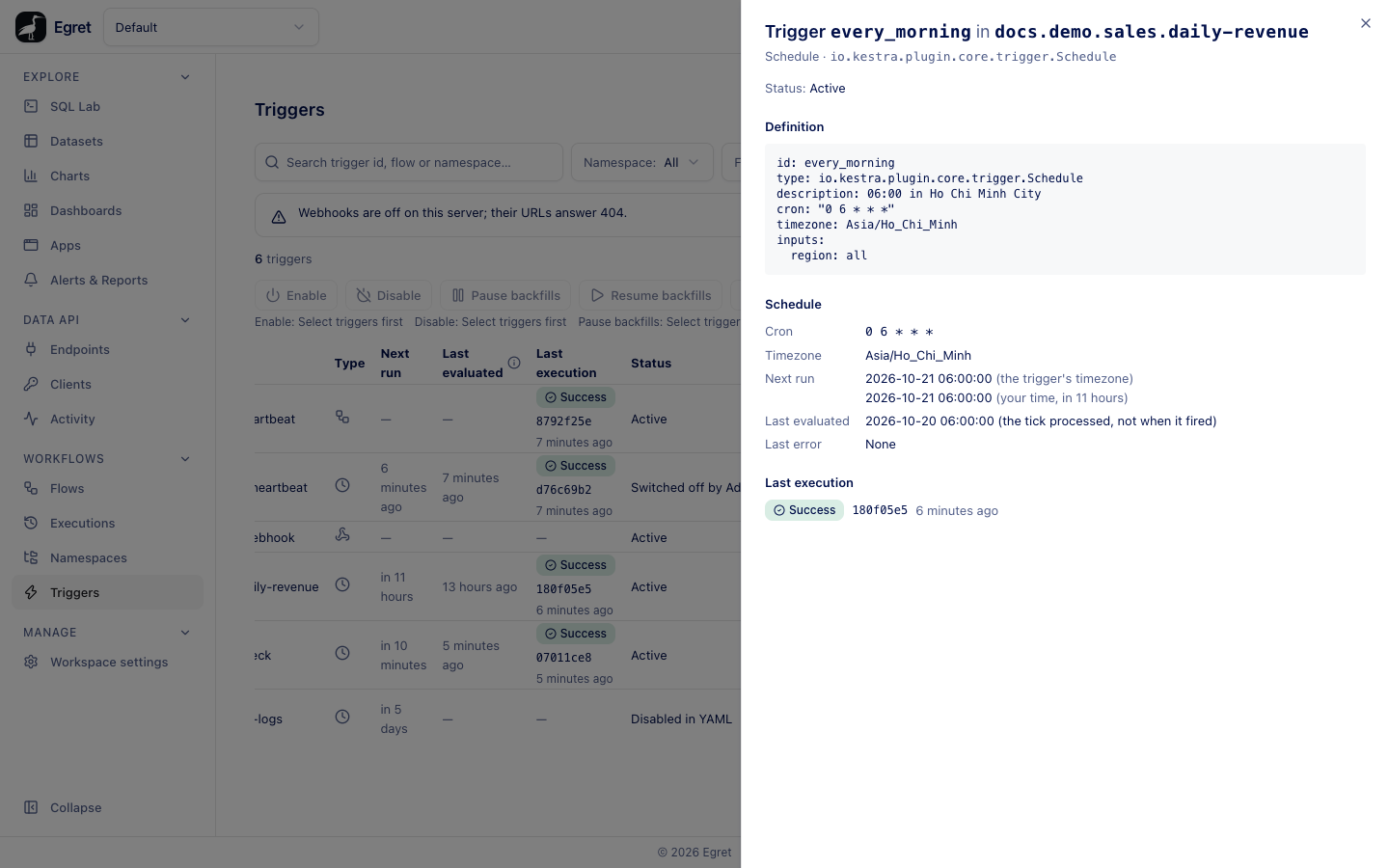
timezone decides what "9:00" means. 0 9 * * * with timezone: Asia/Ho_Chi_Minh ran next at 02:00 UTC. The drawer shows the next run in the trigger's zone and in yours. A few old three-letter zone ids (such as PST or IST) are refused.
Inputs
inputs: takes plain values only. A value with {{ }} in it is not rendered: the trigger stays off the queue with the error inputs.stamp contains template syntax, which a scheduled execution cannot render. Inputs the flow declares and the schedule leaves out use their defaults:.
triggers:
  - id: nightly
    type: io.kestra.plugin.core.trigger.Schedule
    cron: "0 2 * * *"
    inputs:
      label: scheduled
A schedule that omits an input with no default fails the save check schedule_missing_inputs.
Switch a schedule off and on
Use the Enabled switch on the Triggers page or a flow's Triggers tab. While a schedule is off its Missed ticks count grows, up to 1 000 (1000+).
Switch a schedule on again
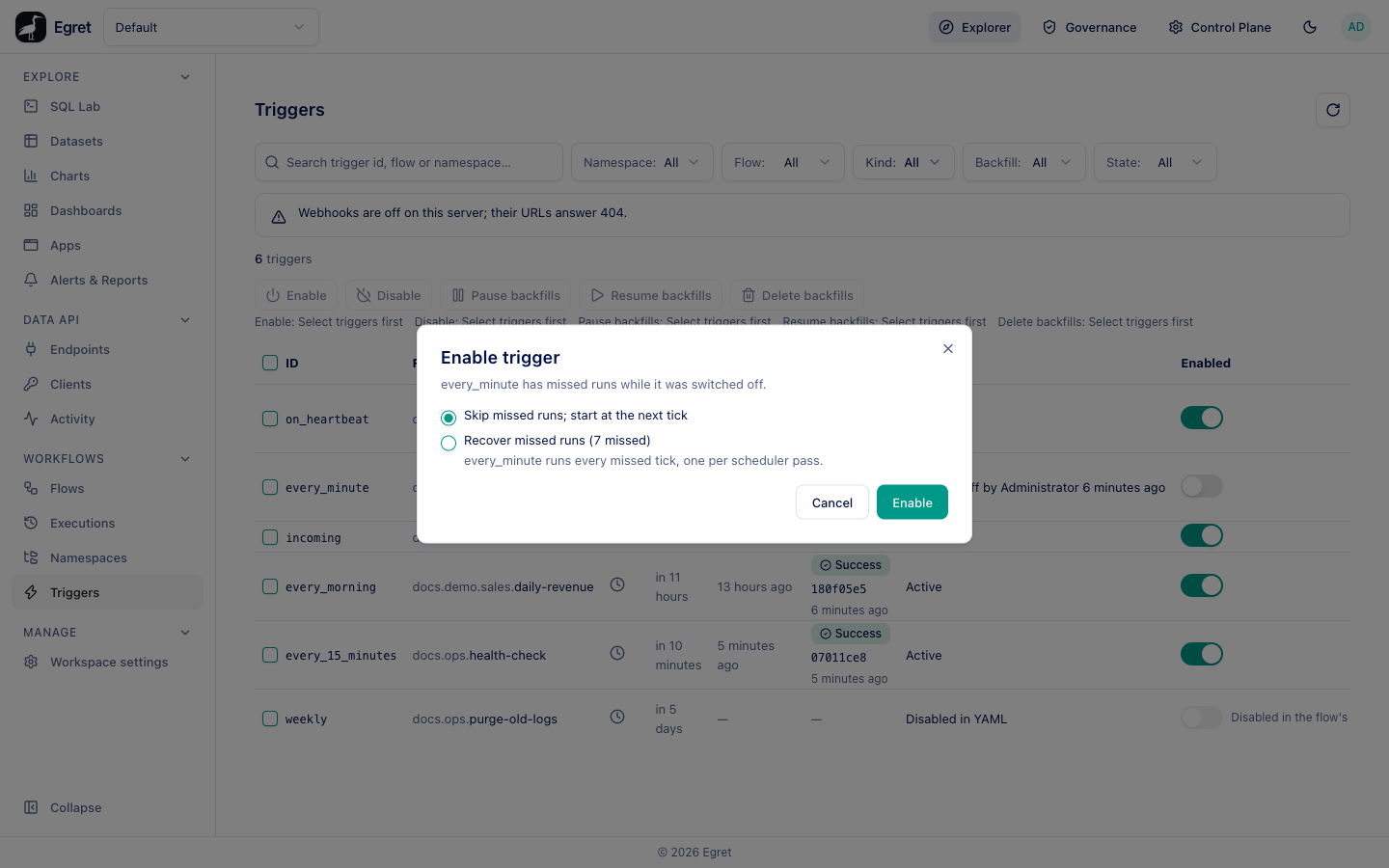
Switching a schedule on after it missed runs opens Enable trigger:
| Choice | What happens |
|---|---|
| Skip missed runs; start at the next tick | Nothing runs for the gap. The schedule resumes at the next tick. This is selected. |
| Recover missed runs (7 missed) | Follows the trigger's recoverMissedSchedules: ALL runs every missed tick, one per scheduler pass; LAST runs only the latest; NONE runs none. |
The dialog appears only when the schedule was switched off and its next tick has passed. A schedule that is already on, or has missed nothing, switches without asking.
Triggers fire from the saved draft
A schedule fires from the flow's saved draft, with or without a version. In testing, a flow that had been saved and never versioned started its first execution at the next minute. Creating a version does not change what the scheduler runs.
Limits and known issues
- The scheduler fires with up to a second of delay. Last evaluated is the tick that was processed, which can be earlier than when the execution started.
- A schedule's
trigger.dateis not readable in the flow's tasks. The execution's Overview shows it under Trigger. - Only one execution per tick is created, and
allowConcurrentis ignored: a slow run does not stop the next tick. - Schedule
whenconditions andlateMaximumDelayare refused.