Flow and webhook triggers
A Flow trigger starts a flow when other flows end. A Webhook trigger starts a flow when an outside system calls a URL. Both are declared under triggers: and listed on the Triggers page.
Flow triggers
id: after-heartbeat
namespace: docs.demo
description: Runs after every successful nightly-heartbeat execution.
tasks:
  - id: react
    type: io.kestra.plugin.core.log.Log
    message: The heartbeat finished successfully
triggers:
  - id: on_heartbeat
    type: io.kestra.plugin.core.trigger.Flow
    states:
      - SUCCESS
    dependsOn:
      - namespace: docs.demo
        flowId: nightly-heartbeat
Each time nightly-heartbeat ended SUCCESS, this flow started once. The new execution's Trigger column says Flow trigger, and the upstream execution lists it under Child executions.
| Property | What it does | Default |
|---|---|---|
states | The end states that count. | all end states |
dependsOn | A list of upstream flows. Each entry takes namespace, flowId, states, labels and when. | none |
mode | ALL, ANY or AT_LEAST (with minSatisfied): how many dependsOn entries must be met. | ALL |
window | The time window in which the entries must be met: every, offset, lookback, deadline, from, to, timezone. | a fixed duration |
when | An extra condition. | true |
inputs, labels | Values passed to the new execution. | none |
A Flow trigger with no dependsOn and no when fires on every execution that ends in the workspace, including its own. Two such flows can trigger each other without end. Name the upstream flow in dependsOn.
Upstream flows that live in the same workspace are resolved when you save. A flow trigger that names a flow that does not exist saves without a warning and never fires. The Triggers drawer shows the Flow trigger section: the states heard, whether it is Listening, the mode, the window, and each condition as Met or Not met in the window that is open now. A condition that is met fires the trigger and the window closes, so on the demo stack docs.demo.nightly-heartbeat showed Not met and No window is open again after the heartbeat had run three times and started after-heartbeat each time.
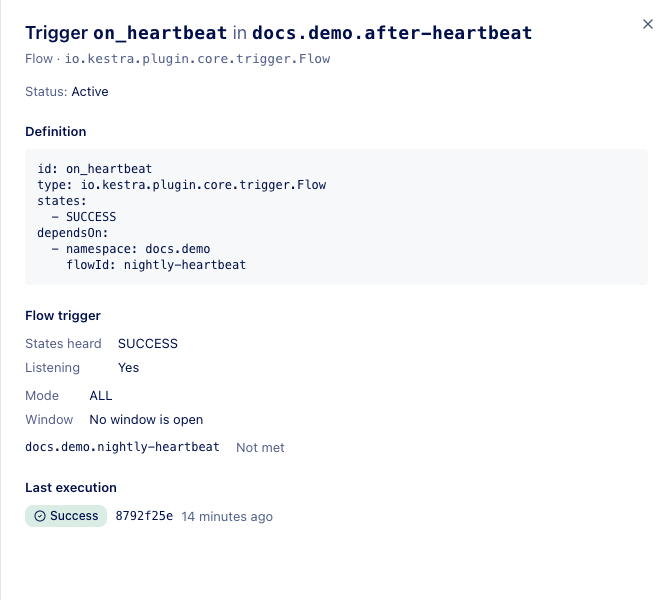 The Dependencies tab of a namespace draws the link as a dashed arrow (Namespaces).
The editor's schema lists condition and inputs for a dependsOn entry; the keys above are what the engine reads.
Webhook triggers
id: order-webhook
namespace: docs.demo
inputs:
  - id: source
    type: STRING
    defaults: unknown
tasks:
  - id: handle
    type: io.kestra.plugin.core.log.Log
    message: "Order received from {{ inputs.source }}"
triggers:
  - id: incoming
    type: io.kestra.plugin.core.trigger.Webhook
    key: orders-demo-key
    inputs:
      source: webhook
The trigger's URL path is /workflows/v1/{workspace}/executions/webhook/{namespace}/{flowId}/{key}; for this flow it is /workflows/v1/default/executions/webhook/docs.demo/order-webhook/orders-demo-key. The drawer shows it with the key hidden, a Reveal button and a Copy button, and says This path is served by the egret backend, at whatever host your operator exposes for webhooks.
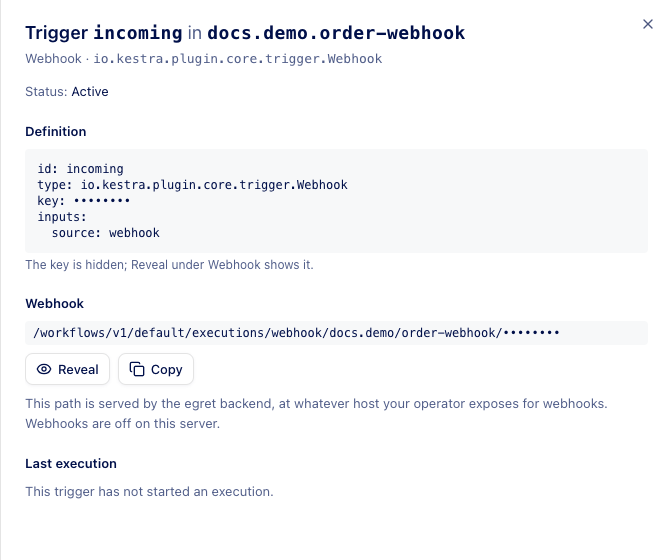 The key in the path is the only credential and the endpoint needs no login, so treat the key as a secret.
Webhooks are disabled unless the operator sets EGRET_WORKFLOW__WEBHOOKS_ENABLED=true. When off, the routes are not mounted: the URL answers 404, and the Triggers page says Webhooks are off on this server; their URLs answer 404. The Docker demo stack runs with webhooks off, so what follows comes from the source and the API, not from a live call.
The route lives on the backend under /workflows/v1/, and neither the frontend's web server nor the Helm ingress forwards that path to the backend: on the demo stack a POST to the URL is answered by the web server with 405. Before you switch webhooks on, add a route for /workflows/v1/ to the backend service in your ingress or proxy.
| Property | What it does |
|---|---|
key | The secret in the URL. It may be an expression such as "{{ flow.id }}". |
inputs | Values for the flow's inputs. They may read the request as {{ trigger.body }}, {{ trigger.headers }} and {{ trigger.parameters }}. |
fetchType | What to do with the body. Storing it in internal storage (STORE) is not supported. |
The route accepts GET, POST and PUT. A request with a multipart body is refused with a message, and wait, returnOutputs, responseCode and responseContentType are refused when the webhook is called. A switched-off webhook answers 409 and starts nothing.
Limits and known issues
- Task expressions cannot read
trigger.*; pass what you need throughinputs:. - Flow triggers fire from saved drafts; a draft with a Flow trigger listens at once.
- The
trigger.outputsof an upstream flow are not available, because flow outputs are not computed.